[Beta] Pixel 2 installer config
-
@bifpowers Ok I will write up some explanations for you later

-
Alright here are some generic steps to see where we are:
- Check that kernel actually boots correctly:
- On your host, enter dmesg -w and then power up the device
- connect your USB cable. See if the host sees a new USB device
- IF there are any messages about RNDIS coming up, try to ping 192.168.2.15 or 10.15.19.82 and eventually try either telnet on 192.168.2.15 or ssh (with user phablet) on 10.15.19.82
-
@flohack Unfortunately I'm not getting anything from any of those steps. I'm on Windows 10 currently, and tried with both PowerShell and WSL Ubuntu.
-
I'm on arch linux and using the appimage installer. It gets stuck on "preparing system image/mounting partitions'
tried using an ubuntu vm -same problem -
HOLY CRAP!
I did not see that this devicetree uses 2 kernel configs for each device. I only patched the one for XL. I push now some changes to add also muskie.Can someone in roughly 24hrs from now try again to install Pixel 2? I bet its working then

BR Florian
-
@flohack best email I've gotten all week! Will give it a shot.
-
Here is the instruction how to flash:
- Download https://ci.ubports.com/job/UBportsCommunityPortsJenkinsCI/job/ubports%252Fcommunity-ports%252Fjenkins-ci%252Fwalleye-taimen/job/main/lastSuccessfulBuild/artifact/halium-boot_walleye.img and flash this with fastboot flash boot halium-boot_walleye.img
Good Luck!
-
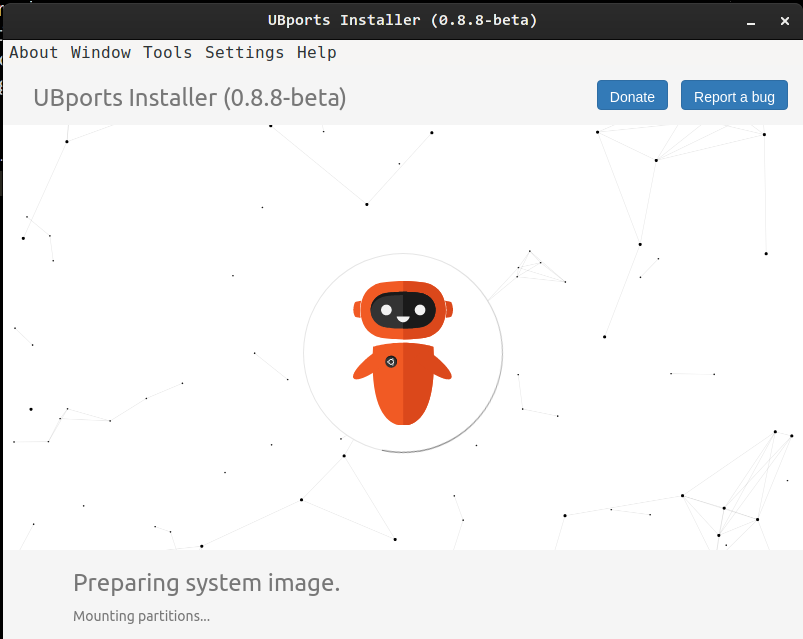
I am unable to get past the recovery step. Everything seems to work, I reboot to recovery and I can interact with the UBports recovery mode interface but it never continues from that point. Any ideas?
Update: It seems to hang on the
Preparing system image
Mounting partitions...
section after the reboot to recovery (screenshot attached).
It could be that I am not giving it enough time so I am going to leave it throughout the night. Here is the verbose output of my UBPorts session:
...
info: Downloading 8 files
info: Downloaded file 1 of 8
info: Downloaded file 2 of 8
info: Downloaded file 3 of 8
info: Downloaded file 4 of 8
info: Downloaded file 5 of 8
info: Downloaded file 6 of 8
info: Downloaded file 7 of 8
info: Downloaded file 8 of 8
verbose: running core action write
verbose: running adb action wait
verbose: running adb action preparesystemimage
Thanks!
-
Pixel 2 does not boot into UI anyways, I would ask you to wait a bit until we can get this sorted out finally. If you like, you can help debugging it maybe, if you are ok with using adb and fastboot directly.
-
Ok guys lets try a different approach. Can you please enter fastboot, flash that image into boot: https://twoot.bin.org.in/nextcloud/index.php/s/mzfmYJscqPyM2Bc with
fastboot flash boot boot.img- so far so old.
Now: DO NOT reboot, but select Boot to recovery. Does this bring up our UT recovery screen?Thanks!
-
-
Booted to fastboot
-
ran
fastboot flash boot boot.imgwith thisimg
I am not sure what is meant by DO NOT reboot, but select Boot to recovery. After running the fastboot command should I just use volume up/down to make the recovery reboot option be visible? Not sure if it is supposed to do something at that point.
-
-
@i2097i Yes exactly, select manually the recovery option.
-
@Flohack
yes, if I press the power button on recovery, it boots to UBPorts Recovery.I also wanted to mention that I let this run all night and it was still on the
verbose: running adb action preparesystemimagewhen I woke up this morning. -
@i2097i Oh yes please dont do that, to not damage your display if its not turned off by recovery
- the install will not take longer than a few minutes, otherwise its broken
Ok but good to hear, we have a working recovery...So actually the kernel is fine. Can you do the following then:
- Boot into recovery
- Check with
adb devicesthat you can see the device - use
adb shellto gain shell access into the recovery - Issue a
mount datathat should get userdata online - Do a
ls -la /dataand paste the result here
Thanks!
-
@Flohack The screen does turn off after a certain amount of time so my display is all good!
Here is the output:
: adb shell root@walleye:/ # ^C 130|root@walleye:/ # pwd / root@walleye:/ # ls -la /data total 0 drwxr-xr-x 2 root root 0 1970-01-01 00:00 . drwxr-xr-x 24 root root 0 1973-04-20 00:54 .. root@walleye:/ #/datais empty it seems. -
@i2097i Did you mount data? can you check with simply typing
mount? Its unlikely that it is fully empty -
My bad - I did not run
mount data. Nowadb shellis just hanging. Is there some where that I can see logging for this? -
@i2097i No, adb is a very quiet protocol - try unplug/replug and reconnect
-
@i2097i Or do you mean the mount command does not finish?
-
this is the general gist of what I am doing:
adb reboot recovery && adb wait-for-recovery && adb shell "mount data" && adb shell "ls -la /data"I haven't been able to get any
adbcommands to run on the device itself (adb devicesworks)

Hello! It looks like you're interested in this conversation, but you don't have an account yet.
Getting fed up of having to scroll through the same posts each visit? When you register for an account, you'll always come back to exactly where you were before, and choose to be notified of new replies (either via email, or push notification). You'll also be able to save bookmarks and upvote posts to show your appreciation to other community members.
With your input, this post could be even better 💗
Register Login