Multicast-dns now works out of box with systemd-resolved and Networkmanager without avahi[Focal]]
-
Tested this on Pixel3a, Rasberry pi, Pinephone & Oppo f1.
Make partition writable
sudo mount -o remount,rw /Create these files with following content, without affecting update or anything, create folder path witjh
mkdir -pif required/etc/systemd/resolved.conf.d/mdns-systemd-resolved.conf
[Resolve]
MulticastDNS=yes
/etc/NetworkManager/conf.d/mdns.conf
[connection]
connection.mdns=2
Reboot or restart systemd-resolved.service and NetworkManager.service. Do this on your local machine as well (may also need reboot)
Restart sshd. (
sudo systemctl restart sshd)Now we can ssh into phone with hostaname.local
ssh phablet@ubuntu-phablet.localAnd .local domains now resolves.
$ resolvectl query -4 ubuntu-phablet.local
ubuntu-phablet.local: 192.168.29.144           -- link: wlan0

-- Information acquired via protocol DNS in 16.6ms.
-- Data is authenticated: yes
Remount filesystem as readonly
sudo mount -o remount,ro /We can also broadcast sftp with systemd-dnssd
/etc/systemd/dnssd/sftp.dnssd
[Service]
Name=%H
Type=_sftp-ssh._tcp
Port=22
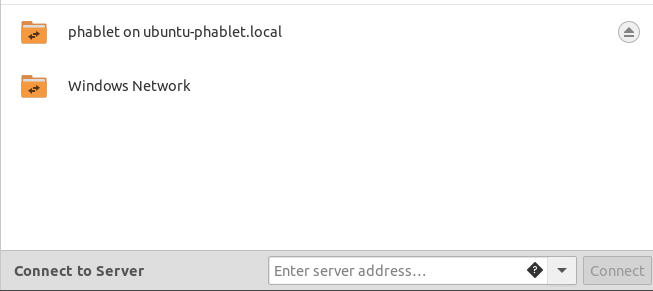
And it will appear on nautilus network share
Hello! It looks like you're interested in this conversation, but you don't have an account yet.
Getting fed up of having to scroll through the same posts each visit? When you register for an account, you'll always come back to exactly where you were before, and choose to be notified of new replies (either via email, or push notification). You'll also be able to save bookmarks and upvote posts to show your appreciation to other community members.
With your input, this post could be even better 💗
Register Login