Unlock bootloader (asus zenfone max pro m1)
-
@MrT10001 Thankyou !! It works !
you are right : it works only with ubunutu (Lubuntu for me). that's doesn't works with debian (or windows). -
@DJac Is it up and running with Ubuntu Touch?
-
@MrT10001 I can't install ubport on my 32bits ubuntu computer. and it don't work with my debian computer... so, I'm looking for others solution.
I have a probleme to install postmarketOS too.
I keep you in touch. -
I am trying to unlock the bootloader of my Asus device. Can you guys help me? Are there any ways which I can still use in 2026??
-
@MadDino Check here. Download the unlock.rar file (link still works). You don't need to root the device for UT. Follow these instructions and you need a Windows PC:
*DATA WILL BE WIPED SO MAKE A BACKUP
- Download this zip(you already have) and you'll get 2 folders 'unlock' and drivers
https://drive.google.com/open?id=1YpezCedaRWGDS9WW7UaXXyyBod0Bk5qp - Install the drivers and go the 'unlock' folder
- Reboot your phone to fastboot mode by pressing volume up + power on at the same time.
- Connect it to pc and open unlock.bat in 'unlock' folder
- Done*
- Download this zip(you already have) and you'll get 2 folders 'unlock' and drivers
-
This post is deleted! -
@MrT10001 hey..
thanks for this. i tried but it just does not seem to work.
all i get is
Begin fastboot flashall
Earse Data: Yes
Support All deviceI do not know what else to do!!
And the bootloader shutdown with this laconic message "press any key to shut down"
-
@MadDino Start the device up and the bootloader should be unlocked.
-
@MrT10001 unfortunately not
All my data is still there and I don't see any bootloader unlocked warning or anything
Could it be because of my build number or security patch?
I am using Android 9 with September 2020 security patch
Build number is WW 16.2017 -
@MadDino The build number should not make a difference. Try running it in an administrative command prompt and run the command with ./ In front.
-
@MrT10001 i see. Does the cable which I am using for the connection make any difference?
I tried it using Linux mint and also Windows 11 (fresh Asus driver installation)
Still facing the same issue on all platforms -
@MadDino I have used Windows 11 to unlock the bootloader and install UT my ASUS devices. It is not the easiest phone to install UT onto. The build number won't make a difference unlocking the bootloader, but when you unlock the bootloader use this (quote from devices page):
"The port is based on Android 9 firmware (WW-16.2017.2004.063) and Lineage 16 vendor image. Current Recovery will be replaced with Ubports Recovery!"
I think you are experiencing difficulties with the ASUS drivers. On Windows uninstall the drivers, reboot the PC, install the drivers and try again. If that fails try disabling driver signing which is a bit of a messy workaround. I found that one of the Windows updates messed with the drivers and uninstalling them and reinstalling solved it.
-
@MrT10001 i tried all that too
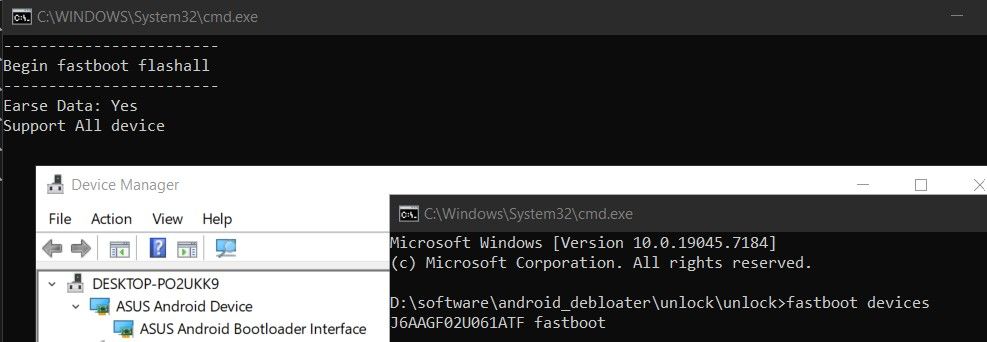
it is still does not go further than this.
sometimes it stays in fastboot mode when i run the script and sometimes it leaves the fastboot mode with this laconic message "press any key to shut down".
if not that then it leaves fastboot mode as soon as i connect it with the pc.NO FURTHER PROGRESS
-
@MadDino Put the unzipped folder on your desktop. Attach the phone to the PC in fastboot mode. Open a terminal in the unlock folder. Run the command ./unlock.cmd. Note the ./ in front of the command.
-
@MrT10001 The screenshot which i have attached was from windows. why do I need to use ./ when using windows for this!!?
-
@MadDino it elevates the command. I have had to use it installing UT on other devices.
-
This post is deleted! -
@MrT10001 hey, i was able to unlock my bootloader
i found a guide on XDA to edit my registories on windows regarding USB ports.
FOR ANYONE READING THIS. PLEASE SAVE THOSE LINE IN A TEXT FILE AND CHANGE THE EXTENSION TO .bat AND THEN RUN IT AS ADMINISTRATION.
then i could run the unlock.cmd file and it ran flowlessly.
thank you for your help.


Hello! It looks like you're interested in this conversation, but you don't have an account yet.
Getting fed up of having to scroll through the same posts each visit? When you register for an account, you'll always come back to exactly where you were before, and choose to be notified of new replies (either via email, or push notification). You'll also be able to save bookmarks and upvote posts to show your appreciation to other community members.
With your input, this post could be even better 💗
Register Login