UBports Robot Logo UBports Forum
    • Categories
    • Recent
    • Tags
    • Popular
    • Users
    • Groups
    • Search
    • Register
    • Login

    Icon "Stop" Waydroid disappeared

    Scheduled Pinned Locked Moved Xiaomi Poco X3 NFC
    11 Posts 5 Posters 1.7k Views 1 Watching
    Loading More Posts
    • Oldest to Newest
    • Newest to Oldest
    • Most Votes
    Reply
    • Reply as topic
    Log in to reply
    This topic has been deleted. Only users with topic management privileges can see it.
    • MoemM Offline
      Moem @_Joao_
      last edited by

      @_Joao_ I don't have it either, I think that is a global bug. But it works just fine so I'm not too bothered.

      Is currently using an Op5t
      Also owns an Op1, a BQ E4.5 and an Xperia X, as well as a BQ tablet and a Pinetab2. Please, someone... make it stop.

      1 Reply Last reply Reply Quote 0
      • M Offline
        mschmids @_Joao_
        last edited by mschmids

        @_Joao_ have you tried (re)installing the Waydroid Stop app by means of the Waydroid Helper app?

        _ 1 Reply Last reply Reply Quote 0
        • K Online
          kristatos
          last edited by

          Here's the bugreport

          BQ Aquaris E4.5 (UT 16.04)
          Vollaphone (UT 24.04)
          Vollaphone 22 (UT 24.04)

          _ 2 Replies Last reply Reply Quote 0
          • _ Offline
            _Joao_ @mschmids
            last edited by

            @mschmids
            Hi, yes without success...

            1 Reply Last reply Reply Quote 0
            • _ Offline
              _Joao_ @kristatos
              last edited by

              @kristatos
              Thank you, I will think about the proposed solutions.
              I will keep you informed of my progress.

              1 Reply Last reply Reply Quote 0
              • _ Offline
                _Joao_ @kristatos
                last edited by

                @kristatos
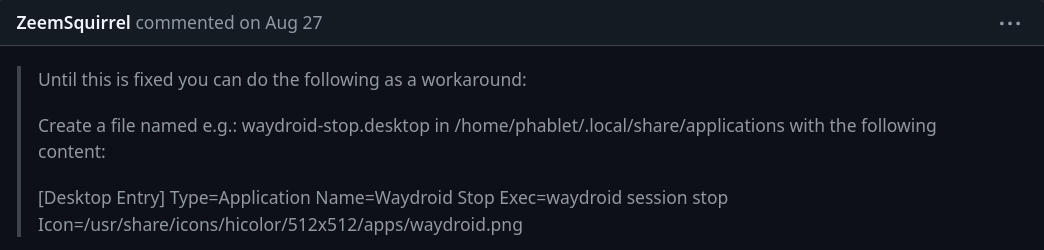
                Hello, the following solution is proposed in the link. Until creating the folder, it's fine, but I am a bit limited technically to create the file. I am wondering how to create the new stop icon or if it’s simply a call to the old stop icon:

                Solution:
                546584bd-82d2-4836-ad97-0ea7c390b510-image.png

                K 1 Reply Last reply Reply Quote 0
                • K Online
                  kristatos @_Joao_
                  last edited by

                  @_Joao_ To create the file you have to open the terminal app and enter:

                  nano /home/phablet/.local/share/applications/waydroid-stop.desktop
                  

                  Then you have created the file and it's opened for editing. Then you have to enter the content ([Desktop Entry]...) and save it.

                  BQ Aquaris E4.5 (UT 16.04)
                  Vollaphone (UT 24.04)
                  Vollaphone 22 (UT 24.04)

                  _ 1 Reply Last reply Reply Quote 0
                  • _ Offline
                    _Joao_ @kristatos
                    last edited by

                    @kristatos
                    Like this ?
                    11a3560e-271b-40f3-a5b3-d809181405dc-image.png

                    ikozI 1 Reply Last reply Reply Quote 0
                    • ikozI Offline
                      ikoz @_Joao_
                      last edited by

                      @_Joao_ It needs new lines after each entry (or space)
                      Example:

                      [Desktop file]
                      Application=aaaa
                      Icon=bbbb
                      

                      May the source be with you

                      _ 1 Reply Last reply Reply Quote 0
                      • _ Offline
                        _Joao_ @ikoz
                        last edited by

                        @ikoz
                        thank you all, I succeeded.

                        1 Reply Last reply Reply Quote 0

                        Hello! It looks like you're interested in this conversation, but you don't have an account yet.

                        Getting fed up of having to scroll through the same posts each visit? When you register for an account, you'll always come back to exactly where you were before, and choose to be notified of new replies (either via email, or push notification). You'll also be able to save bookmarks and upvote posts to show your appreciation to other community members.

                        With your input, this post could be even better 💗

                        Register Login
                        • First post
                          Last post