UBports Robot Logo UBports Forum
    • Categories
    • Recent
    • Tags
    • Popular
    • Users
    • Groups
    • Search
    • Register
    • Login

    Cannot receive SMS/MMS

    Scheduled Pinned Locked Moved Google Pixel 3a/3a XL
    brokensms
    39 Posts 17 Posters 12.7k Views 4 Watching
    Loading More Posts
    • Oldest to Newest
    • Newest to Oldest
    • Most Votes
    Reply
    • Reply as topic
    Log in to reply
    This topic has been deleted. Only users with topic management privileges can see it.
    • bhdouglassB Offline
      bhdouglass @Galestrike
      last edited by

      @galestrike I too am in the US on AT&T. I don't have any advice for you, but I'm very invested in a solution for this. There is a bounty thread if you do find a solution to this. Good luck!

      open-store.io && bhdouglass.com

      1 Reply Last reply Reply Quote 1
      • D Offline
        davedanger @Galestrike
        last edited by

        @galestrike For receiving SMS, try changing from 4g to 3g. That works for a lot of people.

        1 Reply Last reply Reply Quote 0
        • T Offline
          trwidick
          last edited by

          AT&T

          MSS

          AT&T MMS
          APN:
          NXTGENPHONE
          MMSC
          http://mmsc.mobile.att.net
          Proxy
          172.26.39.1
          Port
          80

          You should be able to receive AT&T 4g sms/mms
          https://forums.ubports.com/topic/6275/issues-with-cell-service-can-not-figure-out/2?_=1625675453323

          Known issue, you can not recive MMS when using wifi. Reset APN settings, reboot drive, input new settings, try reciving SMS/MMS on 4g.

          Currently Using: Google Pixel 3a (sargo) OTA-17

          T G 2 Replies Last reply Reply Quote 0
          • T Offline
            trwidick @trwidick
            last edited by

            @trwidick
            Also I would move off stable and move to RC if you can, things have been fixed in RC.

            Currently Using: Google Pixel 3a (sargo) OTA-17

            1 Reply Last reply Reply Quote 0
            • G Offline
              Galestrike @trwidick
              last edited by

              @trwidick Sorry, to be more specific, I'm on cricket, so I don't know if those settings will work for me. Cricket is on AT&T infrastructure though.

              G 1 Reply Last reply Reply Quote 0
              • G Offline
                Galestrike @Galestrike
                last edited by

                I might have just fixed the error. I enabled the options in the APN settings and I seem to be able to use 4G at first glance.

                G 1 Reply Last reply Reply Quote 0
                • G Offline
                  Galestrike @Galestrike
                  last edited by

                  4G seems to work but no luck with MMS in. Could be some APN settings that I need to get right then.

                  T 1 Reply Last reply Reply Quote 0
                  • T Offline
                    trwidick @Galestrike
                    last edited by trwidick

                    @galestrike

                    MMS APN Cricket

                    Name: Internet
                    APN: Endo
                    MMSC: http://mmsc.aiowireless.net:80
                    MMS Proxy: proxy.aiowireless.net

                    This will be for MMS you will also have one for internet. If this works past both internet and mms setting for every one to see.

                    Currently Using: Google Pixel 3a (sargo) OTA-17

                    G 1 Reply Last reply Reply Quote 0
                    • G Offline
                      Galestrike @trwidick
                      last edited by

                      @trwidick No luck. Still very wishy-washy with SMS in too. I think I just have to move back to Lineage until I get time to learn how to debug this correctly.

                      T 1 Reply Last reply Reply Quote 0
                      • T Offline
                        trwidick @Galestrike
                        last edited by

                        @galestrike This week i have to get a sim card for tmobile, next month i will try cricket wireless.

                        Currently Using: Google Pixel 3a (sargo) OTA-17

                        G 1 Reply Last reply Reply Quote 2
                        • G Offline
                          Galestrike @trwidick
                          last edited by

                          @trwidick I'll keep messing around with it every morning. I'll let you know if I get it working.

                          C 1 Reply Last reply Reply Quote 0
                          • C Offline
                            captainzer0 @Galestrike
                            last edited by

                            This post is deleted!
                            C 1 Reply Last reply Reply Quote 0
                            • C Offline
                              captainzer0 @captainzer0
                              last edited by

                              This post is deleted!
                              1 Reply Last reply Reply Quote 0
                              • C Offline
                                captainzer0
                                last edited by captainzer0

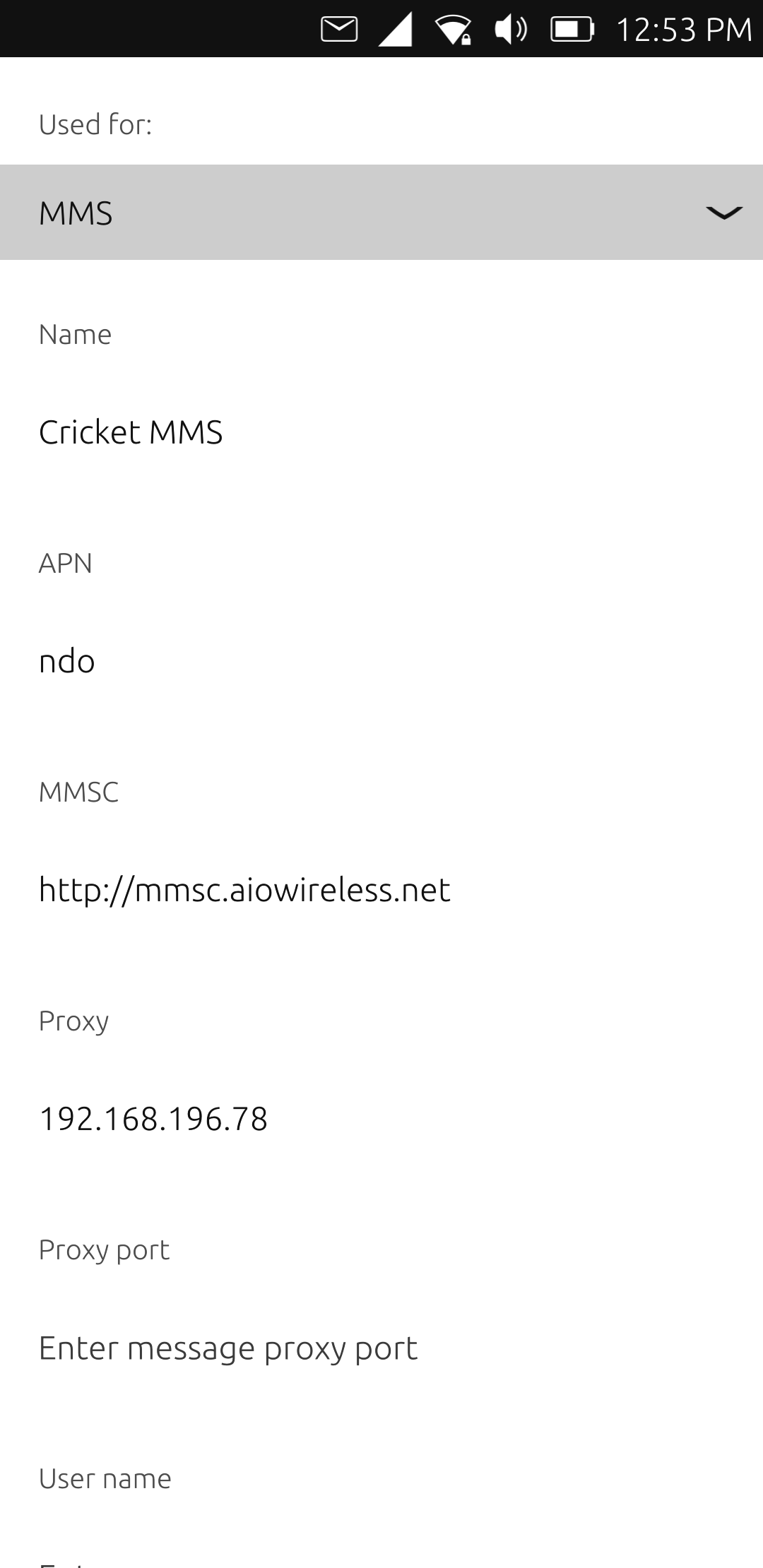
                                I am a cricketwireless user as well, I now have had voice,data,sms, and mms working for a 3 days now, using 3G only. I could not get sms to work with settings from cricket that you posted. So I wiped and reinstalled, and used the apn settings provivded at install and choisw. 3G. The setting Im using under install are as follows hope it helps somehow.screenshot20210712_125353968.png

                                1 Reply Last reply Reply Quote 0
                                • C Offline
                                  captainzer0
                                  last edited by

                                  Well spoke to soon sms not working again and cant get it back, even reinstalled and wiped but, no dice. Still trying.

                                  rikR 1 Reply Last reply Reply Quote 0
                                  • rikR Offline
                                    rik @captainzer0
                                    last edited by

                                    @captainzer0 SMS is now 100% reliable. See this update from @fredldotme :

                                    https://forums.ubports.com/topic/6039/bounty-for-pixel-3a-halium-9-stability/18?_=1630188659271

                                    MMS photos are reliable in / out with wifi OFF. Wifi ON and it is a problem, but broader than the P3a. MMS group messages can be sent but receiving they get "lost" (this is with wifi OFF again, with wifi ON, MMS group messages fail like MMS photos).

                                    1 Reply Last reply Reply Quote 0
                                    • E Offline
                                      esoteric
                                      last edited by

                                      Pixel 3a XL here on development channel. Cricket wireless. After mixing and matching multiple apn solutions to get mms working, I figured I'd share my fix. Hopefully it'll save someone the heartache I just went through, haha.

                                      WIFI off

                                      2g/3g/4g connection type

                                      APN stuff. Modify existing two and save

                                      -Cricket Internet-
                                      Used for
                                      Internet
                                      Name
                                      Cricket Internet
                                      APN
                                      Endo (think this was the main fix from default ndo)

                                      -Cricket MMS-
                                      Used for
                                      MMS
                                      Name
                                      Cricket MMS
                                      APN
                                      ndo
                                      MMSC
                                      http://mmsc.aiowireless.net
                                      Proxy
                                      192.168.196.78

                                      I believe changing the Cricket Internet to Endo helped with a conflict of both mms and internet being stock set to ndo? Not sure, but that was the last thing I tried before giving up, and it started working.
                                      Hope that helps

                                      rikR 1 Reply Last reply Reply Quote 0
                                      • rikR Offline
                                        rik @esoteric
                                        last edited by

                                        I believe changing the Cricket Internet to Endo helped with a conflict of both mms and internet being stock set to ndo? Not sure, but that was the last thing I tried before giving up, and it started working.

                                        I think you are right: in other testing we had similar issues when there were 2 entries with the same APN (one for "Internet" and another for "MMS"). Eventually the best answer will be the ability to set "Internet and MMS" as the APN type, but that is not sticking or working right now.

                                        1 Reply Last reply Reply Quote 0
                                        • E Offline
                                          esoteric
                                          last edited by

                                          Update. Everything worked. Everything. Now it appears to be denied access. Sigh.

                                          1 Reply Last reply Reply Quote 0
                                          • E Offline
                                            esoteric
                                            last edited by

                                            Apparently the verizon access point cell booster in the faraday cage-like place I work kicked me. Walked outside and got it back.

                                            So the fix works so far! Just not the darn access point here. Will play more with it.

                                            1 Reply Last reply Reply Quote 0

                                            Hello! It looks like you're interested in this conversation, but you don't have an account yet.

                                            Getting fed up of having to scroll through the same posts each visit? When you register for an account, you'll always come back to exactly where you were before, and choose to be notified of new replies (either via email, or push notification). You'll also be able to save bookmarks and upvote posts to show your appreciation to other community members.

                                            With your input, this post could be even better 💗

                                            Register Login
                                            • First post
                                              Last post