UBports Robot Logo UBports Forum
    • Categories
    • Recent
    • Tags
    • Popular
    • Users
    • Groups
    • Search
    • Register
    • Login

    Keyboard in landscape mode is ugly

    Scheduled Pinned Locked Moved Solved Xiaomi Mi A2
    10 Posts 4 Posters 1.5k Views 1 Watching
    Loading More Posts
    • Oldest to Newest
    • Newest to Oldest
    • Most Votes
    Reply
    • Reply as topic
    Log in to reply
    This topic has been deleted. Only users with topic management privileges can see it.
    • messayistoM Offline
      messayisto
      last edited by

      The landscape mode for the keyboard is nearly unusable. letters are stretched and scaled in a strange way. Has anybody got an idea how to fix this?
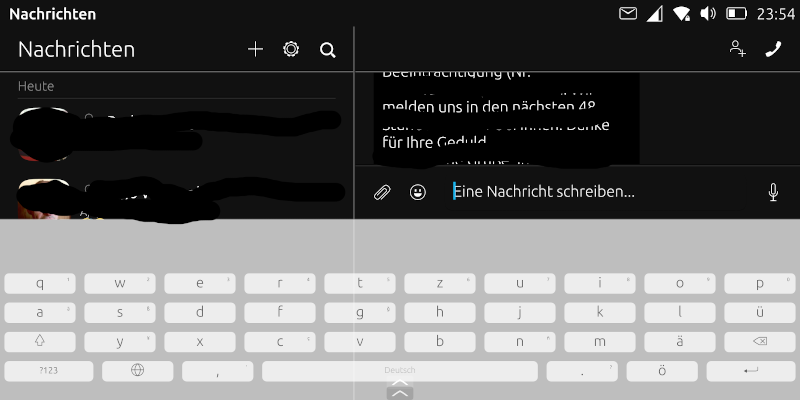
      screenshot20210912_235409987.png
      thanks in advance!

      1 Reply Last reply Reply Quote 0
      • K Offline
        kugiigi
        last edited by

        Yeah, that's because tall screens are detected as tablets, The code definitely needs to be updated to properly handle this. For now, you may modify a file to change the keyboard height in landscape.

        messayistoM dobeyD 2 Replies Last reply Reply Quote 1
        • messayistoM Offline
          messayisto @kugiigi
          last edited by

          @kugiigi thanks! Can you tell me which file I have to modify?

          K 1 Reply Last reply Reply Quote 0
          • dobeyD Offline
            dobey @kugiigi
            last edited by

            @kugiigi said in Keyboard in landscape mode is ugly:

            Yeah, that's because tall screens are detected as tablets, The code definitely needs to be updated to properly handle this. For now, you may modify a file to change the keyboard height in landscape.

            Not sure what you mean by "tablet" in this case. The Mi A2 has a 2:1 screen, albeit with many more pixels than pinephone, the keyboard works fine on pinephone in plasma mobile, and even works OK on my PC with 21:9 ultrawide display.

            1 Reply Last reply Reply Quote 0
            • K Offline
              kugiigi @messayisto
              last edited by

              @messayisto This file https://github.com/ubports/keyboard-component/blob/xenial/qml/keys/key_constants.js. You have to change the value of tabletKeyboardHeightLandscape. On your device, it's located at /usr/share/maliit/plugins/com/ubuntu/keys.

              @dobey Upstream maliit may have changed the logic for the dimensions. UT on the Pinephone have the same issue.

              messayistoM LuksusL 2 Replies Last reply Reply Quote 1
              • messayistoM Offline
                messayisto @kugiigi
                last edited by

                @kugiigi thank you so much, this did the trick. Is there a value to rezise the (too-big-)upper border?

                K 1 Reply Last reply Reply Quote 0
                • K Offline
                  kugiigi @messayisto
                  last edited by

                  @messayisto It's called the word ribbon. Check something similar in the same file.

                  messayistoM 1 Reply Last reply Reply Quote 0
                  • messayistoM Offline
                    messayisto @kugiigi
                    last edited by

                    @kugiigi thank you so much once again!
                    kind regards

                    1 Reply Last reply Reply Quote 0
                    • LuksusL Offline
                      Luksus @kugiigi
                      last edited by Luksus

                      @kugiigi I wonder why tabletKeyboardHeightLandscape is responsible for this, since there is also a phoneKeyboardHeightLandscape?

                      Devices: BQ e4.5, Fairphone 2, Fairphone 3, Lenovo X605F, Pinephone, Moto Z2 Force, OnePlus5T

                      K 1 Reply Last reply Reply Quote 0
                      • K Offline
                        kugiigi @Luksus
                        last edited by

                        @luksus Because the code currently checks the width of the current screen and if it's higher than the specified threshold, the keyboard uses all tablet specific values. Since newer phones are taller, they are detected as tablets by the keyboard.


                        1 Reply Last reply Reply Quote 1

                        Hello! It looks like you're interested in this conversation, but you don't have an account yet.

                        Getting fed up of having to scroll through the same posts each visit? When you register for an account, you'll always come back to exactly where you were before, and choose to be notified of new replies (either via email, or push notification). You'll also be able to save bookmarks and upvote posts to show your appreciation to other community members.

                        With your input, this post could be even better 💗

                        Register Login
                        • First post
                          Last post
