UBports bricked my Xiaomi Redmi 9A?
-
Hello.
I buyed a brand new Xiaomi Redmi 9A smartphone with the intention of installing Ubuntu Touch on it. I succesfully unlocked the phone using the Xiaomi application intended for it and enabble developer mode. UBports detected the exact model of the phone and started flashing the firmware. At some moment it restarted or rebooting the phone and it was stuck on the Redmi Logo restarting over and over again for several hours. At some moment I decide to remove the phone from the computer and I have not been able to get the phone of the endless rebooting cycle. I tried the volume down + power button combination several times without success and then I tried to install the Android SDK tools for window, plugged the phone in and tried 'adb devices' the phone as not recognized. What can I do?
-
@siriusf ubports-installer_0.9.10-beta_win_x64 on Windows 11
-
Hold the power button for about forty seconds to switch it off. It takes perseverance and patience. When you flashed UT to it was it on the correct version of Android?
"Your device must be running the latest Android 10 MIUI firmware."
-
@MrT10001 Thank you for your response, I wil try that.
-
-
S siriusf has marked this topic as solved on
-
SOLVED!
Steps:
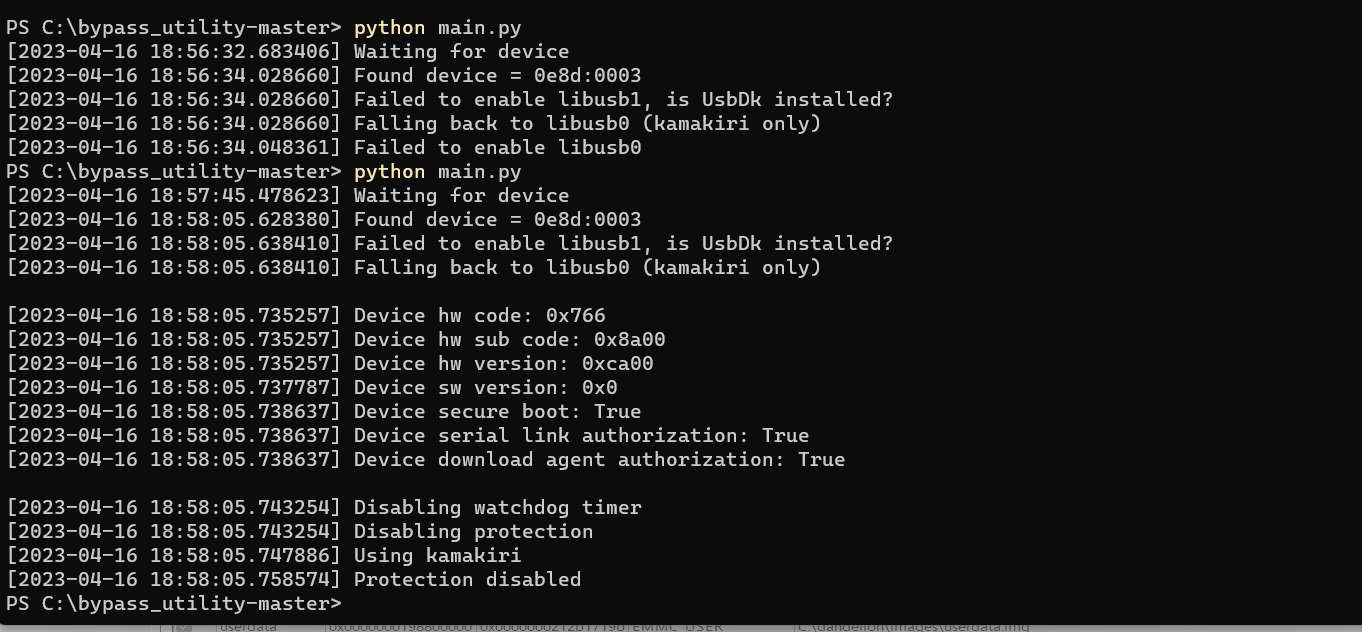
i) Follow the instructions in the links bellow to use the bypass tool (python script). You will need to press the up an down buttons so that Windows can detect the device. After running the bypass python script I obtained this and the device was shut down.
ii) I did NOT turn on the device. Then I use the ROM file (fastboot) provided here
https://xiaomistockrom.com/xiaomi-redmi-9a
and the Mediatek SP Flash tool with this instructions to flash to the device

Hello! It looks like you're interested in this conversation, but you don't have an account yet.
Getting fed up of having to scroll through the same posts each visit? When you register for an account, you'll always come back to exactly where you were before, and choose to be notified of new replies (either via email, or push notification). You'll also be able to save bookmarks and upvote posts to show your appreciation to other community members.
With your input, this post could be even better 💗
Register Login