Notch hack for Focal devices (specifically Volla Phone X23 )
-
Re: Notch hack for affected devices Volla phone
I attempted the notch hack on a Volla Phone X23. It hit issues as show below. Is there anything simple I can do to fix the issues? Otherwise I'll have to be patient as I'm not a linux/mobile developer
GX4 is the underlying Gigaset handset.
The phone has plenty of memory and file space.phablet@ubuntu-phablet:~$ ./apply-notch-hax.sh
No device specified, detecting device name...
WARNING: linker Warning: "[vdso]" unused DT entry: unknown processor-specific (type 0x70000001 arg (nil)) (ignoring)
Device is 'GX4'
Using diff '/home/phablet/.cache/lomiri-notch-hax/GX4.diff'
System utility 'patch' not found, starting installation...
[sudo] password for phablet:
Hit:1 http://ports.ubuntu.com/ubuntu-ports focal InRelease
Get:2 http://ports.ubuntu.com/ubuntu-ports focal-updates InRelease [114 kB]
Get:3 http://ports.ubuntu.com/ubuntu-ports focal-backports InRelease [108 kB]
Get:4 http://ports.ubuntu.com/ubuntu-ports focal-security InRelease [114 kB]
Hit:5 http://repo.ubports.com focal InRelease
Fetched 336 kB in 11s (31.9 kB/s)
Reading package lists... Done
Building dependency tree
Reading state information... Done
167 packages can be upgraded. Run 'apt list --upgradable' to see them.
W: No sandbox user '_apt' on the system, can not drop privileges
Reading package lists... Done
Building dependency tree
Reading state information... Done
Suggested packages:
ed diffutils-doc
The following NEW packages will be installed:patch
0 upgraded, 1 newly installed, 0 to remove and 167 not upgraded.
Need to get 98.1 kB of archives.
After this operation, 229 kB of additional disk space will be used.
E: You don't have enough free space in /var/cache/apt/archives/.
phablet@ubuntu-phablet:~$ -
@tera I'm using a SDHC card from my previous phone. I wonder if reformatting it will help
-
@treebeard try this with a tmp folder somewhere:
sudo mount --bind tmp/ /var/cache/apt/archives/A note that the GX4 profile do not exists,i used yggdrasilx with success fyi
-
@tera Thanks. After some trial and error I did;
$sudo su (mount requires su mode)
#mount --bind /tmp /var/cache/apt/archives (note the slash before 'tmp')
#exit (exit su mode)
$./apply-notch-hax.sh (only runs in normal user mode)It got further through updating packages before running out of space further along.
I've had a brief look at trying to allocate more space in the mount command but can't see anything obvious. I'll read up more later today.
-
@treebeard it workedforme, but use a temp folder in your home, /tmp has limited space as far as i recall
-
@tera I'm not a linux dev so may be making simple mistakes.
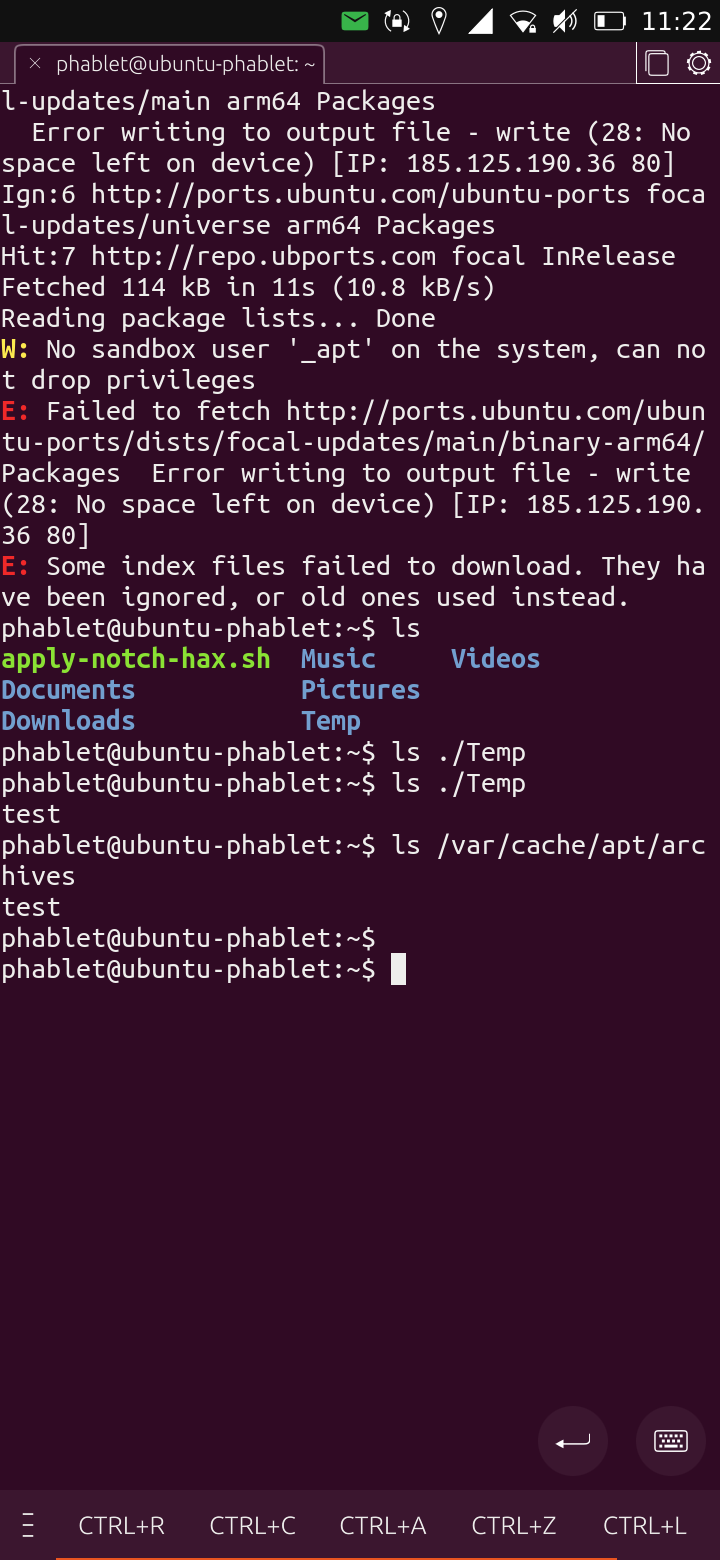
i created a Temp folder and added a 'test' file.
ls ./Temp showed the file
ls /var/cache/apt/archives showed the fileI reran the script and this is the output:
-
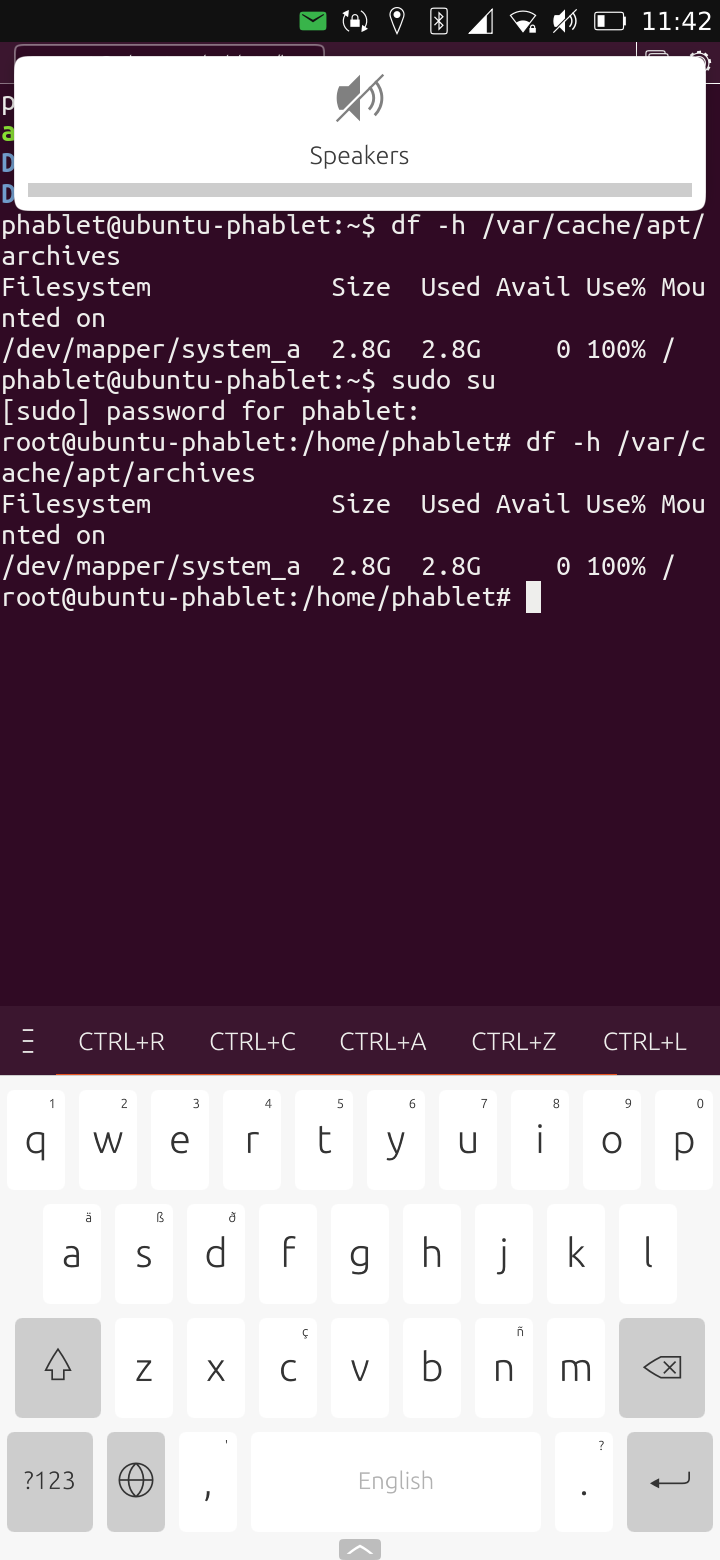
@treebeard strange, i rechecked my history and it matches... Can you check the space available with the output of:
df -h /var/cache/apt/archives/ -
@tera Very odd...
-
@tera I'm using a SDHC card from my previous phone. I wonder if reformatting it will help
-
@treebeard i would reboot and starts again, here is a extract from my history:
mkdir tmp sudo mount --bind tmp/ /var/cache/apt/archives/ wget -O apply-notch-hax.sh https://git.io/JtIpG ./apply-notch-hax.sh yggdrasilx -
@tera That set of commands worked thanks.
It took a few attempts as I forgot that rebooting would end the tmp mount.
The time is now visible. The icons around the notch still overlap but it's a step further to have the time visible.
Thank you

-
T treebeard has marked this topic as solved on
Hello! It looks like you're interested in this conversation, but you don't have an account yet.
Getting fed up of having to scroll through the same posts each visit? When you register for an account, you'll always come back to exactly where you were before, and choose to be notified of new replies (either via email, or push notification). You'll also be able to save bookmarks and upvote posts to show your appreciation to other community members.
With your input, this post could be even better 💗
Register Login