UBports Robot Logo UBports Forum
    • Categories
    • Recent
    • Tags
    • Popular
    • Users
    • Groups
    • Search
    • Register
    • Login

    How to enable Waydroid on a OnePlus 6

    Scheduled Pinned Locked Moved Unsolved Support
    6 Posts 3 Posters 948 Views 2 Watching
    Loading More Posts
    • Oldest to Newest
    • Newest to Oldest
    • Most Votes
    Reply
    • Reply as topic
    Log in to reply
    This topic was forked from Whats your solution for WhatsApp? arubislander
    This topic has been deleted. Only users with topic management privileges can see it.
    • D Offline
      Dunbrokin @ManuelBoe
      last edited by arubislander

      @ManuelBoe https://www.youtube.com/watch?v=2Swuq4_9C0A

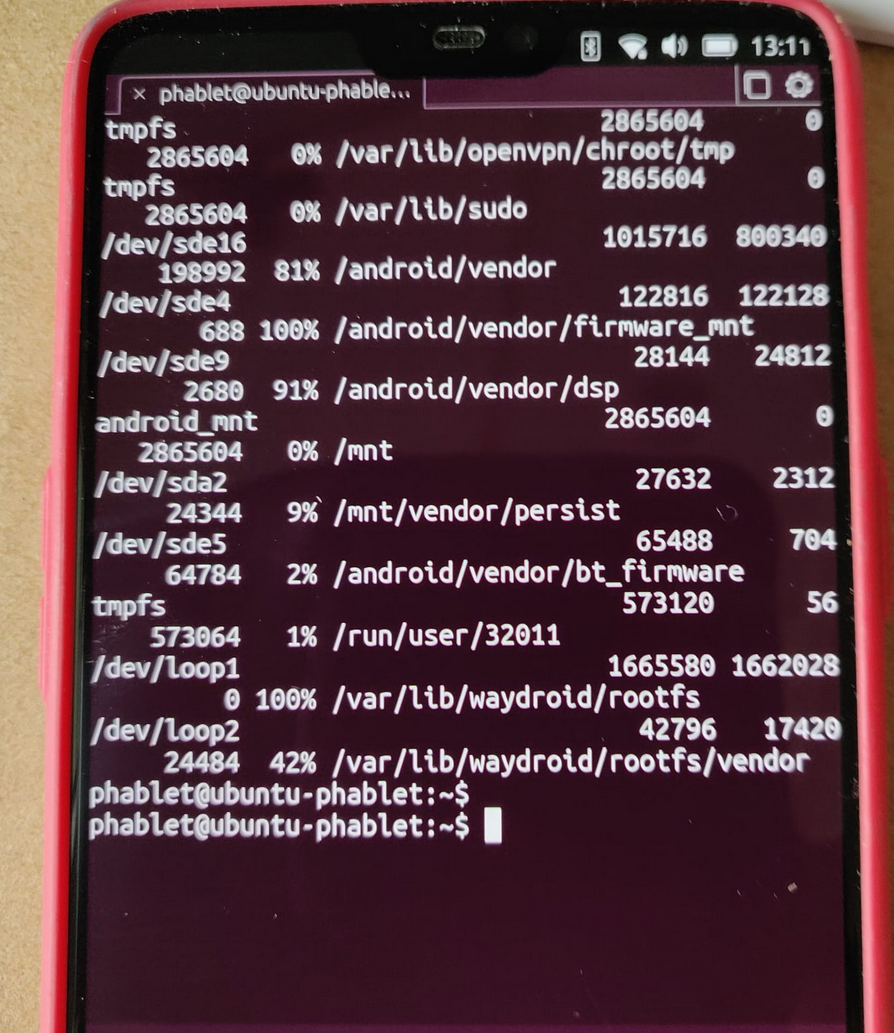
      I am using an OP6 and I am following the above YouTube Tutorial....but when I download waydroid it gets to the end and says that my disk is full. Any idea where I should go from here? What should I do to get some space back?
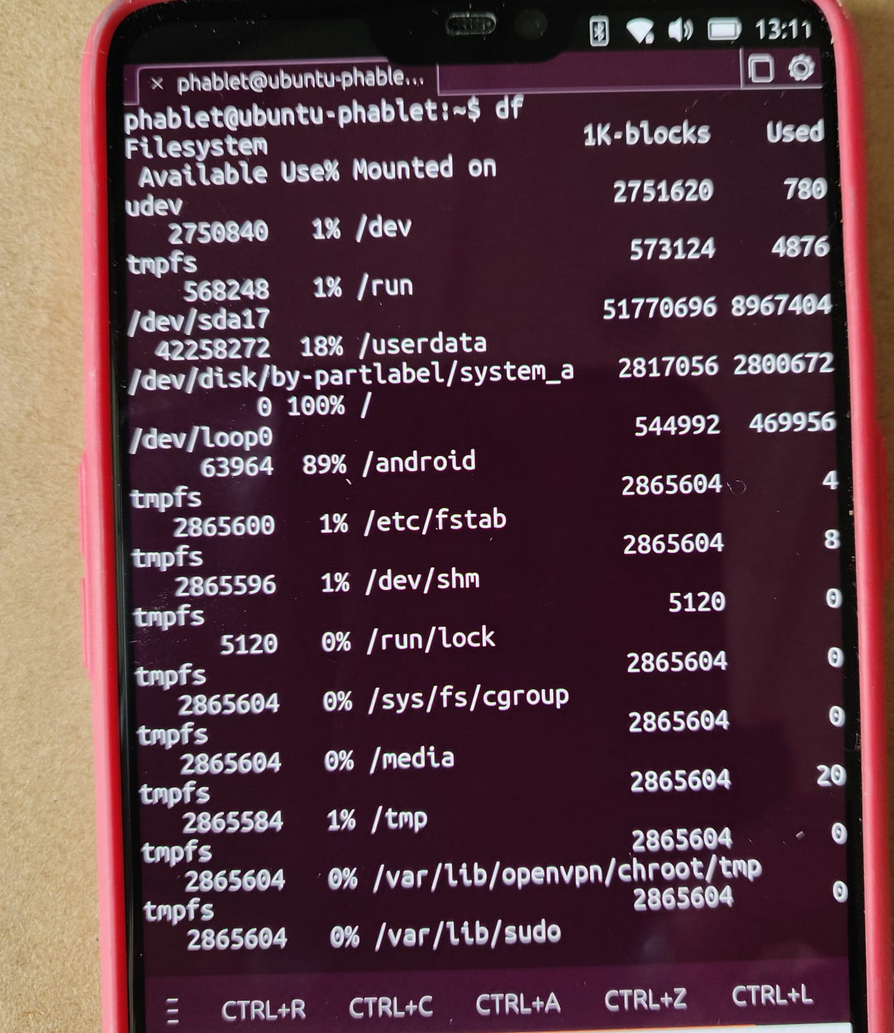
      ec0627d9-b5d1-4dac-924c-94fac98d7224-image.png

      759375ee-d9b3-46c5-b7af-4d2d29d8210d-image.png

      arubislanderA M D 3 Replies Last reply Reply Quote 0
      • arubislanderA Offline
        arubislander @Dunbrokin
        last edited by

        @Dunbrokin You've kind of hijacked the OP's thread as a support question on using WhatsApp. If you don't mind, I will separate these into a separate thread.

        πŸ‡¦πŸ‡Ό πŸ‡³πŸ‡± πŸ‡ΊπŸ‡Έ πŸ‡ͺπŸ‡Έ
        Happily running Ubuntu Touch
        JingPad (24.04-1.x daily)
        OnePlus Nord N10 5G (24.04-2.x daily)
        PinePhone OG (20.04)
        Meizu Pro 5 (16.04 DEV)

        D 1 Reply Last reply Reply Quote 1
        • M Offline
          mschmids @Dunbrokin
          last edited by

          @Dunbrokin in case of interest, typically pressing volume up/down simultaneously creates a screen shot.

          1 Reply Last reply Reply Quote 1
          • D Offline
            Dunbrokin @arubislander
            last edited by

            @arubislander Apologies!

            1 Reply Last reply Reply Quote 0
            • D Offline
              Dunbrokin @Dunbrokin
              last edited by

              @Dunbrokin This problem has now been superseded, as after this screenshot, I deleted Waydroid from my list of apps. Then I noticed that there was an system update to 570 and so Installed that.....now I cannot boot my phone...it sticks on the "The boot loader is unlocked.......etc." screen...and no matter what I do, it boots to that screen and never gets any further!!!....am I bricked? How do I escape?

              arubislanderA 1 Reply Last reply Reply Quote 0
              • arubislanderA Offline
                arubislander @Dunbrokin
                last edited by arubislander

                @Dunbrokin Seems like, as with your OP1 a reflash with the installer is warranted.

                πŸ‡¦πŸ‡Ό πŸ‡³πŸ‡± πŸ‡ΊπŸ‡Έ πŸ‡ͺπŸ‡Έ
                Happily running Ubuntu Touch
                JingPad (24.04-1.x daily)
                OnePlus Nord N10 5G (24.04-2.x daily)
                PinePhone OG (20.04)
                Meizu Pro 5 (16.04 DEV)

                1 Reply Last reply Reply Quote 1

                Hello! It looks like you're interested in this conversation, but you don't have an account yet.

                Getting fed up of having to scroll through the same posts each visit? When you register for an account, you'll always come back to exactly where you were before, and choose to be notified of new replies (either via email, or push notification). You'll also be able to save bookmarks and upvote posts to show your appreciation to other community members.

                With your input, this post could be even better πŸ’—

                Register Login
                • First post
                  Last post