-
Re: Location of Android 9 images for Lenovo M10 x606F?
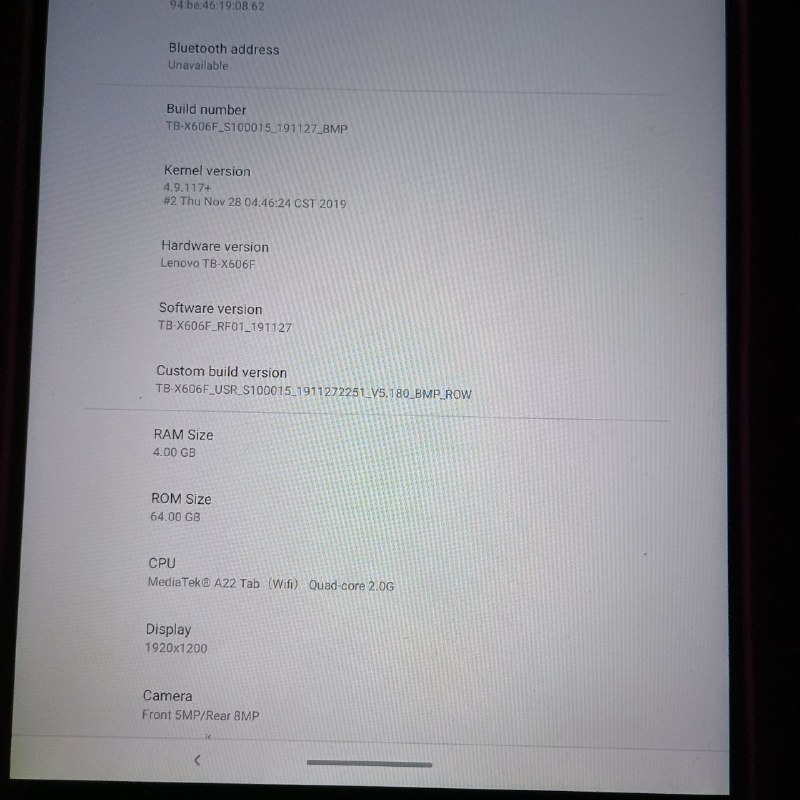
I just searched a lot on google I went on the same site and there two x606f devices listed the drive link wasnt working for some reasong so I just downloaded the file from https://drive.usercontent.google.com/download?id=18_vFVhQia5Zkedjy9Vz05x_wlNrN-sxe&export=download&authuser=0 I downloaded it extracted it to the rom zip folder created by the rescue tool and rescued my device with it now I'm on android 9
-
@ykmsr What is this for? Is there a recent development with the UT port for this model?
-
@kugiigi there seems to be recent activity in a fork:
https://gitlab.com/yassinrezai71/lenovo-x606I just remember, that the different issues with this device led me to drop the idea of bringing it the installer someday and I sold it again.
-
@Luksus Oh nice. Looks like someone else picked it up. Mine is usually collecting dust and only use when I need to test on tablets. It's still in xenial though

Good luck to the new porter. Hopefully we can get focal. I think one of the main issues is that Lenovo sucks at releasing kernel sources that their supposed to do
-
I was trying to buy an M10 HD and accidentally bought this instead...
Gonna give this a try, hope it works.
Assuming I properly downgrade to Android 9, will the installer work or do I have to manually install?
-
@rogue_ronin The installer won't work for this device. There is a port for it, but it has not been kept up with. The installer only works for the TB-X605F or TB-X605L. 3GB RAM, 32GB storage.
The installer also has a port for the TB-X306F 4Gb RAM 64Gb storage, which is a better option as the TB-X605F or L can be a pain to boot from cold or reboot.
At the current moment with the Focal port the cameras don't work on the X605 either.
-
@MrT10001 Thanks for the reply!
Been busy, just got back to this as the new tablet arrived yesterday - I used the installer for the x306f and it seems to have gone very well.
Does do this weird thing where I power it off and when I place it down it comes back on. I am absolutely not touching the edge of the screen - my hand is completely on the underside. I had double-tap to turn on enabled, but even with that disabled it still does it. Is there another setting somewhere?
Also, is there a reliable guide somewhere to try UT on the HD Plus?
If not, would a tablet donation contribute to adding it to the installer? I can't use it as-is with standard Android.
-
@rogue_ronin said in Location of Android 9 images for Lenovo M10 x606F?:
Does do this weird thing where I power it off and when I place it down it comes back on. I am absolutely not touching the edge of the screen - my hand is completely on the underside. I had double-tap to turn on enabled, but even with that disabled it still does it. Is there another setting somewhere?
Yes its a bug. Mine does it, I tried a bootloader that seemed to resolve it from the porter, but it may have regressed. Just keep the updates going on a regular basis.
-
@MrT10001 Very good, I will await updates. Thanks for your guidance!
First impression of UT on the x306f is excellent. Gotta try out some browsers - is Firefox or IceWeasel available somewhere? Or, dare I hope, Ungoogled Chromium?
Been searching for an open-source tablet to use with my D&D game (5e.tools, DungeonMastersVault, etc).
-
@ykmsr , do you still have this A9 image safed and could share it to me, cause the download link works no more ?
-
@Luksus I’ve just ported Ubuntu Touch (Focal):
https://gitlab.com/yassinrezai71/lenovo-x606/-/jobs/12500903564 -
@ykmsr
Quoting: "I’ve just ported Ubuntu Touch (Focal)"I can get a Lenovo TAB M10 FHD model: TB-X606F, 4GB, 64GB internal storage, no sweat... could you please guide me on what you exactly did, to port UT on it, please(English version, not German)...?!? Btw, what is "(Focal)"...??
-
Quoting: "I managed to install UT on TB-X606F, it's working great.
Downgrade was done with SP Flash Tool on Ubuntu 20.04. It didn't work on Win 11. Be sure to select de Download Agent from the image."So basically SP Flash, was launched from within Ubuntu 20.04, do you think it might work just as well from Cachy OS(Arch Linux)...?!?
-
@Moktrull Yeah you need to download the SP Flash Tool and an Android 9 image for your device: https://drive.usercontent.google.com/download?id=18_vFVhQia5Zkedjy9Vz05x_wlNrN-sxe&export=download&authuser=0. This works for me (x606f).
I had some issues using SP Flash Tool on Linux, so I recommend downloading the MTK drivers for Windows and flashing from Windows instead.
Then flash that Android 9 image using SP Flash Tool. Unselect preload inside SP Flash Tool, then flash. After verifying in Settings that it’s Android 9, enter fastboot mode.
Next, download the devel-flashable artifacts from here:
https://gitlab.com/yassinrezai71/lenovo-x606/-/jobs/12500903564/artifacts/downloadUnzip it. After unzipping, flash the boot image:
fastboot flash boot out/boot.img(or wherever the
boot.imgis located). Then format userdata:fastboot format:ext4 userdataAfter that, flash the Ubuntu image:
fastboot flash system out/ubuntu.imgFinally, reboot:
fastboot rebootWait until the device boots into Ubuntu Touch.



Hello! It looks like you're interested in this conversation, but you don't have an account yet.
Getting fed up of having to scroll through the same posts each visit? When you register for an account, you'll always come back to exactly where you were before, and choose to be notified of new replies (either via email, or push notification). You'll also be able to save bookmarks and upvote posts to show your appreciation to other community members.
With your input, this post could be even better 💗
Register Login