Lock The Boot Loader
-
When starting my phone OnePlusNord 100 a message appears at the display about going to g.co/ABH leads to Android trouble shooting page showing there is a problem with operating system. So i guess I should Format my phone by going into : Settings > Backup & reset > Factory Data Reset.It will ask for passcode, input & it will reset the device. How can I lock the Boot Loader?
-
@GerhardF You can't lock the bootloader on Ubuntu Touch*, it will brick the device. Your startup message sounds absolutely normal. Can we see a picture of it please?
*with a few exceptions but OnePlus isn't one of them
Is currently using an Op5t
Also owns an Op1, a BQ E4.5, an Xperia X, a Nothing Phone 1, and a Rabbit R1 as well as a BQ tablet and a Pinetab2. Please, someone... make it stop. -
@Moem
My smartphone is a OnePlus Nord N100, originally loaded with
Android10.0, Halium10, Kernel version on the device is 4.19.95,
and I've upgraded it successfully with Ubuntu-Touch 24.04-noble,
Version 025-12-09/2, Release Date 12/9/2025,
from my Linux-Mint 22 Computer using Debian deb x64.
After starting it, this screen appears for about 15 seconds :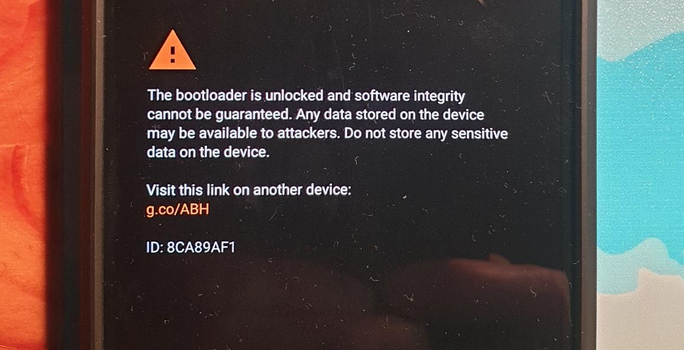
but then it turns to the Right Ubuntu-Touch Screen.
What can I do?
Shall I ignore that warning and put all my Data on it?
or
Can I Lock the Android Boot-Loader any way? -
I'll repeat myself in case it was not clear:
You can't lock the bootloader on Ubuntu Touch, it will brick the device.
What can you do? You can rest easy, knowing that this message is completely normal on Ubuntu Touch, and almost all users see something similar when their phone boots.
My strategy is to see it as a badge of honour, a visible proof that you freed the device from Google's clutches. It's not mandatory, but certainly allowed, to respond with a loud "MUHAHAHAHA!" every time you see it. -
@GerhardF said in Lock The Boot Loader:
put all my Data on it?
you can try to use the built-in encryption feature. I can't say much about it because I've never tried it, but know that it exists, and it's supposed to protect the user's data (photos, docs, mails, contacts...) if the phone gets in the hands of an unfriendly person.
-
@Moem
OK, That`s all I want to know. Thank You, I'll always make a smile and go away from all this american garbage.

-
said in Lock The Boot Loader:
@Moem
OK, That`s all I want to know. Thank You, I'll always make a smile and go away from all this american garbage.
-
@GerhardF A smile works fine!


Hello! It looks like you're interested in this conversation, but you don't have an account yet.
Getting fed up of having to scroll through the same posts each visit? When you register for an account, you'll always come back to exactly where you were before, and choose to be notified of new replies (either via email, or push notification). You'll also be able to save bookmarks and upvote posts to show your appreciation to other community members.
With your input, this post could be even better 💗
Register Login