any good guides for TB-X306X?
-
Hi all
I have this Lenovo TB-X306X and I want Ubuntu on it, but I am having a hard time to find any guides that is easy to follow.
Any here that have one or can write one up?/Magnus
-
I tried looking at https://gitlab.com/ubports/porting/community-ports/android11/lenovo-tab-m10-hd/lenovo-m10-hd/ but I cant follow that one
-
-
@magnusajber I got one up and running successfully last week.
The first task is to install stock Android 11 on the X306X. Do you have a plan for that yet? -
@Linus67
Doesnt the Android 11 I have on it work? Do I need a different one? -
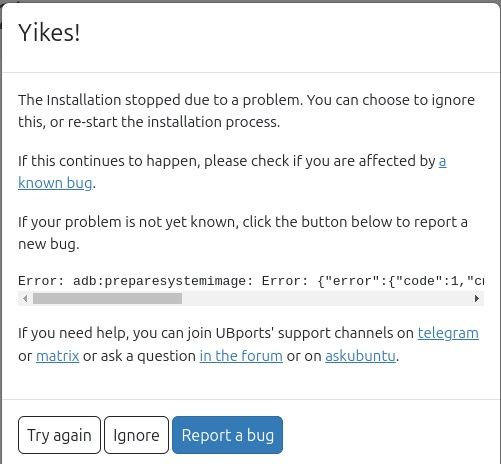
cause of the fail above, it only boots in fastboot mode. Did I brick it?
-
@magnusajber Do you have an x306x running stock Android 11?
Then everything is perfect! -
@magnusajber No, but there are things you can do.
-
Have a windows PC to hand with Lenovo Software Fix installed. This is the easiest way to return the tablet back to stock Android and the instructions in the fix tool are helpful and intuative.
-
The device has to be the 3Gb/32Gb or 4Gb/64Gb version. The 2Gb/32Gb version is stuck on Android 10 (Android 11 runs very poorly on it, UT runs a lot better). UT can be installed on it, but it involves doing other things to get Android 11 on it.
-
Fastboot is good, it means you can run the device through the UT installer again assuming you had Android 11 on the device.
-
On the installer tick all the boxes (wipe data etc).
-
Leave the device alone and let it do it's thing. Moving it while downloading UT and pushing it to the device may cause an issue due to a loose connection.
-
-
@MrT10001 I managed to make it work, I just forgot to click the option to wipe disk in the ubports installer
So on this TB-X306X you don't need to reinstall android 11, cause its already there and it cant be upgraded to higher than that. So I want to be clear to others, I used the Lenovo Android 11 that ws already on it.
In regards of ADB tool, I installed it directly from Ubuntu repos on my Ubuntu 24.04 laptop. I was working on my Ubuntu-laptop to flash the tablet so that works too.When I flash my next one, I will write up a more detailed guide on this.
-
I managed to make it work, I just forgot to click the option to wipe disk in the ubports installer
In fact: You haven't read the UBports instructions. As a thank-you for our help, please promise to provide us with detailed installation instructions the next time you perform an installation. Keep in mind: Even the best instructions are useless if no one reads them.


Hello! It looks like you're interested in this conversation, but you don't have an account yet.
Getting fed up of having to scroll through the same posts each visit? When you register for an account, you'll always come back to exactly where you were before, and choose to be notified of new replies (either via email, or push notification). You'll also be able to save bookmarks and upvote posts to show your appreciation to other community members.
With your input, this post could be even better 💗
Register Login