Indra: Meshtastic for Ubuntu Touch
-
I think I have finally figured out why some nodes cannot be DMed. The fix for this will likely not be in the initial OpenStore release (undergoing review right now), but it will be part of the first update after.
-
Alpha 4!
https://git.agnos.is/projectmoon/indra/releases
Next alpha release that focuses on finalization of MVP functionality ahead of OpenStore release. This release also contains the changes in the unreleased alpha 3.
A database wipe is required for this release!
Delete the database by doing
rm ~/.local/share/indra.projectmoon/indra.dbon your phone, or by deletingindra.dbusing the file manager.Changelog
- Support connecting to radios via network/wi-fi.
- Ensure contact info is on radio when sending direct messages.
- Fix channels not showing up if they don't have a name.
- Node list is now one large list off online + offline.
- Actually reliable message queueing system.
- Adhere to firmware-imposed text message rate limits.
- Security indicators on channel/DM list.
- Sortable node list.
- Move more Meshtastic-specific stuff out of app domain.
- Show and enforce character limits on sending text messages.
-
https://next.open-store.io/app/indra.projectmoon/
Indra is now available on the OpenStore, with all the fixes in Alpha 4 and a few more tweaks! From this point forward, the database will be treated as something that needs to be migrated instead of wiped on every update. (The setting in the menu to wipe the database does not actually do anything, and will be removed).
-
Indra 1.2.1 is now available with a laundry list of improvements and fixes. Find it at https://next.open-store.io/app/indra.projectmoon/ or https://git.agnos.is/projectmoon/indra/releases/tag/v1.2.1.
- Feature: Make links clickable in messages.
- Feature: Add the ability to search and filter nodes on the map.
- Feature: De-duplicate messages that are likely rebroadcasts.
- Feature: Show hops away/signal strength on messages.
- Feature: Add/remove favorite nodes.
- Improvement: New message footer layout.
- Improvement: Better node list appearance in dark mode.
- Improvement: Tweaks to the choice of black or white text for messages in dark mode. More readable.
- Improvement: Add node ID to the node info page.
- Improvement: Show node distance on the map, and sort by distance.
- Improvement: New map icon.
- Improvement: Pull to refresh the node list.
- Improvement: Proper status indicators for sending messages.
- Improvement: Show channel/conversation status indicators on main view.
- Improvement: Add a setting to toggle forced Bluetooth reset.
- Improvement: Add a setting to control how long it takes before a node is considered offline.
- Improvement: Add a setting to control the message de-duplication window.
- Improvement: Translation updates.
- Fix: Apply the default channel name to the public channel no matter its index.
- Fix: Fix a UI lockup when reconnecting to the radio.
- Fix: No more UI flickering when disconnecting from the radio.
- Fix: More efficient refreshing of the node list.
-
@projectmoon
Hello.
I’ve done my research.
I’ve just bought two cards to try out.
I’ll let you know if I run into any issues with the app.
I’m really looking forward to trying this out!
Thanks for this app! -
@projectmoon
Hello.
I’ve done my research.
I’ve just bought two cards to try out.
I’ll let you know if I run into any issues with the app.
I’m really looking forward to trying this out!
Thanks for this app!Good luck. Hope your mesh is nice and big and stable.
-
@projectmoon
I bought two fairly old Lilygo T3 V1.6.1 boards.
They’re running on Meshtastic now and the tests are going well.
The UT app works well (I found it has more latency than the Android version, but it’s not the same phone so it’s hard to be objective).
It’s brilliant to have a native app – a thousand thanks for that.
I could help a bit with the French translation if needed. -
@Vlad-Nirky good to heaven. Can you be more specific about latency issues?
-
@projectmoon
When I send a message on UT, Android device receives it immediately.
When I send a message from Android, UT don't receive it.
The message only appears after UT has sent another message.
If Android send two messages, UT dosen't receive it.
If UT send a new message, it receives the first Android one but not the second.
If UT send another message, it receives the second from Android.
As I'm complet beginer, maybe there is something in settings I missed. -
@projectmoon
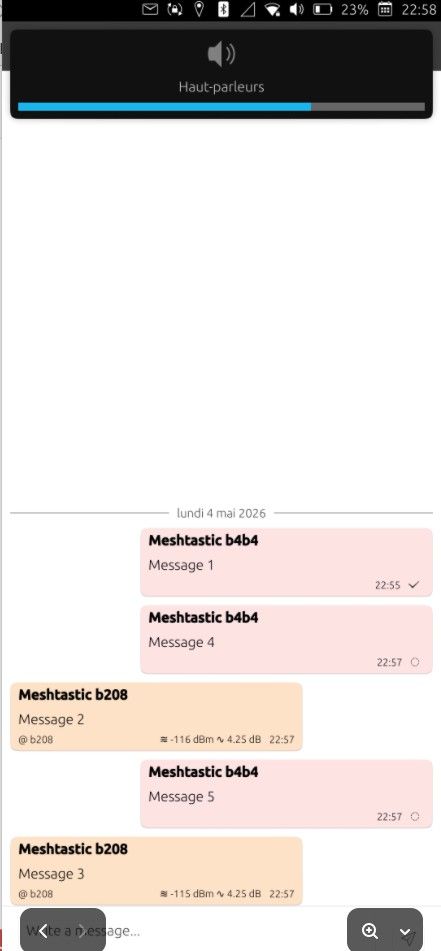
In this test, I have sent messages in the following order
UT message 1
Android message 2
Android message 3
UT message 4
UT message 5
Result on Indra
-
@projectmoon
In this test, I have sent messages in the following order
UT message 1
Android message 2
Android message 3
UT message 4
UT message 5
Result on Indra
I have seen this before. It's not a latency problem but rather some kind of lock up with the async runtime. I haven't experienced it in a long timed. Do you have app suspension disabled in UT Tweak Tool? And how are you connected to the radio with Indra?
-
@projectmoon
Thanks for your help.
No, I hadn’t disabled the suspension in UT Tweak Tools (I’ve done that now).
And I’m connecting via Bluetooth for the time being (whenever I try to switch to Wi-Fi, I can’t seem to reconnect to the board at the moment).
I'll test and let you know.
-
No, no change.
I'll open an issue; that'll be more efficient.
I've started the French translation on Weblate.

Hello! It looks like you're interested in this conversation, but you don't have an account yet.
Getting fed up of having to scroll through the same posts each visit? When you register for an account, you'll always come back to exactly where you were before, and choose to be notified of new replies (either via email, or push notification). You'll also be able to save bookmarks and upvote posts to show your appreciation to other community members.
With your input, this post could be even better 💗
Register Login