Some questions
-
Well you have to reinstall it from the installer, but you can keep all your userdata and installed apps. Just make sure to UNCHECK "wipe userdata", when you reinstall.
In practice this is quite fast to do, and you won't have much overhead as you will find everything as you left it and will not loose any of your user setup. Anyway it's really not recommended to use development version for a usage as a daily driver.
-
@gpatel-fr I did not have trouble running Uwolf exept for the fact that I only can use it with an external keybord.
I stil not quite understand the onscreen keybord problem. In most apps/ programs it workes fine. So how could this be an OS issue? For me it looks like a app problem. Is te onscreen keyboard not part of the OS and is called from within an app?
I write this message from my phone on the onscreen keyboard...
EJ
Ernst
-
@Ernst-Jan15 said in Some questions:
how could this be an OS issue?
I can't give you a definite answer, but the OSK question is complicated. It's currently quite a Ubuntu Touch only feature, that is, it's accessed through QT Apis using a plugin that is written specifically for Ubuntu Touch.
One problem is that currently (it's worked on) the QT version on which UT is based is obsolete, so the official browser, Morph, has an 'old' engine that don't work with quite a few 'modern' web sites.
So a few open source enthusiasts have written hacks to make browsers that don't support the UT apis natively use the UT OSK. These are not upstream patches that have been accepted to the standard browsers, that's packaging. LibreWolf for UT is not LibreWolf recompiled, it's LibreWolf with clever packaging.
As such these solutions are inherently fragile. Also it's not worth much investing in making these hacks more robust, since goal is to avoid them altogether by making UT more receptive to alien architecture.
-
@Ernst-Jan15 said in Some questions:
So how could this be an OS issue? For me it looks like a app problem
Except that OSK for uWolf works on 24.04.1 for me and for @gpatel-fr , and probably many others, so if it does not work for you, and you're not running the stable version, then that's the first thing I would try.
-
-
@pparent Well,
Housten I have a problem...Device not suported
Yor device: halium_arm64You want to try anyway?
Not realy, I now have a more or less working phone. It tells me to go back to stock os for Faiphone.
Any suggestion? I'm in the gray zone here and have now one bricked fone getting repaid by Google.
This one I need to work. I need a full profe method...EJ
Ernst
-
@pparent Yeah, it looks the same as mine

Ather question,
My update manager is set on dayly updates. Is there a wai to get it to stable, I cannot find a wai to change this...
EJ
-
@Ernst-Jan15 said in Some questions:
@pparent Yeah, it looks the same as mine
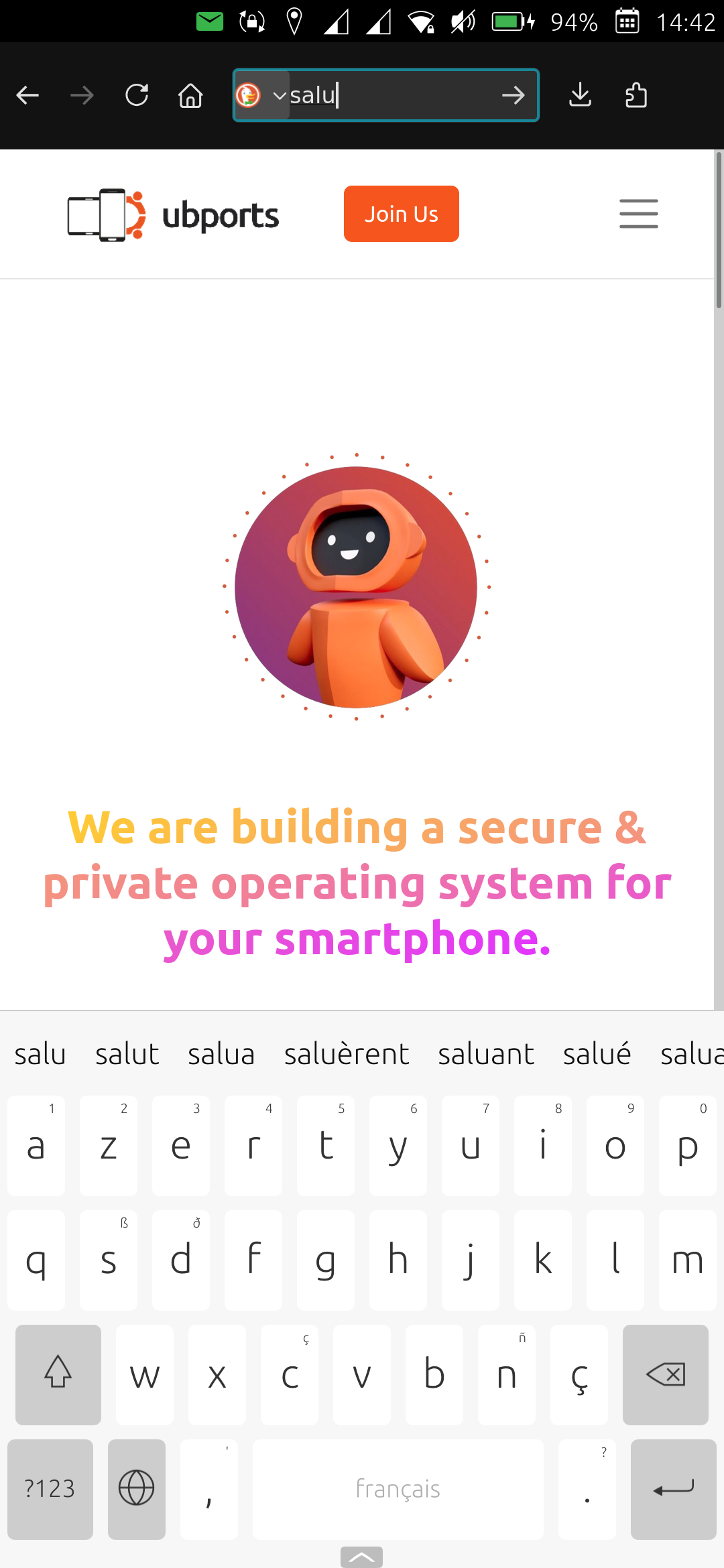
What do you mean? I thought the on-screen-keyboard did not work for you in uWolf?
-
@Ernst-Jan15 said in Some questions:
Housten I have a problem...
Device not suported
Yor device: halium_arm64Have you rebooted your phone while pressing power button + volume down before pluging it in USB?
-
@pparent No it does not work in Uwolf but it works on this forum and in most other apps in UT
EJ
Ernst
-
@pparent Ah, no I did not... Thanks I will try this. I asume stil using the installer on my mint pc?
EJ
-
Yes but the screenshot I sent you is uWolf with the On-Screen-Keyboard working
Ah, no I did not... Thanks I will try this. I asume stil using the installer on my mint pc?
Yes but connect it in usb to the computer only after rebooting it that way.
-
@Ernst-Jan15 said in Some questions:
Yor device: halium_arm64
I see the same for my Fairphone 5 (not that I want to reinstall, I just tested for you).
I think that the model detection works better when UT is not yet installed. In your place I'd just be careful in selecting the correct phone model. -
@gpatel-fr Thank you!
I think it's better to wait. I need this phone working until my Pixel is back from repair... After that I will see how to attack this isue.
EJ
-
@pparent Ah, didn't uderstood that...
-
@pparent Hi,
Today i fiddled around with the installer. Whatever I try it keeps telling me to first back to stock Android version 11for my FP4. It also tells me to get in developer mode. So how does it work to get 24.4.1 stable on my FP4 with the installer? I cannot find any good info on what you describe?
EJ
-
@Ernst-Jan15 said in Some questions:
@pparent Min Browser also rejects me to my normal Ubuntu Touch folders. I don' t understad why...
By the way I've just made an update of Min browser, that corrects bug on inputing password, and allow to import/export files. Not sure if it will be enough to meet your needs, but you can always try.
-
@pparent Hello Piere,
I installed min browser again. My findings...
The screen keyboard is not activated
I not able to get my .cvs with my password loaded. It loops back to no passwords. When I try again the program cashes. I tryed this 3 times with te same result.Ernst-Jan
Ernst
-
@Ernst-Jan15 said in Some questions:
The screen keyboard is not activated
I really don't know how the OSK could have worked on the previous version and not this one. Well I guess you can test it again when you have reinstalled the system, because it is most probably not an application-side issue.
I not able to get my .cvs with my password loaded.
I'm not sure what you mean by that though. How do you load your csv passwords?
-
Ps: just a question when you are doing your tests with the On Screen Keyboard, you don't have a physical Usb/bluetooth keyboard plugged in right?

Hello! It looks like you're interested in this conversation, but you don't have an account yet.
Getting fed up of having to scroll through the same posts each visit? When you register for an account, you'll always come back to exactly where you were before, and choose to be notified of new replies (either via email, or push notification). You'll also be able to save bookmarks and upvote posts to show your appreciation to other community members.
With your input, this post could be even better 💗
Register Login