VP22 High CPU usage + battery drain: c2@1.2-mediatek
-
@pparent
I have no idea what kind of app is the one that is draining your battery and I dont even know how to check which app is draining my battery.
the only thing I know after updating to 20.04-1.2 my battery is not lasting at all.
Posted it here -
Well it could help if when the battery is draining fast, you can go to the terminal and type "top", to see what program is using a lot of CPU.
-
@pparent
I used "top -o %CPU" command, that you suggested "THANKS" and I realize that whatsnew app which suppose to be the upgrade of whatsapp web app is consuming all the battery, I am just waiting to test it for a full day and I will let you know tomorrow.PS the icon of the new app is X11 icon, which someone asked me to check, his quote was: "Do you use one of the newer browsers, or any app that produces an X11 icon in the Dash?"
-
@pparent
I just realize it is your project
I can be your tester.
-
Hum this is kind of strange as I don't observe anything similar. For me "Whatslectron" which is the process behind whatsnew, takes 1-3% CPU when in background (more or less the same that whatsweb consumed when unsuspended)
Question:
-What version of Ubuntu Touch are you using precisely? Stable or daily?
-When you use Whatsnew, when you go in the window carousel, do you see one ore two window corresponding to whatsnew, and what icon does it have under it?
-What is precisely the name of the process you see in top taking 100% CPU? Is it "Whatsnew"? "whatslectron"? Something else?
-Could you give me the result of "md5sum /lib/aarch64-linux-gnu/liblomiri-private.so" in your terminal?
-
UT 24.04-1.2 stable
Unfortunately, I uninstall the app and try to install the old one, I am not sure if it is still the case.
I am not sure but, I think that at the first install there were 2 windows in the window carousel.
Now I see 2 apps but after few seconds the second one is disappearing.
The icon is X11 Support.
The command in the top command list was and is whatslectron, before was at the top of the list with 100% cpu now is at the second place with 8% or less.
md5sum:
2abe4aa39f76b1526c334afdfeef309b /lib/aarch64-linux-gnu/liblomiri-private.so -
@pparent
you are in luck I have a screenshot
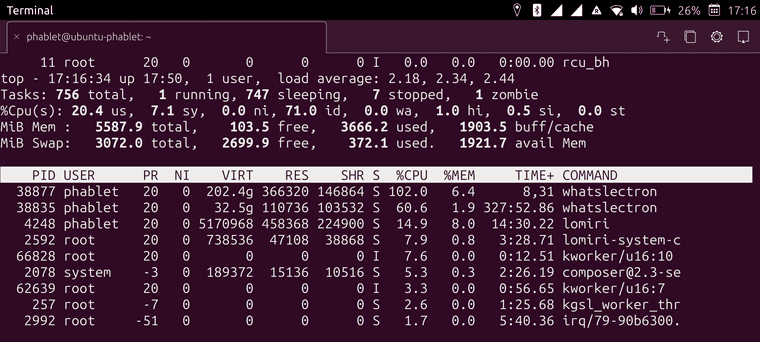
-
Ok well this is very strange.
Well it's possible that whatslectron take a lot of CPU on some occasions. For example when syncing messages. But this should not be a recurrent behaviour that drains the battery when the app is in background.
If there were 2 windows remaining this could explain the problem, but I don't see how uninstalling and reinstalling the app could have any effect on that, as you now seem to have the proper behaviour i.e the second window closing after few seconds.
But, so do you still have the battery drain problem?
-
@pparent
no :(, the battery now is ok, I will monitor it for a couple of days and I ll post here the results.
Feel free to ask me any question, I ll monitor the topic.PS
I just remembered something: when I updated your app, at the same time I updated the OS.
I was waiting for the OS to be downloaded without leaving from the update app.
When it finished I clicked on the button next to it and before I exit the update app, the phone automatically restarted to update the OS.
It restarted twice, maybe that was the issue, because after that I immediately noticed the battery drainage. -
S smobilesoft referenced this topic on
-
@pparent
after a week of testing, the battery usage looks normal.

Hello! It looks like you're interested in this conversation, but you don't have an account yet.
Getting fed up of having to scroll through the same posts each visit? When you register for an account, you'll always come back to exactly where you were before, and choose to be notified of new replies (either via email, or push notification). You'll also be able to save bookmarks and upvote posts to show your appreciation to other community members.
With your input, this post could be even better 💗
Register Login