click on notification bubble
-
Tapping the notification should just execute the notification handler
You mean "tapping the notification bubble"?
-
@mihael yes, tapping the floating one that appears when the notification appears. It doesn't make sense to me to have the tap dismiss the notification into the notification bar, when you can do that with a swipe.
-
Its definitely a Lomiri UI inconsistency, not an app issue. From apps perspective, there's no way to tweak this behavior. And there's no difference between an app using dbus or the http apis to send notifications, they end up flowing over the same path in your device.
-
From apps perspective, there's no way to tweak this behavior.
not sure what you are meaning by 'this behavior' and 'tweaking'.
What I understand is there would be no way to display a time out notification and detect if the user has pressed the notification before it closes by itself.
If this is what you mean, this example shows how it can be done..
Granted, don't know if this can work from an unconfined app. This caveat was not part of the discussion

-
So just speaking from the user point of view, not developer:
Right now, there is a notification bubble that the user can interact with by swiping it away and this notification bubble also has a time out - it disappears by itself.
Then, there is the notification in the notification list - this notification has a "load" - like info about what app to open and some other info that is passed to the app. The user can interact with this notification by tapping on it - then the UI opens that specific app and passes that specific info to the app.
My question is: can't the "load" be included in the notification bubble as well? And then the UI adds the possibility for the user to interact with the bubble by tapping on it.
-
@mihael this is the intended behavior.
No click on notification bubbles, please.
I have disabled notification bubbles long time ago, as they turn on the screen and that's annoying.
Notifications should show in the notifications indicator. All of them in one place.Another planet, another time, another universe!
-
@CiberSheep That could actually work as a workaround solution: to disable bubbles and enable notifications sound: this way I am notified that there is a new message / email but I don't have to wait for the bubble to disappear before I scroll down the notifications list and click on the notification. However, this introduces an extra step: to turn on the screen by pressing the power button.
What I was looking for is a simple, direct, straight forward way of being notified and then opening that specific app.
I also have to explain a detail about my context: I don't have a passcode or fingerprint reader enabled, so I don't have these extra steps of unlocking the phone.
-
@gpatel-fr I'm talking about the title, that an app has no API to set an action when clicking on the notification bubble.
I think your example shows that, as it is not using the official lomiri api for this. So it doesn't work with an http post to the push server for example.
-
can't the "load" be included in the notification bubble as well? And then the UI adds the possibility for the user to interact with the bubble by tapping on it.
I have looked at the spec for push notifications. Not the http notifications via the ubports push server, the notifications via d-bus, the so-called "low-level API", the 'postal message':
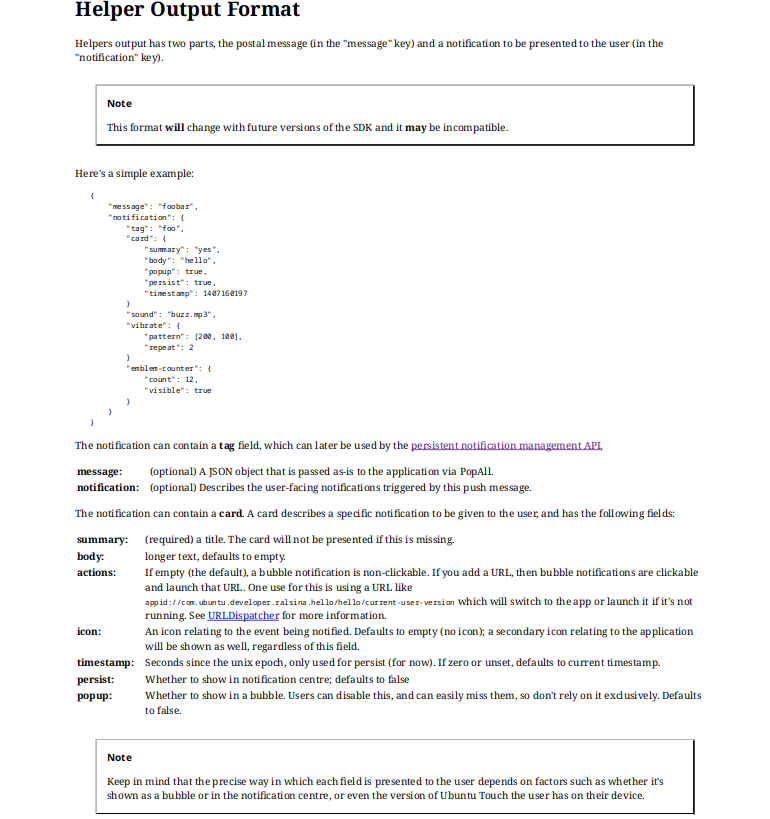
here is an exemple use from Dekko source code:
QJsonObject NotificationWatcher::buildSummaryMessage(const QString &msg) {


    QString appDir = QCoreApplication::applicationDirPath();
    appDir.replace(QRegExp("dekko2.dekkoproject/.*"), "dekko2.dekkoproject/current/");
    QString icon = QString("file://").append(appDir).append("dekko.png");

    QJsonObject c;
    c["summary"] = msg;
    c["popup"] = true;
    c["persist"] = true;
    c["icon"] = icon;
    QJsonArray actions = QJsonArray();
    QString actionUri = QStringLiteral("appid://dekko2.dekkoproject/dekko/current-user-version");
    actions.append(actionUri);
    c["actions"] = actions;

    QJsonObject notification;
    notification["card"] = c;
    notification["sound"] = true;
    notification["vibrate"] = vibrate();
    QJsonObject message;
    message["notification"] = notification;
    return message;
}
what is important is that Dekko does everything 'right' to allow for the system to activate it when clicking (pressing) the bubble notification. There is nothing that Dekko is purposely NOT doing to disable this capability that is said to be possible in plain english in the doco:
If you add a URL, then bubble notifications are clickable and launch that URL.so it can be considered like a bug, yes. I'm changing my point of view here. Per the doc, it was designed to work like you want it to work, but obviously it don't (I checked again with Dekko).
I guess that it has never worked like that though.
For apps that are using the high level Api, I don't know if it's even possible to pass an activation URI so it's possible that this capability was not really wanted as it seemed just not doable.
-
@gpatel-fr Great find!
I don't know where to search but maybe we need to inspect the code in the OS for handling the bubble.
Some time ago I had to write a service worker for browsers and I had to specifically program what it is done when a notification is clicked.
-
I guess that it has never worked like that though.
I'm not 100% sure, but AFAIR it was working like this in earlier UT-Versions (16.04, maybe 20.04)
-
interesting, unfortunately it's very unlikely that someone still running 16.04 is reading this, maybe someone running 20.04 could chime in ?
-
interesting, unfortunately it's very unlikely that someone still running 16.04 is reading this, maybe someone running 20.04 could chime in ?
I have a Nexus 5 in a drawer... that might be running 16.04... Assuming it actually turns on, which is not a given.
-
I have a Nexus 5 in a drawer... that might be running 16.04
interesting. Don't expect it to do any better in 26.04 (if it's supported one day). Notification bubbles don't work as per the doc in 26.04 either, it's not worth the bother to upgrade
-
@gpatel-fr I still have my E4.5 in fully working condition. Maybe I'll test with a spare SIM-card if the notifications are working like expected

-
@gpatel-fr would not upgrade it. Just test notifications. It is indeed 16.04 and turns on. Haven't tested yet though.
-
I found my old phone (Meizu Pro5) with 16.04. I can confirm that I can click on the bubble when I receive a new email and it opens Dekko2.
-
No click on notification bubbles, please.
I don't want to get you upset, I am not trying to convince anybody of anything, I am just trying to understand... but it seems as if I touched a sensitive issue here: why are you against click on notification bubbles? - especially since you have them disabled, then it would not affect you in any way. Or will that somehow make the OS worse / slow / etc? - as I said, I am just trying to understand. Thank you.
-
thanks for the investigation, in this case it seems indeed a regression to add to the fact that it don't conform to the spec. I'm beginning to think to create an issue on Gitlab.
-
Maybe @projectmoon and @kristatos can confirm? - @kristatos, you don't need to insert a sim, you just need to connect to wifi and then receive an email while having Dekko2 installed...



Hello! It looks like you're interested in this conversation, but you don't have an account yet.
Getting fed up of having to scroll through the same posts each visit? When you register for an account, you'll always come back to exactly where you were before, and choose to be notified of new replies (either via email, or push notification). You'll also be able to save bookmarks and upvote posts to show your appreciation to other community members.
With your input, this post could be even better 💗
Register Login