click on notification bubble
-
@CiberSheep That could actually work as a workaround solution: to disable bubbles and enable notifications sound: this way I am notified that there is a new message / email but I don't have to wait for the bubble to disappear before I scroll down the notifications list and click on the notification. However, this introduces an extra step: to turn on the screen by pressing the power button.
What I was looking for is a simple, direct, straight forward way of being notified and then opening that specific app.
I also have to explain a detail about my context: I don't have a passcode or fingerprint reader enabled, so I don't have these extra steps of unlocking the phone.
-
@gpatel-fr I'm talking about the title, that an app has no API to set an action when clicking on the notification bubble.
I think your example shows that, as it is not using the official lomiri api for this. So it doesn't work with an http post to the push server for example.
-
can't the "load" be included in the notification bubble as well? And then the UI adds the possibility for the user to interact with the bubble by tapping on it.
I have looked at the spec for push notifications. Not the http notifications via the ubports push server, the notifications via d-bus, the so-called "low-level API", the 'postal message':
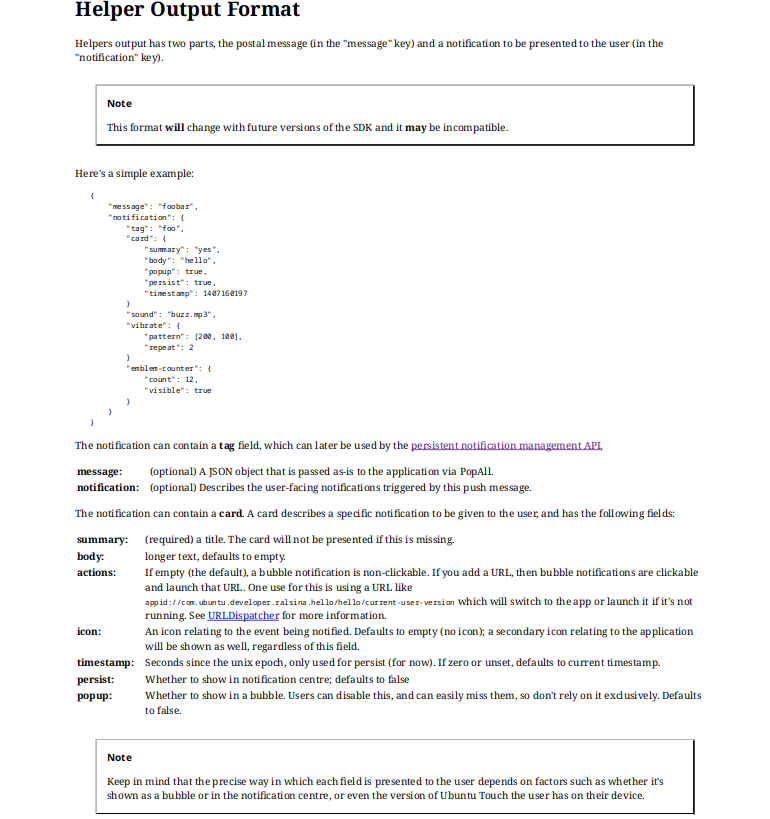
here is an exemple use from Dekko source code:
QJsonObject NotificationWatcher::buildSummaryMessage(const QString &msg) {


    QString appDir = QCoreApplication::applicationDirPath();
    appDir.replace(QRegExp("dekko2.dekkoproject/.*"), "dekko2.dekkoproject/current/");
    QString icon = QString("file://").append(appDir).append("dekko.png");

    QJsonObject c;
    c["summary"] = msg;
    c["popup"] = true;
    c["persist"] = true;
    c["icon"] = icon;
    QJsonArray actions = QJsonArray();
    QString actionUri = QStringLiteral("appid://dekko2.dekkoproject/dekko/current-user-version");
    actions.append(actionUri);
    c["actions"] = actions;

    QJsonObject notification;
    notification["card"] = c;
    notification["sound"] = true;
    notification["vibrate"] = vibrate();
    QJsonObject message;
    message["notification"] = notification;
    return message;
}
what is important is that Dekko does everything 'right' to allow for the system to activate it when clicking (pressing) the bubble notification. There is nothing that Dekko is purposely NOT doing to disable this capability that is said to be possible in plain english in the doco:
If you add a URL, then bubble notifications are clickable and launch that URL.so it can be considered like a bug, yes. I'm changing my point of view here. Per the doc, it was designed to work like you want it to work, but obviously it don't (I checked again with Dekko).
I guess that it has never worked like that though.
For apps that are using the high level Api, I don't know if it's even possible to pass an activation URI so it's possible that this capability was not really wanted as it seemed just not doable.
-
@gpatel-fr Great find!
I don't know where to search but maybe we need to inspect the code in the OS for handling the bubble.
Some time ago I had to write a service worker for browsers and I had to specifically program what it is done when a notification is clicked.
-
I guess that it has never worked like that though.
I'm not 100% sure, but AFAIR it was working like this in earlier UT-Versions (16.04, maybe 20.04)
-
interesting, unfortunately it's very unlikely that someone still running 16.04 is reading this, maybe someone running 20.04 could chime in ?
-
interesting, unfortunately it's very unlikely that someone still running 16.04 is reading this, maybe someone running 20.04 could chime in ?
I have a Nexus 5 in a drawer... that might be running 16.04... Assuming it actually turns on, which is not a given.
-
I have a Nexus 5 in a drawer... that might be running 16.04
interesting. Don't expect it to do any better in 26.04 (if it's supported one day). Notification bubbles don't work as per the doc in 26.04 either, it's not worth the bother to upgrade

-
@gpatel-fr I still have my E4.5 in fully working condition. Maybe I'll test with a spare SIM-card if the notifications are working like expected

-
@gpatel-fr would not upgrade it. Just test notifications. It is indeed 16.04 and turns on. Haven't tested yet though.
-
I found my old phone (Meizu Pro5) with 16.04. I can confirm that I can click on the bubble when I receive a new email and it opens Dekko2.
-
No click on notification bubbles, please.
I don't want to get you upset, I am not trying to convince anybody of anything, I am just trying to understand... but it seems as if I touched a sensitive issue here: why are you against click on notification bubbles? - especially since you have them disabled, then it would not affect you in any way. Or will that somehow make the OS worse / slow / etc? - as I said, I am just trying to understand. Thank you.
-
thanks for the investigation, in this case it seems indeed a regression to add to the fact that it don't conform to the spec. I'm beginning to think to create an issue on Gitlab.
-
Maybe @projectmoon and @kristatos can confirm? - @kristatos, you don't need to insert a sim, you just need to connect to wifi and then receive an email while having Dekko2 installed...
-
can confirm?
I hope that this question don't come from my musing about thinking to create an issue on Gitlab.
If I am thinking and not yet acting on it, it's not that I don't trust you, it's because I would like to take a look at the code if I see anything obvious (sometimes one get lucky) and in this case I'd not create an issue, I'd create directly a merge request. It's better to try to fix than just create yet another issue.
-
@gpatel-fr Oh, noooo, not at all, I'm not that deep or intense
I just don't trust myself. I am quite tired and confused these days. I mean I tested it with Dekko, I tested with bubbles and with notifications but maybe I missed something. Who knows?... That is why I would feel better if someone else would confirm it for 16.04 - so that it would not be my experience only. -
@gpatel-fr @mihael I've made a quick test with my Volla22 on 24.04-1.3: I set a calendar-event with notification and closed the calendar app. On the beginning of the event the notification comes up and when I tap on the bubble the calendar app starts and showed me the event. So it still seems to work for some applications on 24.04...
-
I'm sorry. I should learn again how to listen. Forgive me.
@mihael said:
why are you against click on notification bubbles? - especially since you have them disabledTrue and well spotted.
I find bubble notifications annoying (that I left clear) additional the app badges (or whatever called). Let me explain and mix.
I disabled notification bubbles but SMS ones can't be disabled (nor incoming call ones, that's understandable).
I do that because they turn on the screen (unwanted behavior for me) and I read «add tap actions». So for me is «unwanted with SMS and unwanted tap actions on top». I read now that they might be options.I already answer automatic responses when I get a call (and the phone is on my pocket).
On the desktop, as Unity does, notification bubbles are «click transparent» so you tap through them because you cannot move them.
I find it terrible if you are using an app and tap on the header and SMS bubble shows. Add a url action.
That's my point of view.
Thank you.
PS: I find a terrible idea those App badget
Notifications should be all in one place: the Notification indicator, not scattered on each app.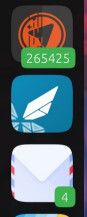
-
I just discovered that, when I receive a new text message (SMS), click on notification bubble works: it opens Messages App to that specific message.
So I don't have to dismiss the notification or wait for it to time out and then open the drop-down notifications top menu and click on the specific notification, but instead I can directly click (tap) on the notification bubble the moment I see it.
So it seems that this is a bug - that it doesn't behave like this for Dekko, Greenline, etc.
-
For calendar it works not only for tapping on the bubble, it also works if you swipe down the notification-indicator and tap on the notification. Then the calendar-app opens and shows you the event.
I think that should be the normal way and what users are expecting from the system. Otherwise you have to check from which application the notification comes from and then open the drawer search for the app and open it manually to see the whole message or whatever.



Hello! It looks like you're interested in this conversation, but you don't have an account yet.
Getting fed up of having to scroll through the same posts each visit? When you register for an account, you'll always come back to exactly where you were before, and choose to be notified of new replies (either via email, or push notification). You'll also be able to save bookmarks and upvote posts to show your appreciation to other community members.
With your input, this post could be even better 💗
Register Login