[Release] HomeSpike v1.0 — a real home screen for Ubuntu Touch (multi-page, dock, drag-to-reorder, three placement modes, true multitasking)
-
@projectmoon I'm pretty sure no

But it would be nice if this is packaged as Ambot/Jerk package so that it's easy for me to try.Personally I'm not interested with a "proper" home screen but it would be interesting to see which ones can be implemented in the app drawer. I want to see how well the icon positioning works. My solution in Lomiri Plus isn't polished

-
@Linus67 that's fair, and that's the point, this is for the people who do want it. The whole value of open source is choice: you run it how you like, I run it how I like. Up to now everyone was locked into one default that a lot of newcomers find confusing, especially coming from Android or iPhone. This is for those folks.
I don't really need to justify it, but a concrete example: my wife flat-out refused to use UT. The iOS style layout is for her. Something like this is exactly what gets non technical people to adopt it. Back when UT first launched I bought a Nexus 4 and 7 to run it, and the UI lost me inside a month, I went back to an iPhone. So I get being opinionated about your setup. This clearly isn't for you, and that's completely fine. It's an option, not a replacement. -
@Zer0
Absolutely no one will ever stick with Ubuntu Touch because it works similarly to an iPhone or Android device.
These people are also abandoning GrapheneOS even though it’s very similar to Android or iPhone.
To stick with Ubuntu Touch, it’s not enough to simply switch operating systems. It’s similar to Linux. So we should focus on the 5% of Linux users.
There are iPhone and Android people, Illy, Lavazza, BMW, and Porsche people. Today this, tomorrow that... Those aren’t real changes.
The only thing you can change in life is your mindset; the physical aspects will inevitably follow. Isn’t that exactly how it is? -
@Zer0 Nice iniciative, to me there is some nice ideas in your effort, will try in a spare phone in the near future. Its always good to have options, design choices should evolve and enable users to use their device as they wish.
I would suggest having your work as an unconfined click app, so you can reach more users. There are other launchers and apps that modify Lomiri so should be doable.
Thanks for your work
-
@Linus67 fair enough. im part of that 5% too and i can make UT do whatever i want. honestly i think the default ui is rough, thats why i made this. but thats just my take, not me saying everyone has to agree. its an option for people who want it. you dont and thats fine. point of UT is we each set it up how we like.
-
@brenno.almeida Hey I'd appreciate the feedback!
-

@Zer0 I installed HomeSpike v1.0 on a Pixel 3a running 24.04-1.3 rc. My respect for the work, but there’s still a lot to do before it works really well. As an app in the OpenStore—perfect!
I still find it to be a bit of an overlap in user interface concepts. The launcher already covers 90% of standard daily use. I think a moderate restructuring of the existing app drawer would make more sense. -
@Linus67 hey thanks for the feedback. i just added a system setting menu where you can turn it on and off. I just did some reading on how to get this ready for open store so that will be coming soon. also did some bug fix. v2 will have this fearure along with widgets and folders i hope. lol
-
@Zer0 Turning it on and off or using it as an app sounds great. A lot of people will love it.
I have a Pixel 3a as a test device. Moving apps around is a bit clunky. A video would be the best way to explain this. I had a bit of trouble installing V1. Is version 2 available yet?
How can I update it? -
@Zer0 I'm sure you're familiar with this initiative as well:
Personally, I prefer this solution. Instead of sorting strictly by alphabet, it should be possible to create custom categories.
- Communication
- Development
- Tools
- News
- Education
- Games
- Favorites (fixiert) Like the iphon allway visible bar.
- A way to pin a Favorites category (at the top or bottom)
And if anyone wants it, a toggle (App Drawer as Home Screen always on)
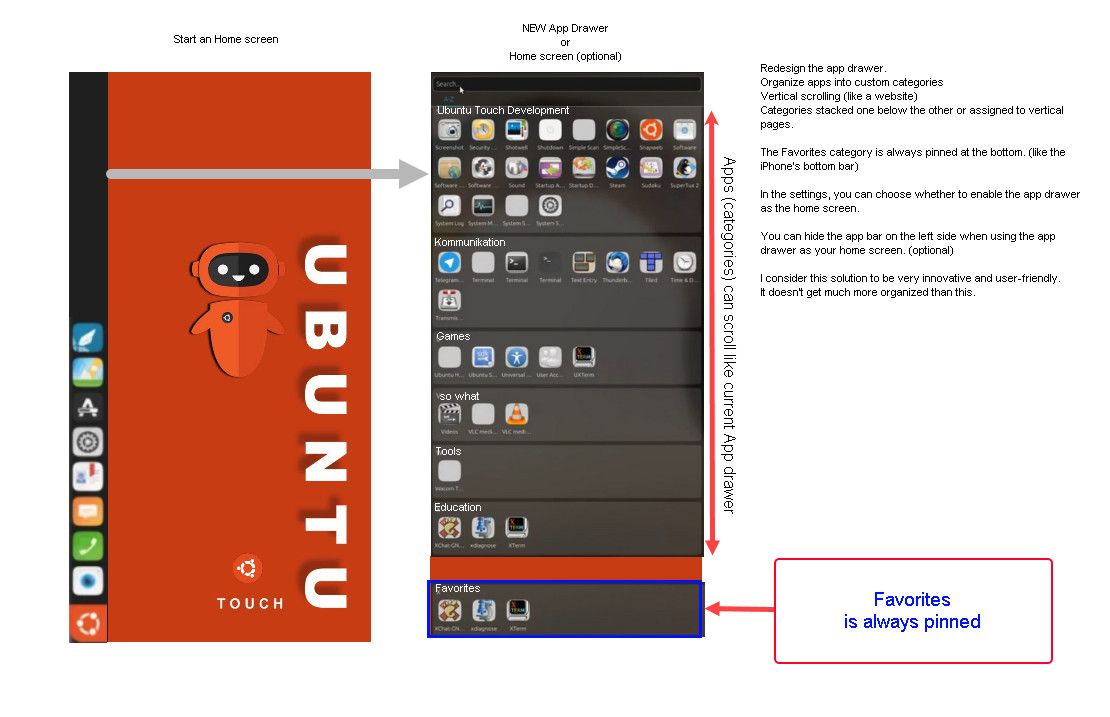
-
@Linus67 nope. I haven't seen that
-
The current user interface design of UT is very good.
It is.
But if you hang in there since a long time, what @zer0 try to achieve is a long demand from some part of UT users.
And "home apps" like Launcher Modular or Home, got lot of downloads (xenial versions disappeared but had thousands).So it is very good, but that doesn't mean adding possibilities for people who want more personalization is not a good way to make UI better for some people.
-
@Keneda Please excuse me, but I’ve only been using Ubuntu Touch for about 4 or 5 months. So I’m still pretty new to it. I studied mechanical engineering—I’m not a Smartphone software engineer.
Anyway, my daughter wants to keep HomeSpike on her Pixel 3a (which is also the device I use for experiments).
-
@Linus67 your welcome.
-

-
@arubislander HomeSpike doesn't actually change app lifecycle. It's loaded inside the Lomiri shell process as the wallpaper layer (z=-2 in Stage.qml), not a separate app. Lomiri still suspends/resumes background apps by its own existing rules. any apps that are not declared background services will still "sleep" in the background.
-


-
@Zer0 Then I don't understand what the section I quoted is actually saying.
-
Just installed this, giving it a try, so far, so good!
-
@Zer0 I follow the development and communication on GitLab. Collaboration and respect among open-source developers should be better. That would also lead to better solutions.
I’ve been trying to develop my own custom app drawer, which is also useful as a home screen. I’d like to share the result. Maybe it will inspire someone with more expertise in QML and software development.
I used the Show Desktop app by @mateo_salta as inspiration. Show Desktop OpenStore
I use the transparent area to display an app drawer as a home screen.
There is a fixed category at the bottom called “Quick Start” (similar to the Bottom Dock).
And the rest of the area is filled with the base category “Unsorted.” This contains all installed apps, just like in the app drawer.It is now possible to create new categories and move and sort apps between categories.
It’s a wonderful way to design your own tidy app drawer that also works as a home screen.See Screenrecording: screen recording
Unfortunately, I wasn't able to automatically import the installed apps into the “Uncategorized” category. I had to hardcode the launch commands into the code.
I also couldn't use app icons, which is why it's “Text Only.”
But I think with your skills (see Spike V1), you can create a perfectly organized app drawer as your home screen.
Hello! It looks like you're interested in this conversation, but you don't have an account yet.
Getting fed up of having to scroll through the same posts each visit? When you register for an account, you'll always come back to exactly where you were before, and choose to be notified of new replies (either via email, or push notification). You'll also be able to save bookmarks and upvote posts to show your appreciation to other community members.
With your input, this post could be even better 💗
Register Login

