Ubuntu Touch on Sony Xperia X
-
Now that the port has reached a certain state I'd like to present the status of this project to a wider audience,
Current status:
- Full AppArmor support
- Adequate Mir performance
- Full ofono/rild support
- Passing most hybris tests
Known issues:
Unable to enumerate rotation status and updatesCalling doesn't workAudio doesn't workCamera doesn't workClick package support incomplete
The full build instructions are available on the Halium project management issue page.
Halium port project management, HAL port specific issues:
https://github.com/Halium/projectmanagement/issues/98For a list of my contributions to Ubuntu Touch visit: https://fredl.me
If you have enjoyed my work on Ubuntu Touch over the years, please donate to my causes:
- PayPal: https://paypal.me/beidl
- Liberapay: https://liberapay.com/fredldotme
-
Wow that's a great achievement, when can i expect a daily use image.
-
You can try to build the image and see for yourself.

Currently I'm trying to get the audio working, I'd probably need
some help figuring out which component of Unity8 is responsible for
setting a global rotation lock and acting according to user preferences.
AFAICT getting the camera to work now requires at least a rebuild of ubuntu-touch
specific qt platform changes. -
Sorry sir i would love to, but i got no knowledge of programming or coding.
-
Sir any progress
-
Progress update: I managed to get Bluetooth working, currently investigating ways on how to enable audio support.
Out-of-the-box ALSA-only audio seems to be further away than anticipated.
If anyone with a Sony Xperia X (single- or dual-SIM) would like to help, contributions are welcome. -
Status update:
Device sensors like the orientation sensor as well as GPS location should now work.
Also, due to recent changes in the rootfs itself it should be possible to boot Ubuntu Touch (xenial-edge) using the Halium 7.1 based device HAL.
Merging all required changes to the device-specific repo manifest back into Halium is pending, so if anyone is interested in helping it's necessary to sync the repositories from my GitHub.
EDIT: Pushing most current state will be done as soon as I'm not on a metered internet connection.
EDIT: 2018-10-27:repowerdissue fixedRemaining graphical issues:
repowerdSIGSEGV (SIGILL under gdb)- Fix
unity-system-compositorarmhf builds to run on arm64 kernels
Remaining issues related to media support, specifically:
- Audio (calling is untested)
- Video decoding
- Camera (incl. video encoding)
-
repowerd SIGSEGV (SIGILL under gdb)
You can type
continueto keep running after a SIGILL in GDB. It seems pretty common for Hybris software to throw those. -
@unisuperbox It's openssl I think, which is probing for features and traps SIGILL, but when running under gdb, it pops up. So yeah, probably should tell gdb to ignore SIGILL, to be able to run anything under it.
-
I've assembled an image for those who are interested in testing and contributing to Ubuntu Touch.
Downloads:
Current: https://drive.google.com/open?id=1a3JtU2TIFg7E53z2pHoveOtOj7LYxJyW
~~https://drive.google.com/open?id=1Pmp3sfOs3g5mAb4_W4780-pX4KPliy2F~~
~~https://drive.google.com/open?id=1ZmdXFDPDCDkYmVnHC1uf2dYZ8MH6bxwK~~
~~https://drive.google.com/open?id=1Ql84ucDlatauuXpqBU-k-jKzdqotYAaB~~
~~https://drive.google.com/open?id=1OJjTosp7jFaYhEYYkB9Mxf3lA0HPIXY6~~Instructions (tested on Ubuntu 18.04):
- Linux PC with adb and fastboot properly set up
- Recent UBPorts rootfs image from the
edgedevel channel(tested with build #88):
https://ci.ubports.com/job/xenial-rootfs-armhf/lastSuccessfulBuild/artifact/out/ubports-touch.rootfs-xenial-armhf.tar.gz - TWRP Recovery (tested with version 3.2.3-0)
- Android 7.1 (Kernel 4.4) Loire OEM binaries
- Flash script: halium-install
After successfully flashing the recovery image the OEM binaries need to be flashed onto the oem partition:
unzip SW_binaries_for_Xperia_AOSP_N_MR1_5.7_r1_v08_loire.zip
fastboot flash oem SW_binaries_for_Xperia_AOSP_N_MR1_5.7_r1_v08_loire.img
System images:
./halium-install -p ut ubports-touch.rootfs-xenial-armhf.tar.gz system.img
adb reboot bootloader
fastboot flash boot halium-boot.img
fastboot reboot
Post-installation steps
Either make sure to properly set up the USB-Ethernet connection OR enter the commands in the Terminal app.
USB Ethernet:
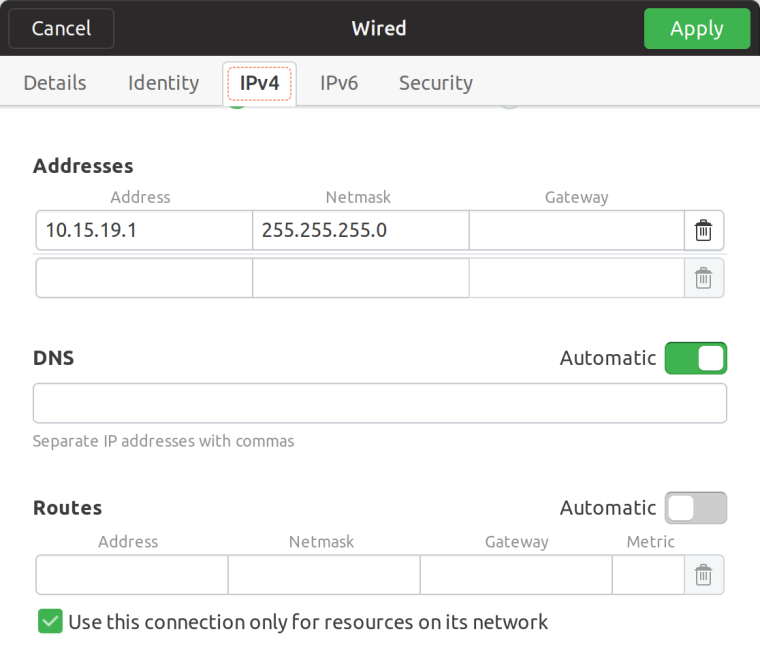
SSH shell connection:
ssh phablet@10.15.19.82Enable audio in calls
# Mount rootfs read-write sudo mount -o remount,rw / # Install updated packages # When asked to override maintainer files just answer with Y sudo ubports-qa install xenial_-_haliumfixup sudo apt install pulseaudio-modules-droid-24 pulseaudio-modules-droid-glue-24 # Mount rootfs read-only and reboot sync && sudo mount -o remount,ro / && sudo reboot -
Thank you sir, i will try to flush ubuntu touch on my xperia x as soon as my broken screen is fixed.
Sir can you help me with link to buy original screen for xperia x. If we are allowed to share such information on this forum. -
@beidl First of all, thanks a lot for trying to port Ubuntu Touch to Xperia X.
I'm trying to follow your guide, but I'm getting stuck at halium-install.
It wants:adb: error: failed to copy '.halium-install-imgs.yk2k5/rootfs.img' to '/data/rootfs.img': remote couldn't create file: Permission denied .halium-install-imgs.yk2k5/rootfs.img: 0 files pushed. 154.0 MB/s (2817704 bytes in 0.017s) adb: error: failed to copy '.halium-install-imgs.yk2k5/system.img' to '/data/system.img': remote couldn't create file: Permission denied .halium-install-imgs.yk2k5/system.img: 0 files pushed. 116.0 MB/s (2686648 bytes in 0.022s)My Xperia's current status is that I've flashed twrp and the oem binaries via fastboot.
The phone is on Android 8.0, and not rooted.
Any idea what could be wrong? -
@gmelchett Have you tried wiping data, cache and system partitions? Make sure to create a backup before wiping those partitions and flashing the Ubuntu Touch port.
-
@beidl Thanks for a quick reply. No, I didn't wipe data, cache and system partitions.
I've done that now from twrp, but there seems to be no mobile-side adb running when in twrp. And because I did wiping system, I have no Android to boot.
Any idea how to progress? -
@gmelchett could be you're missing udev rules on your Linux host to establish an adb connection. If you're on Ubuntu 18.04 you could try the following command:
sudo apt install android-sdk-platform-tools-commonElse I could publish a much bigger version of the udev rules file in a GitHub gist.
EDIT: on the other hand, adb wouldn't even be able to respond with a "permission denied" error in case the device-side adb daemon wasn't up and running.
-
@beidl adb was running just fine when I tried halium-install before wiping system + data + cache. I tested with adb shell. (Then I couldn't even ls /data without getting permission denied.) On second though, why is halium-install pushing files to /data and not
/storage/0/emulated (or what the "internal sd" card path's is.)?A wild guess is that the system.img that halium-install creates is the provided system.img + the .tar.gz file. Maybe that could be fastboot flash'ed into system? But then, where would rootfs.img go? Hmm.
I don't know android's file system layout good enough. Have to do some reading up.
-
Success at last! It is apparently very import to unlock at "latest android". I unlocked at Android 6.
I installed twrp like this:sudo fastboot flash boot boot.imgIt will then always boot into twrp, but I didn't manage to flashing it to the recovery area to work.
Once booted into twrp, I had to format system, data & cache since the phone got encrypted by default.Btw, ip configurtion from console:
sudo ip addr add 10.15.19.1/24 dev -your device-For those of us that don't have a fancy GUI to help you with.
ubports on xperia x feels a bit sluggish compared to the nexus 5. A look at top, shows that unity8 consumes quite a lot of cpu when doing some ui interaction. I suspect no hw acceleration enabled?
edit: Some language corrections.
-
I've been playing around from time to time with Ubuntu Touch on the Xperia X. Over all it works very well, but a few things that are not really working (and not mentioned not to work above):
- Vibrator
- GPS
- Of the sensors, only accelerometer works
- A fully charged battery is reported to be at 67%.
- After pressing the power, it takes a few seconds before I can unlock it. Maybe related to the lack of graphic hw acceleration?
-
@beidl Sir any update on ut on xperia X
-
Hi any progress...



Hello! It looks like you're interested in this conversation, but you don't have an account yet.
Getting fed up of having to scroll through the same posts each visit? When you register for an account, you'll always come back to exactly where you were before, and choose to be notified of new replies (either via email, or push notification). You'll also be able to save bookmarks and upvote posts to show your appreciation to other community members.
With your input, this post could be even better 💗
註冊 登入