Send Some: File Manager Icon Set Love
-
Aaaand the time is up.
Thank you all indeed for joining this first experiment.@3arn0wl I see your proposal as interesting but maybe in the information side. Maybe System-Settings > About > Storage
i could work there.@mateo_salta I think the way to go with the icon set is feeding from upstream Suru project. You gave here a little twist with the colors. Conservative but effective

Follow up next: The Content Hub
-
@cibersheep sorry I'm late :*(, I'll upload my work this afternoon but it's quite similar to @mateo_salta 's one
-
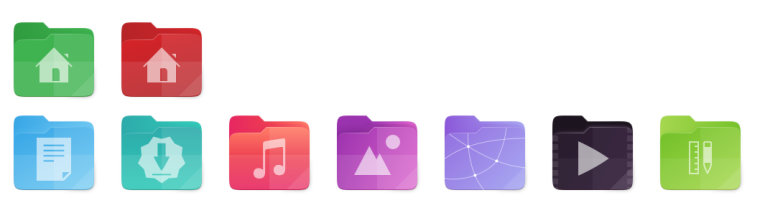
here is it! I took quite everything from suru-icon-theme. the video image could be not visible with SuruDark, but this was the color from video mimetype. in the music and models/templates I experimented a bit more with gradients making the back part of the folder more different from the near front part, a bit of contrast in addition... -
@mymike also I'm not very sure about the right and bottom folds, not originally present in the folder icon, but took from mimrtypes
-
@mymike Very nice (you're late) I like the colors but not the folds. Good job (even you're late
 :D)
:D) -
@cibersheep
This is even later - well! you can't expect creatives to keep to deadlines!
A couple of ideas for a new desktop icon based on Suru:


And the suggestion that the app just be called "Files", rather than the more cumbersome "File Manager".
Also, I was wondering where the images came from on the documents themselves? And whether there were alternatives? The videos one is very orange...
-
@3arn0wl Ha ha ha... nicely played with deadelines
I like that icon.
About the name, actually in the desktop is called Files. -
@cibersheep
Hmmm - I took the File shape from the Suru link that @mateo_salta gave, but I've noticed subsequently that it's different to the one in his images. I wonder where he got them from?
Also, I quite like the idea that Files itself is "coloured" white - white being the combination of the whole spectrum - but it's a difficult hue to work with! Maybe it could have a folded background with a spectrum of colours? But then again, that might be too much... A monochrome Icon seems the other extreme though - just dull.

(Apologies for my artwork not being up to snuff - I'm just trying to give an idea)
-
@3arn0wl There's a pattern and it's to use whitish icon on greyish background for core system app:
- System Settings (nearly)
- File Manager
- Ciborium
- Terminal
- Clock
- Calendar
- OpenStore
and I kinda like it
-
Something like this:

Or perhaps this:



Hello! It looks like you're interested in this conversation, but you don't have an account yet.
Getting fed up of having to scroll through the same posts each visit? When you register for an account, you'll always come back to exactly where you were before, and choose to be notified of new replies (either via email, or push notification). You'll also be able to save bookmarks and upvote posts to show your appreciation to other community members.
With your input, this post could be even better 💗
Register Login