[Guide] Run clickable on macOS
-
I wanted to use my MacBook Air to develop Ubuntu Touch apps. After a lot of trial and error I've got clickable working. So here's is a guide on how to set up clickable for macOS.
Install Homebrew
First off, you'll need to install Homebrew with this command:/bin/bash -c "$(curl -fsSL https://raw.githubusercontent.com/Homebrew/install/master/install.sh)"Dependencies
After installing Homebrew you'll need to installpip3,adbanddockerwith the following commands (open the macOS terminal):brew install python3brew cask install android-platform-toolsbrew cask install dockerAfter installing Docker, open the Docker application (via Launchpad or by pressing Command + Space and searching for it with spotlight). Click OK in the Docker needs privileged access dialog and enter your user password. A whale icon will appear in the status menu and the symbolic links for
docker,docker-compose,docker-credential-osxkeychainanddocker-machineare created in/usr/local/bin. Confirm that docker is running, by clicking the icon in the status menu. If it says Docker Desktop is running you're ready to test out clickable! :party_popper:Run clickable
Open the macOS terminal app andcdinto the directory you want to store and build your app. Run the commandclickable initto create a new app project.cdinto your app project folder. Runclickableto build your app and push it to your Ubuntu Touch device through adb!Clickable desktop
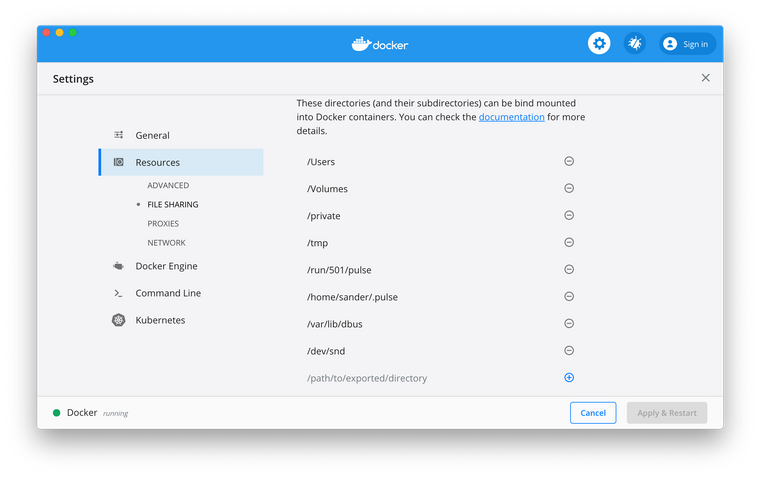
clickable desktopis not working. I've installed XQuartz but I get the following error:Successfully built package in './test.sanderklootwijk_1.0.0_all.click'. non-network local connections being added to access control list Mounting device home to /Users/sander/.clickable/home docker: Error response from daemon: Mounts denied: The paths /dev/snd and /var/lib/dbus and /run/501/pulse and /home/sander/.pulse are not shared from OS X and are not known to Docker. You can configure shared paths from Docker -> Preferences... -> File Sharing. See https://docs.docker.com/docker-for-mac/osxfs/#namespaces for more info. . ERRO[0000] error waiting for container: context canceled Command exited with non-zero exit status 125, see above for details. This is most likely not a problem with Clickable.Atom
Atom with the language-qml and atom-build-clickable packages, works great for developing Ubuntu Touch apps on macOS. Get the Atom text editor here and install language-qml and atom-build-clickable (Atom > preferences > install). -
For some reason I can't update the post above. But before you're able to run clickable, you'll need to install it of course. I forgot this step in the guide :grinning_face_with_sweat:
Install clickable with the following command:
pip3 install git+https://gitlab.com/clickable/clickable.gitNow you'll be able to run clickable!
-
Great work Sander!
Just curious though, what happens when you configure the folders mentioned in the error message to be shareable to the container in the the docker preferences?
-
@arubislander I think it has something to do with pulseaudio (which is not installed by default on macOS). You can install it with homebrew:
brew install pulseaudioI've tried to add the paths to Docker, but I get exactly the same error.
-
another solution is to use limavm with ubuntu instance , then install docker on it


Hello! It looks like you're interested in this conversation, but you don't have an account yet.
Getting fed up of having to scroll through the same posts each visit? When you register for an account, you'll always come back to exactly where you were before, and choose to be notified of new replies (either via email, or push notification). You'll also be able to save bookmarks and upvote posts to show your appreciation to other community members.
With your input, this post could be even better 💗
Register Login