Introducing Miroil
-
Running some clients
I've been doing some experimentation with the setup above.
Firstly, I had to revise the QtMir commandline to make it possible to connect
mirclientbased clients:MIR_SERVER_ENABLE_MIRCLIENT= MIR_SERVER_CURSOR=null QT_QPA_PLATFORM=mirserver qmlscene qml-demo-shell/qml-demo-shell.qmlAfter this I could connect, for example the "egltriangle" example:
~$ mir_demo_client_egltriangle --desktop_file_hint=/usr/share/applications/thunderbird.desktop
Window is on output 1: 96 DPI, scale 1.0x, monitor form factor, 60.00Hz
Window exposed
I also found that I could (somewhat surprisingly) connect s/w rendered Wayland clients:
$ mir_demo_client_wayland --desktop_file_hint=/usr/share/applications/thunderbird.desktop
Got geometry: (338mm × 245mm)@(0, 0)
Got mode: 1280×930@60000 (flags: 3)
Output scale: 1
Output events done
^CSignal 2 received. Good night.
(The
--desktop_file_hint...argument is something that QtMir consumes - it just has to point at a.desktopfile that exists on the system.)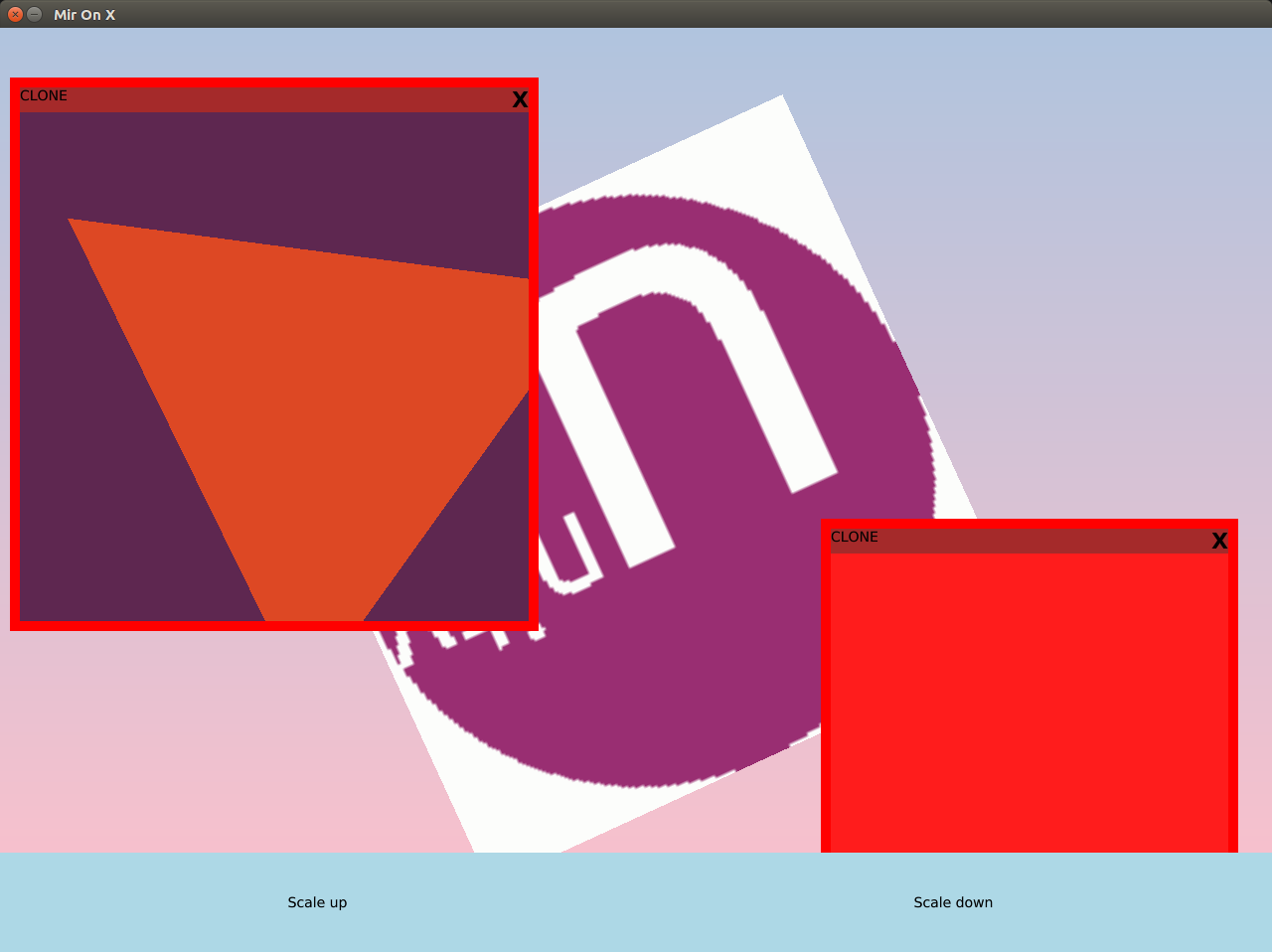
Sadly, EGL based Wayland clients crash the server:
$ mir_demo_client_wayland_egl_spinner --desktop_file_hint=/usr/share/applications/thunderbird.desktop
~~~
qtmir.surfaces: MirSurface[0x214cc80,"thunderbird"]::registerView(35079680) after=1
qtmir.surfaces: MirSurface[0x214cc80,"thunderbird"]::setReady()
qtmir.applications: Application["thunderbird"]::setInternalState(state=Running)
qtmir.surfaces: MirSurface[0x214cc80,"thunderbird"]::updateExposure(true)
terminate called after throwing an instance of 'std::logic_error'
  what():  Buffer does not support GL rendering
Aborted (core dumped)
I'm going to try a couple of other QtMir branches to see if I can get a more stable starting point.
NB: So far, I've not made any changes to QtMir, I've just shown how to build Mir and QtMir locally and run one against the other.
branch what works what doesn't xenialmirclient and s/w wayland egl wayland xenial_-_edge_-_waylandmirclient and egl wayland s/w wayland xenial_-_edge_-_wayland_-_mir18mirclient and s/w wayland and egl wayland (none) That's reason enough to base this work on
xenial_-_edge_-_wayland_-_mir18, I'll update themiroilbranch accordingly. -
@alan_g said in Introducing Miroil:
NB: So far, I've not made any changes to QtMir, I've just shown how to build Mir and QtMir locally and run one against the other.
I've now made one change. Using
miroil::GLBufferin QtMir in place of the original version from QtMir. But that's all I'll achieve today. (PRs welcome!) -
At building QtMir I run into
/home/miroil/qtmir/src/modules/Unity/Application/mirbuffersgtexture.h:20:30: fatal error: miroil/mirbuffer.h: No such file or directorythe file is installed at
/usr/local/include/miroil/miroil/mirbuffer.h. It looks like there is onemiroiltoo much in there. Or is GCC supposed to find it in a sub folder? -
@jonius I don't have access to my test system just now, but:
pkg-config --cflags miroilShould return
-I/usr/include/miroil(amongst others), and that should be picked up bycmakewhen run in the QtMir directory. -
@alan_g
pkg-configlists the include dir correctly (/usr/local/include/miroil). I also printed the include dirs in CMake and the directory was there. Running make withVERBOSE=1shows that it does not get passed to the compiler for some reason:cd /home/miroil/qtmir/cmake-build-debug/tests/modules/SurfaceManager && /usr/bin/c++ -DGTEST_VERSION_MAJOR=1 -DGTEST_VERSION_MINOR=7 -DGTEST_VERSION_PATCH=0 -DQT_CORE_LIB -DQT_DBUS_LIB -DQT_DISABLE_DEPRECATED_BEFORE=0x050900 -DQT_GUI_LIB -DQT_NETWORK_LIB -DQT_NO_DEBUG -DQT_NO_KEYWORDS -DQT_QML_LIB -DQT_QUICK_LIB -DQT_SENSORS_LIB -DQT_TESTCASE_BUILDDIR=\"/home/miroil/qtmir/cmake-build-debug\" -DQT_TESTLIB_LIB -DQT_USE_QSTRINGBUILDER -DQT_USING_OPENGL -I/home/miroil/qtmir/cmake-build-debug/tests/modules/SurfaceManager -I/home/miroil/qtmir/tests/modules/SurfaceManager -isystem /usr/include/x86_64-linux-gnu/qt5/QtCore -isystem /usr/include/x86_64-linux-gnu/qt5 -isystem /usr/include/libdrm -I/home/miroil/qtmir/tests/include -I/home/miroil/qtmir/src/common -I/home/miroil/qtmir/src/platforms/mirserver -I/home/miroil/qtmir/src/modules -I/home/miroil/qtmir/tests/framework -isystem /usr/local/include/miral -isystem /usr/local/include/mirclient -isystem /usr/local/include/mircookie -isystem /usr/local/include/mircore -isystem /usr/local/include/mirtest -isystem /usr/local/include/mirserver -isystem /usr/local/include/mirplatform -isystem /usr/local/include/mircommon -isystem /usr/local/include/mirrenderer -isystem /usr/include/uuid -isystem /usr/lib/x86_64-linux-gnu/qt5/mkspecs/linux-g++ -isystem /usr/include/x86_64-linux-gnu/qt5/QtDBus -isystem /usr/include/x86_64-linux-gnu/qt5/QtQml -isystem /usr/include/x86_64-linux-gnu/qt5/QtNetwork -isystem /usr/include/x86_64-linux-gnu/qt5/QtQuick -isystem /usr/include/x86_64-linux-gnu/qt5/QtGui -isystem /usr/include/x86_64-linux-gnu/qt5/QtFontDatabaseSupport/5.12.9 -isystem /usr/include/x86_64-linux-gnu/qt5/QtThemeSupport/5.12.9 -isystem /usr/include/x86_64-linux-gnu/qt5/QtEventDispatcherSupport/5.12.9 -isystem /usr/include/x86_64-linux-gnu/qt5/QtEglSupport/5.12.9 -isystem /usr/include/x86_64-linux-gnu/qt5/QtServiceSupport/5.12.9 -isystem /usr/include/x86_64-linux-gnu/qt5/QtSensors -isystem /usr/include/x86_64-linux-gnu/qt5/QtTest -fPIC -Wall -fno-strict-aliasing -Werror -Wextra -O2 -g -DNDEBUG -fPIC -DQT_GUI_LIB -DQT_CORE_LIB -std=gnu++14 -o CMakeFiles/surfacemanager_test.dir/surface_manager_test.cpp.o -c /home/miroil/qtmir/tests/modules/SurfaceManager/surface_manager_test.cpp -
I can workaround the issue by adding the include directories to the target directly (see Commit). Weird issue...
-
-
@jonius Not sure why you're seeing different things. Maybe something with the graphics setup in your VM?
Can you run the mir examples? For example:
$ mir-smoke-test-runner
...
I: Smoke testing complete with returncode 0
If that also shows problems, this solution might help (depending on your choice of VM):
https://discourse.ubuntu.com/t/problems-running-electron-app-in-mir-kiosk-on-kvm/16196/6
-
@alan_g said in Introducing Miroil:
mir-smoke-test-runner
I: The following clients failed to execute successfully:
I:     mir_demo_client_prerendered_frames
I:     mir_demo_client_animated_cursor
I:     mir_demo_client_render_surface
I:     mir_demo_client_basic
I:     mir_demo_client_flicker
I:     mir_demo_client_fingerpaint
I:     mir_demo_client_release_at_exit
I:     mir_demo_client_eglstateswitcher
I:     mir_demo_client_wayland
I:     mir_demo_client_target
I:     mir_demo_client_tooltip
I:     mir_demo_client_eglsquare
I:     mir_demo_client_cursors
I:     mir_demo_client_egldiamond_render_surface
I:     mir_demo_client_egltriangle
I:     mir_demo_client_chain_jumping_buffers
I:     mir_demo_client_touch_validator
I:     mir_demo_client_wayland_egl_spinner
I:     mir_demo_client_progressbar
I:     mir_demo_client_camera
I:     mir_demo_client_prompt_session
I:     mir_demo_client_multiwin
I:     mir_demo_client_scroll
I:     mir_demo_client_display_config
I:     mir_demo_client_screencast
I:     mir_demo_client_eglcounter
I:     mir_demo_client_multistream
I:     mir_demo_client_input_shapes
I:     mir_demo_client_eglplasma
I:     mir_demo_client_eglflash
I:     mir_demo_client_pointer_confinement
I: Smoke testing complete with returncode -1
I am using VirtualBox. I am not sure how to apply the suggestions in the link. Which VM solution would you suggest? Otherwise I'll install the system again on a separate partition without VM.
-
@jonius I don't have VirtualBox to hand to give detailed instructions. But it should work if you enable "the right" graphics options. Not sure what it's called. Something like 'passthrough' or '3D' maybe?
-
@alan_g
I was hit by this bug. Now with 3D acceleration enabled most of the smoke tests succeed. Onlymir_demo_client_eglplasmastill failes. And the unit test I mentioned above continues to fail as well. Will test on separate installation without VM this weekend.MIR_SERVER_CURSOR=null QT_QPA_PLATFORM=mirserver qmlscene qml-demo-shell/qml-demo-shell.qmlworks partially. The circle rotates, but the mouse cursor is not visible and clicking the scale buttons results infile:///home/miroil/qtmir/demos/qml-demo-shell/qml-demo-shell.qml:28: Error: Unknown method parameter type: FormFactor. -
@jonius said in Introducing Miroil:
the mouse cursor is not visible
That's sort of expected. I disabled the cursor in Mir because QtMir tries to set a zero sized image instead of hiding it. And Mir treats that as an error.
I've not looked at how it works for Lomiri. I suspect it renders its own cursor.
-
@alan_g installed Ubuntu 16.04 on my notebook directly via Ubuntu Touch (ISODrive is a great tool). Unfortunately the situation here is worse than in my VM on an Ubuntu 20.04 host. I guess the outdated
amdgpufor my Radeon Vega 8 Graphics in Ubuntu 16.04 is to blame. The demo runs like in the VM, the same unit test fails, but many smoke tests fail:I: mir_demo_client_camera I: mir_demo_client_tooltip I: mir_demo_client_eglsquare I: mir_demo_client_eglplasma I: mir_demo_client_eglstateswitcher I: mir_demo_client_target I: mir_demo_client_scroll I: mir_demo_client_cursors I: mir_demo_client_egltriangle I: mir_demo_client_egldiamond_render_surface I: mir_demo_client_display_config I: mir_demo_client_eglcounter I: mir_demo_client_touch_validator I: mir_demo_client_animated_cursor I: mir_demo_client_pointer_confinement I: mir_demo_client_input_shapes I: mir_demo_client_eglflashSo I guess best is to switch back to my VM? Is the failing tests something I could ignore for now?
-
@jonius said in Introducing Miroil:
Is the failing tests something I could ignore for now?
Of course. It will get annoying, but if you know you didn't break the code...
You've clearly got enough working to try stuff out.
-
Hey folks,
I can make this slightly easier with a few handy env vars.@alan_g said in Introducing Miroil:
sudo ln -s /usr/local/lib/qt5/plugins/platforms/libqpa-mirserver.so /usr/lib/x86_64-linux-gnu/qt5/plugins/platforms/Allows Qt to find the platform.
You can avoid this soft link by setting this env var instead:
export QT_QPA_PLATFORM_PLUGIN_PATH=/usr/local/lib/qt5/plugins/platforms@alan_g said in Introducing Miroil:
So Let's make that easier to find too:
sudo ln -s /usr/local/lib/qt5/qml/Unity/ /usr/lib/x86_64-linux-gnu/qt5/qml/Similarly, you can avoid the soft link again and point Qt directly to where those QML plugins live with:
export QML2_IMPORT_PATH=/usr/local/lib/qt5/qmlHope this helps
-G -
during the QtMir build with
make -j 6 all testI also had the fatal error described by @jonius :[ 87%] Building CXX object tests/mirserver/ScreensModel/CMakeFiles/ScreensModelTest.dir/screensmodel_test.cpp.o In file included from /home/aurelio/qtmir/src/modules/Unity/Application/mirsurface.h:35:0, from /home/aurelio/qtmir/tests/modules/SurfaceManager/surface_manager_test.cpp:22: /home/aurelio/qtmir/src/modules/Unity/Application/mirbuffersgtexture.h:20:30: fatal error: miroil/mirbuffer.h: Not existing file or directory compilation terminated. tests/modules/SurfaceManager/CMakeFiles/surfacemanager_test.dir/build.make:62: instruction set for the target "tests/modules/SurfaceManager/CMakeFiles/surfacemanager_test.dir/surface_manager_test.cpp.o" failed make[2]: *** [tests/modules/SurfaceManager/CMakeFiles/surfacemanager_test.dir/surface_manager_test.cpp.o] Error 1 CMakeFiles/Makefile2:2146: instruction set for the target "tests/modules/SurfaceManager/CMakeFiles/surfacemanager_test.dir/all" failed make[1]: *** [tests/modules/SurfaceManager/CMakeFiles/surfacemanager_test.dir/all] Error 2 make[1]: *** waiting incomplete process....and after that
[ 95%] Built target applicationmanager_test Makefile:138: instruction set for the target "all" failed make: *** [all] Error 2 -
@jonius can you PR your fix? It looks to tidy up the cmake code too.
-
-
@alan_g does that mean no need for a PR from my side?
-
@jonius i tried again after the
git pullbut obtain the same error



Hello! It looks like you're interested in this conversation, but you don't have an account yet.
Getting fed up of having to scroll through the same posts each visit? When you register for an account, you'll always come back to exactly where you were before, and choose to be notified of new replies (either via email, or push notification). You'll also be able to save bookmarks and upvote posts to show your appreciation to other community members.
With your input, this post could be even better 💗
Register Login