Update versiom 609 failed and Ubports installer fails
-
I have installed on my Sony Xperia X Ubuntu touch. Today under software updates a new update version 609 appeared.
I downloaded it and installed it.The install restarted the phone and the sony bootloader reported a recovery error. Thus the bootloader went back to the previous version from 21.01.21.
When I now come back to the software update menu, it still provides update version 609 as available, downloaded and ready for install.
If however I try to install it, it asks for "Restart & Installing" (german "Neustart & Installieren"), but nothing happens.
Now I have tried to install ubuntu touch with the ubports installer from scratch.
This failed with the above image, even if it worked successfully with a previous version of the bootloader before. -
I had installed on my Xperia X Sailfish X OS and managed to install with ubports installer after some time to install ubports successfully (directly without reinstalling android before). This was quite difficult and I guess I had to activate the developer mode in sailfish os before.
Today in ubports a software update failed and therefore I tried to reinstall ubports with the ubports installer and I got the message.
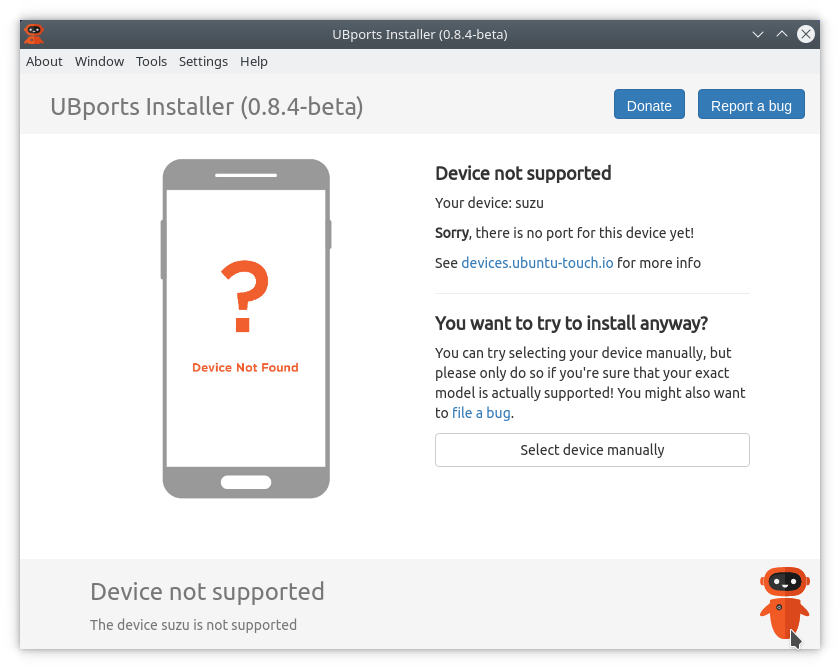
Even if I had installed it some time ago with uborts installer.
-
@mjosenhans did you not select device manually?
-
No I did not. But now it worked. It found the Xperia X device itself. I guess I had the ubports installer opened twice. I found another window in the background.
But now I have another problem.
I had to download the SW_binaries_for_Xperia_AOSP_N_MR1_5.7_r1_v08_loire.zip from Sony manually. I have checked the sha256sum from the downloaded file against the checksum provided by Sony. It was the same.
I extracted the image file from the zip file and went on with the process.
Now I get the following error message: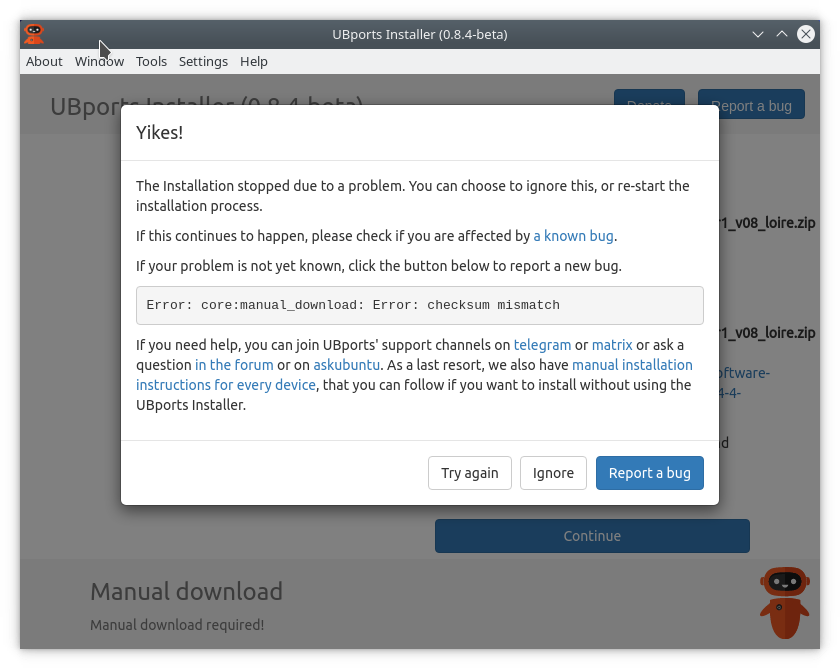
I have tried it both. With the zip file and the image file. Both provide the above result. this was with ubports-installer_0.8.4-beta_linux_x86_64.AppImage
-
As above with ubports-installer_0.8.4-beta_linux_x86_64.AppImage failed (latest version available) and I was unable to get the downloaded file SW_binaries_for_Xperia_AOSP_N_MR1_5.7_r1_v08_loire.zip / *.img accepted, I used ubports-installer_0.7.4-beta_linux_x86_64.AppImage, a previous version I still had on my computer and this worked.
After that I was able to reinstall with ubports-installer_0.8.4-beta_linux_x86_64.AppImage (latest version). This time it was not requested to manually download the image file. Installation worked.
Still there is the issue in ubports installer version 0.8.4 (ubports-installer_0.8.4-beta_linux_x86_64.AppImage) that installation of the image file failed before and why it is now working.

Hello! It looks like you're interested in this conversation, but you don't have an account yet.
Getting fed up of having to scroll through the same posts each visit? When you register for an account, you'll always come back to exactly where you were before, and choose to be notified of new replies (either via email, or push notification). You'll also be able to save bookmarks and upvote posts to show your appreciation to other community members.
With your input, this post could be even better 💗
Register Login