Dual-SIM + OTA-20 on Mi A2
-
Well, I can select the stable channel again, but nothing happens: the updater doesn't detect anything to download (even after closing and restarting the "Settings" app).
-
@phandersson Try a complete shutdown and reboot of the phone sometimes this does play up.
-
@lakotaubp Same behaviour after power cycle.
What's strange is that after switching back to the stable channel, the main "Settings" screen shows 1 update available (see screenshot below):
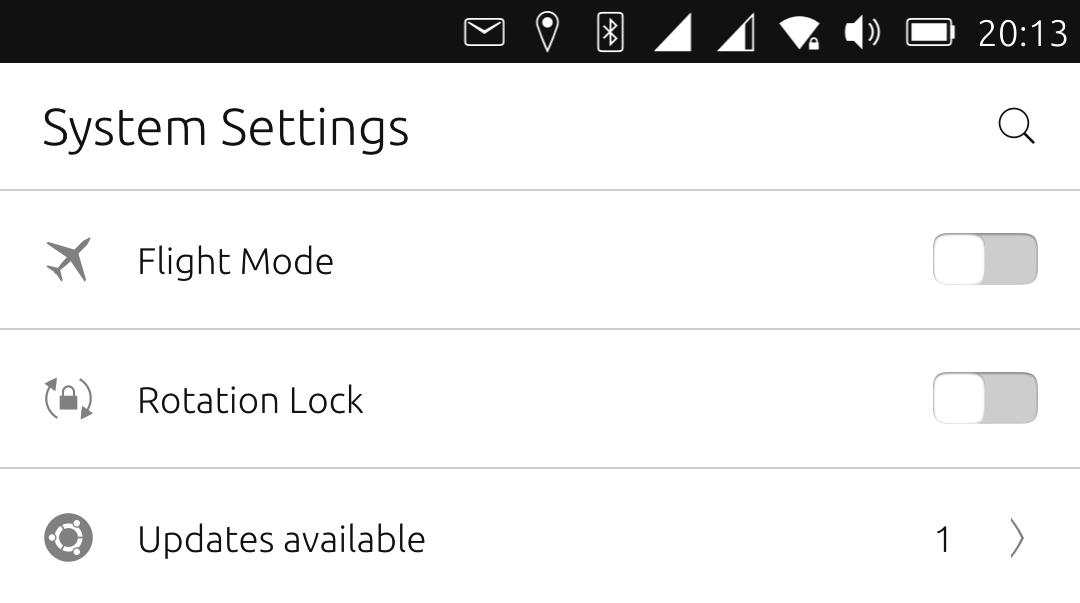
But when tapping on that line, and after "checking for updates", it still returns "Software is up to date".
-
@phandersson So you are back on stable with 2 simsworking? Might just be an overlap of updates between being onndev and going back to stable. Should be safe enough to ignore it and carry on the next stable update should remove it.
-
The update servers generally have a lot of problems if you haven't deleted old downloads. If I were them, I would always delete installed system updates. Then new updates should also go through without problems. Sometimes, however, the updates bounce back. I was told that this is an old bug and will be tackled again.
-
@lakotaubp said in Dual-SIM + OTA-20 on Mi A2:
@phandersson So you are back on stable with 2 simsworking?
The 2 SIMs are working again, yes, but I'm still on "devel" (v763), and apparently unable to get back to "stable". I can select the channel, but nothing gets downloaded.
Might just be an overlap of updates between being on dev and going back to stable. Should be safe enough to ignore it and carry on the next stable update should remove it.
You mean, switch to "stable" even if nothing happens, and wait for OTA-21 to be released? I can try. Although representing heavier work, I guess I could also re-install the phone from scratch on OTA-20 using UTI.
By the way, the problem of dual-SIM support in OTA-20 is a known bug (just found out about it):
https://github.com/ubports/ubuntu-touch/issues/1879
...and a manual fix is provided in the post by "laguna66".
-
Hi,
As I understand it, all available updates must first be done in that channel before you can switch to another channel.
Is it or isn't it?
Otherwise, an update that is not suitable for the channel will get in the way of changing the channel.Greetings Mario
-
@mario-ch Since I do this story with updates very often, you can do it as follows. Once you have finished downloading and installing an update, don't forget to remove it from your history. Then you can immediately switch to the next channel. If this fails, simply repeat the process, which may happen from time to time. Another annoyance I have noticed is that various downloads for the individual channels stop or break off at the end and start again in the middle. If the downloads don't continue, close the update and open it again. Then they actually run through. These are my experiences with Merlin.
What I would like to add to the updates. If you are using a mobile phone with low data volume, please make sure that you set the settings to Wifi only or a data connection. Some people are surprised when only the circle turns. I have read this several times now, so I would like to mention it here as another problem solution for failed updates.
-
This post is deleted! -
Status update:
As it happens, I took the opportunity of having the phone on the dev channel to re-test an application that typically froze the GUI (the app called "Steps" -- I already opened a bug report on that specific issue). Turns out the behaviour was the same on v763, so I wanted to force a power cycle by rebooting the phone on the recovery image (Power + Vol+).But instead of the recovery menu, I was greeted by the spiralling animation: the phone was clearly installing something. When it finished rebooting, I was back on OTA-20, and both SIMs were still active!
Following @DPITTI suggestion, I also removed v763 from the upgrade history.
I'll now mark this post as "resolved". Many thanks to all those who contributed.
-
P PhAndersson has marked this topic as solved on


Hello! It looks like you're interested in this conversation, but you don't have an account yet.
Getting fed up of having to scroll through the same posts each visit? When you register for an account, you'll always come back to exactly where you were before, and choose to be notified of new replies (either via email, or push notification). You'll also be able to save bookmarks and upvote posts to show your appreciation to other community members.
With your input, this post could be even better 💗
Register Login