Deploying aditional files with the application
-
I have images and some fonts I want to deploy, but I don't seem to find how to deploy them and the path to them after deployment.....
Can someone give me a hand?
The files are in in directories such as "fonts" and "icons". -
I have solved this, in case anyone hits the same brick wall:
In the .pro file, the one selected in my screenshot, I needed to specify that it should install those aditional files.
In my case I mentioned that it should install the DISTFILES, like the following:
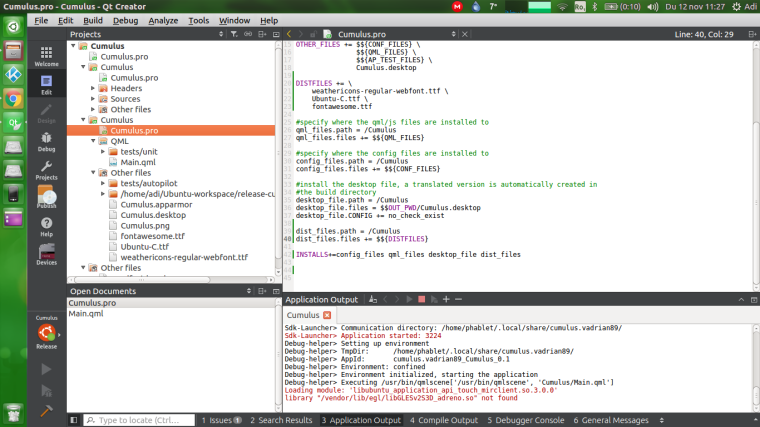
DISTFILES +=
weathericons-regular-webfont.ttf
Ubuntu-C.ttf
fontawesome.ttf#set the path where to install distfiles aswell as adding which files to be added
dist_files.path = /Cumulus
dist_files.files += $${DISTFILES}#you can see that at the the end I've mentioned that dist_files should be installed aswell
INSTALLS+=config_files qml_files desktop_file dist_filesMight seem dumb of me for not knowing, that the files should be manually set to install, but I haven't used it before since for Android Qt Creator does that for me because it has a special directory where I need to add the aditional files.
And on desktop I manually copied the files in the build directories without thinking I can tell qmake which files should also be deployed.
So in case any other has this issue might help them out.
Hello! It looks like you're interested in this conversation, but you don't have an account yet.
Getting fed up of having to scroll through the same posts each visit? When you register for an account, you'll always come back to exactly where you were before, and choose to be notified of new replies (either via email, or push notification). You'll also be able to save bookmarks and upvote posts to show your appreciation to other community members.
With your input, this post could be even better 💗
Register Login