UBports Robot Logo UBports Forum
    • Categories
    • Recent
    • Tags
    • Popular
    • Users
    • Groups
    • Search
    • Register
    • Login

    Saving files edit on nano on pinephone where ctrl is not present?

    Scheduled Pinned Locked Moved Unsolved Support
    2 Posts 2 Posters 338 Views 1 Watching
    Loading More Posts
    • Oldest to Newest
    • Newest to Oldest
    • Most Votes
    Reply
    • Reply as topic
    Log in to reply
    This topic has been deleted. Only users with topic management privileges can see it.
    • C Offline
      clacoiks
      last edited by

      Terminal nano on pinephone dont have ctrl?

      arubislanderA 1 Reply Last reply Reply Quote 0
      • arubislanderA Online
        arubislander @clacoiks
        last edited by arubislander

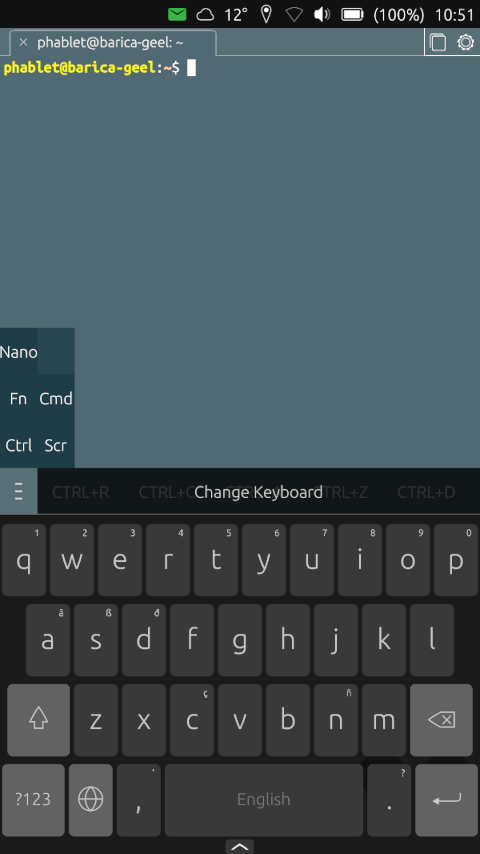
        @clacoiks tap and hold on the 'hamburger' left on the strip above the keyboard, then select Nano, you will find most of the key-combinations you need. Swipe left on the strip to reveal more options to the right.

        UTouch Keyboard extras.png

        πŸ‡¦πŸ‡Ό πŸ‡³πŸ‡± πŸ‡ΊπŸ‡Έ πŸ‡ͺπŸ‡Έ
        Happily running Ubuntu Touch
        JingPad (24.04-1.x daily)
        OnePlus Nord N10 5G (24.04-2.x daily)
        PinePhone OG (20.04)
        Meizu Pro 5 (16.04 DEV)

        1 Reply Last reply Reply Quote 2

        Hello! It looks like you're interested in this conversation, but you don't have an account yet.

        Getting fed up of having to scroll through the same posts each visit? When you register for an account, you'll always come back to exactly where you were before, and choose to be notified of new replies (either via email, or push notification). You'll also be able to save bookmarks and upvote posts to show your appreciation to other community members.

        With your input, this post could be even better πŸ’—

        Register Login
        • First post
          Last post