Foot navigation bar is masked in waydroid / Pixel 3a XL
-
Hi there,
I just installed waydroid, with waydroid helper.
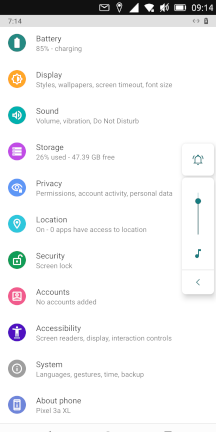
I experienced a problem with the foot navigation bar :
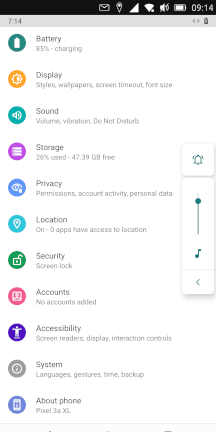
As you see, the foot navigation bar is masked. Cause, of the top UBTouch bar.
To be clear, what i'd like to have is :

Any tips ?
By the way, a giant thanks for all your works, it is irritating to live in a society that only moves in one direction.
The freedom to be able acting, in accordance with my own values, is a great thing for me. -
@spacering said in Foot navigation bar is masked in waydroid / Pixel 3a XL:
As you see, the foot navigation bar is masked. Cause, of the top UBTouch bar.
I don't think it's just masked. I think it's just not there since UT doesn't support it. I could be mistaken but I think you will still not have it even if you are running Waydroid.
-
@moem Okey !
So the best way to use WayDroid is to launch app, directly via the UBTouch App Menu ?
I I experienced this when I wanted to download, an app through WayDroid's browser.
I was unable to switch between browser and file explorer.
Thanks for the light.
-
@spacering Honestly I wouldn't know. I don't use Waydroid. But I do have the impression it's indeed meant to be used as a way to use Android apps, not a full Android OS.
-
@spacering It might be a scale thing. I vaguely remember something like that. On the Pixel 3a it is just about visable and usable. Try having a good look/search through the Waydroid section to find it.
Edit: Is this any help https://forums.ubports.com/topic/7593/pixel-3a-has-limited-access-to-lower-android-navigation-buttons
-
@lakotaubp I posted a kind of clone of this post (https://forums.ubports.com/topic/7593/pixel-3a-has-limited-access-to-lower-android-navigation-buttons)
I would have looked twice...
But anyway, thanks, it works now.
-
@lakotaubp said in Foot navigation bar is masked in waydroid / Pixel 3a XL:
It might be a scale thing. I vaguely remember something like that. On the Pixel 3a it is just about visable and usable.
Oh hey, then I was indeed mistaken!
Not the first time, and it won't be the last... -
@spacering Good your all sorted, now if you would please mark as solved https://forums.ubports.com/topic/6311/how-to-ask-a-question-and-then-mark-it-as-solved it's a great help for others.
@Moem No worries your answer kicked my brain into some sort of gear to remember it
-
S spacering marked this topic as a question on
-
S spacering has marked this topic as solved on


Hello! It looks like you're interested in this conversation, but you don't have an account yet.
Getting fed up of having to scroll through the same posts each visit? When you register for an account, you'll always come back to exactly where you were before, and choose to be notified of new replies (either via email, or push notification). You'll also be able to save bookmarks and upvote posts to show your appreciation to other community members.
With your input, this post could be even better 💗
Register Login