UBports Robot Logo UBports Forum
    • Categories
    • Recent
    • Tags
    • Popular
    • Users
    • Groups
    • Search
    • Register
    • Login

    One Plus 6 semi bricked un update to Focal..where to?

    Scheduled Pinned Locked Moved Oneplus 6/6T
    updateone plussemi brick
    11 Posts 3 Posters 1.4k Views 1 Watching
    Loading More Posts
    • Oldest to Newest
    • Newest to Oldest
    • Most Votes
      Reply
      • Reply as topic
      Log in to reply
      This topic has been deleted. Only users with topic management privileges can see it.
      • D Offline
        Dunbrokin
        last edited by Moem

        I updated my One Plus 6 about 3 or 4 weeks ago from 16....and it ended up semi bricked due to to the various bugs. I had a lot on for the last couple of weeks and could not follow up because of work and travel commitments. Now I have had time to look at the problem again. I seem to have 3 different screens that the system defaults to. The first one is the regular warning about the boot loader. When I press power and vol down, I end up with a blank screen which seems to lead nowhere. If I do power + Vol up I get the Lineage recovery screen. This has 3 Icons: Reboot, Factory Reset and Advanced.

        It also has the words Halium 9 and slot a towards the bottom of the screen.

        My question is, where should I go to from here if my goal is to install Focal on my phone. Any suggestion or guidance would be much appreciated

        1 Reply Last reply Reply Quote 0
        • MoemM Offline
          Moem
          last edited by

          I would reinstall. The button Advanced should lead to the option to Reboot to Bootloader; this is the state the device needs to be in when you start the installer (it's also called Fastboot).

          Is currently using an Op5t
          Also owns an Op1, a BQ E4.5 and an Xperia X, as well as a BQ tablet and a Pinetab2. Please, someone... make it stop.

          D 1 Reply Last reply Reply Quote 1
          • D Offline
            Dunbrokin @Moem
            last edited by

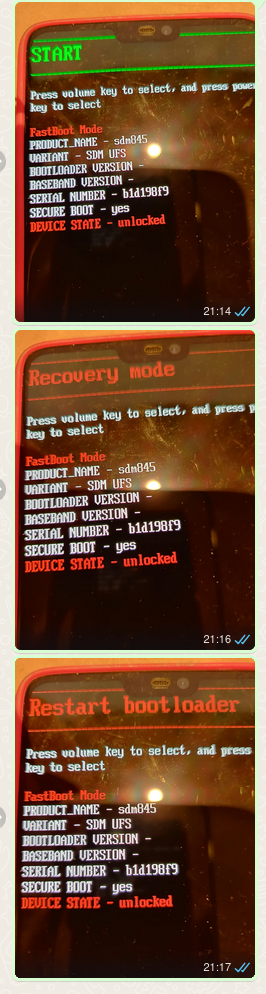
            @Moem Thank you for that suggestion. That helped me get out of the loop, When I reboot to Bootloader, I get a number of choices: Start, Restart Bootloader, Recovery Mode and Power off....I cannot figure out what I did last time around to start the installer.

            D 1 Reply Last reply Reply Quote 0
            • D Offline
              Dunbrokin @Dunbrokin
              last edited by

              @Moem I have tried the various options in the Bootloader; but they all seem to lead to the same loop of Start,.....Power Off. I am obviously missing something crucial.

              1 Reply Last reply Reply Quote 0
              • MoemM Offline
                Moem
                last edited by

                Sorry, I can't help you here... i've never seen a bootloader that offered different options. Mine only says "fastboot" and it's a statement, not an option to choose.

                Maybe a screenshot would help here?

                Is currently using an Op5t
                Also owns an Op1, a BQ E4.5 and an Xperia X, as well as a BQ tablet and a Pinetab2. Please, someone... make it stop.

                D 1 Reply Last reply Reply Quote 0
                • D Offline
                  Dunbrokin @Moem
                  last edited by

                  @Moem a13e86d3-1d13-426b-8617-81d1f064f35a-image.png

                  1 Reply Last reply Reply Quote 0
                  • MoemM Offline
                    Moem
                    last edited by

                    That helps to refresh my memory! When the words 'Fastboot Mode' are shown in red, you already are in fastboot / the bootloader. So do not choose any option, but plug the phone in and start the installer.

                    Is currently using an Op5t
                    Also owns an Op1, a BQ E4.5 and an Xperia X, as well as a BQ tablet and a Pinetab2. Please, someone... make it stop.

                    MrT10001M 1 Reply Last reply Reply Quote 1
                    • MrT10001M Offline
                      MrT10001 @Moem
                      last edited by

                      @Moem yes, that is the old bootloader. You are at a good place at that for a reinstall.

                      Xiaomi Redmi Note 7.... And more...
                      I have too many devices...

                      MoemM 1 Reply Last reply Reply Quote 0
                      • MoemM Offline
                        Moem @MrT10001
                        last edited by

                        @MrT10001 said in One Plus 6 semi bricked un update to Focal..where to?:

                        yes, that is the old bootloader.

                        I know 😁

                        Is currently using an Op5t
                        Also owns an Op1, a BQ E4.5 and an Xperia X, as well as a BQ tablet and a Pinetab2. Please, someone... make it stop.

                        MrT10001M 1 Reply Last reply Reply Quote 0
                        • MrT10001M Offline
                          MrT10001 @Moem
                          last edited by

                          @Moem Sorry, I meant to reply to the thread in general, but was typing on a bus that was lurching 😠 😠

                          I see the confusion with the bootloader and fastboot mode being the same on OPO devices...

                          As a side note my OPO 6 and 6T's boot into the Qualcomm crash dump every so often, a hard start sorts it out. I think it is related to their shutdown issue.

                          Xiaomi Redmi Note 7.... And more...
                          I have too many devices...

                          D 1 Reply Last reply Reply Quote 1
                          • D Offline
                            Dunbrokin @MrT10001
                            last edited by

                            Sorry have been away for a couple of months and only now finally got back to my OP6. Using the UB touch installer, I got Focul up and running. A couple of minor issues, the date and time (despite been set as automatic) seems to revert to manual on reboot. I get the Qualcom Crash Dump screen whenever I leave it charging....and on reboot get the Boot Loader is unlocked screen.

                            I have not had time to explore much more than this at the moment.

                            1 Reply Last reply Reply Quote 0

                            Hello! It looks like you're interested in this conversation, but you don't have an account yet.

                            Getting fed up of having to scroll through the same posts each visit? When you register for an account, you'll always come back to exactly where you were before, and choose to be notified of new replies (either via email, or push notification). You'll also be able to save bookmarks and upvote posts to show your appreciation to other community members.

                            With your input, this post could be even better 💗

                            Register Login
                            • First post
                              Last post