UBports Robot Logo UBports Forum
    • Categories
    • Recent
    • Tags
    • Popular
    • Users
    • Groups
    • Search
    • Register
    • Login

    sdm845: Device not supported

    Scheduled Pinned Locked Moved Oneplus 6/6T
    9 Posts 4 Posters 1.9k Views 1 Watching
    Loading More Posts
    • Oldest to Newest
    • Newest to Oldest
    • Most Votes
    Reply
    • Reply as topic
    Log in to reply
    This topic has been deleted. Only users with topic management privileges can see it.
    • B Offline
      Boldos
      last edited by

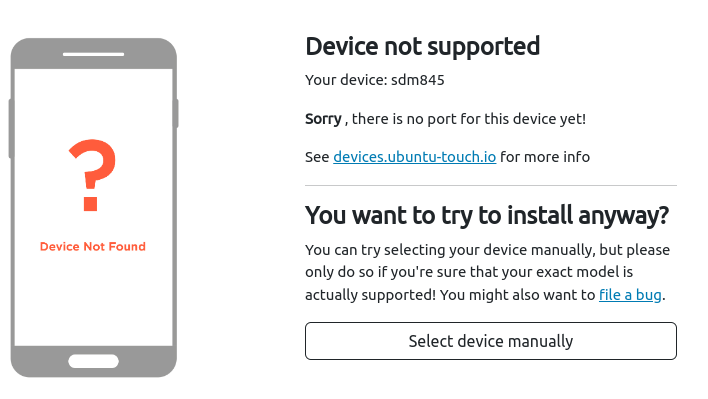
      OnePlus 6/6T cannot be imaged with UBports. For months.
      Can anybody please look at this?

      Thanks a lot.

      b61301e7-8b69-47ca-bfcb-c0a6c2684d49-obrazek.png

      LakotaubpL MrT10001M 2 Replies Last reply Reply Quote 0
      • LakotaubpL Offline
        Lakotaubp @Boldos
        last edited by

        @Boldos Have you tried the select device manually button? The OP6/t is there.

        B 1 Reply Last reply Reply Quote 0
        • MrT10001M Offline
          MrT10001 @Boldos
          last edited by

          @Boldos Yeah, common when you start the install from fastboot rather than Android. As @Lakotaubp pointed out, select the device manually from the drop down.

          Xiaomi Redmi Note 7.... And more...
          I have too many devices...

          1 Reply Last reply Reply Quote 0
          • B Offline
            Boldos @Lakotaubp
            last edited by Boldos

            @Lakotaubp Yes, I tried. Unfortunately that does not work: UBPorts installer flashes something small onto the device, then asks user to manually switch the phone to Recovery mode, and then nothing happens (Installer starts adb waiting for the device.... indefinitely) 😞

            The big problem here is that the device is stated as - basically - fully supported in the device DB, which is obviously not true...

            MrT10001M 1 Reply Last reply Reply Quote 0
            • MrT10001M Offline
              MrT10001 @Boldos
              last edited by

              @Boldos said in sdm845: Device not supported:

              The big problem here is that the device is stated as - basically - fully supported in the device DB, which is obviously not true...

              It is one of the better supported devices on both Focal and Xenial.

              You have to:
              A) Make sure the boot loader is unlocked.
              B ) Make sure the correct version of Android is installed
              C ) You have the latest version of Fastboot and ADB drivers installed on your PC.
              D ) Your device has at least 80% charge on it
              E ) have an open mind and patience. UT when installing takes time on some bits of the install.
              F ) Read through the forums for tips such as trying another USB cable, changing the USB port etc.

              Xiaomi Redmi Note 7.... And more...
              I have too many devices...

              B 1 Reply Last reply Reply Quote 1
              • B Offline
                Boldos @MrT10001
                last edited by

                @MrT10001 said in sdm845: Device not supported:

                B ) Make sure the correct version of Android is installed

                Hmmmmm This might not be fulfilled currently (I do have installed PostmarketOS on the phone).

                Can I please ask you for a confirmation exactly which Android image needs to be used for this? (I'm asking since there are lots of Oneplus Android 9 image version flying around...)

                (The rest of the prerequisites are satisfied, including my patience 😇 )

                And thank you for the reply and time you are spending helping me ♥

                MrT10001M B 2 Replies Last reply Reply Quote 0
                • MrT10001M Offline
                  MrT10001 @Boldos
                  last edited by MrT10001

                  @Boldos Read this thread.

                  Download from Android File Host (AFH) and choose the fastboot version with the 9 so it should be 9.0.17.

                  Then follow the instructions after you have unzipped from the above site.

                  Xiaomi Redmi Note 7.... And more...
                  I have too many devices...

                  1 Reply Last reply Reply Quote 0
                  • B Offline
                    bable3 @Boldos
                    last edited by

                    @Boldos i got the exact same problem do you have the Qualcomm crash dump mode issue too ?

                    MrT10001M 1 Reply Last reply Reply Quote 0
                    • MrT10001M Offline
                      MrT10001 @bable3
                      last edited by

                      @bable3 if you do a hard reset (power off) it should go past the crash dump on starting it up again. Possible sign of a weak battery.


                      Xiaomi Redmi Note 7.... And more...
                      I have too many devices...

                      1 Reply Last reply Reply Quote 0

                      Hello! It looks like you're interested in this conversation, but you don't have an account yet.

                      Getting fed up of having to scroll through the same posts each visit? When you register for an account, you'll always come back to exactly where you were before, and choose to be notified of new replies (either via email, or push notification). You'll also be able to save bookmarks and upvote posts to show your appreciation to other community members.

                      With your input, this post could be even better 💗

                      Register Login
                      • First post
                        Last post