How-To : Offline Unav maps

-
Could you help me install the one in Spain?
-
I recently found that foxtrotgps runs fine in a Libertine shell, and more importantly the files are compatible with uNav.
This can all be done on the phone, or just using foxtrot on a pc.
I think the better question is why does uNav not cache downloaded tiles? If that happened most users would be fine downloading tiles on-the-go; the current arrangement eats mobile data unnecessarily.
-
I download Openstreetmap tiles in advance for my interested regions (Munich and Havana) with the resolution 11-18 to my laptop and update them there from time to time, tar+SCP copy them to the SD of my BQ E4.5, start a small local Python web server in the phone and have a patched
uNavapp which ask this local webserver and not the Internet for the tiles. I can post the exact details if someone is interested.Matthias
-
@guru said in How-To : Offline Unav maps:
I download Openstreetmap tiles in advance for my interested regions (Munich and Havana) with the resolution 11-18 to my laptop and update them there from time to time, tar+SCP copy them to the SD of my BQ E4.5, start a small local Python web server in the phone and have a patched
uNavapp which ask this local webserver and not the Internet for the tiles. I can post the exact details if someone is interested.Please do. This sounds extremely useful.
-
I'm curious if there's a reason to use a web server vs a symlink to the storage location...
ie.
I symlinked foxtrotgps to download to ~/Downloads/maps
and symlinked uNav to read from ~/Downloads/maps/OSMThis seems simpler with no overhead to me, but I've no idea what the advantages of a tile server might be.
-
OK, here comes the first part of the howto:
How To Use OSM Tiles Offline with uNav
guru@unixarea.deThe problem
The app for UbuntuTouch "uNav" works only with Internet connection when presenting maps and locations. Sometimes Internet is not reliable or over data mobile even expensive and the idea to workaround is having the maps' tiles prefetched and stored in the Ubuntu phone. Here is the tool chain so solve this.
- Prefetching OSM tiles for a given area of interest and
There is a C-written tool 'osmtiles' to be fetched an compiled
on your Linux or FreeBSD workstation: http://www.millions.ca/~stacy/osmtiles.tgz
Compilation is simple (see its README):tar xzf osmtiles.tgz cd osmtiles cc -o osmtiles osmtiles.c -lmThe tool 'osmtiles' allows to make a list of all OSM tiles of a given GPS coordinates of an area, for example:
     osmtiles -z 9 -Z 18                \
        23.178555 -82.462692            \
        23.050039 -82.288628            \
        > havana.txt
-z 9and-Z 18give the nivel of the tiles, from 9 to 18. The above region(23.178555 -82.462692)x(23.050039 -82.288628)are the GPS coordinates of a rectangle of the capital of Cuba, Havana. The output of the tool is a list file like this:9/138/222.png 10/277/444.png 11/554/888.png 11/554/889.png 11/555/888.png 11/555/889.png 12/1109/1776.png ...Some ~18.000 lines, i.e. tiles to fetch. This list is stored for fetch (and later updates) in a file, let's say havana.txt. I have a bunch of such files for the places I visit.
Based on this list I have a shell script which in principle does for any of the files in the list:
    while read name ; do
        fetch the MD5 sum from the server for the file http://tile.openstreetmap.org/$name
	if the MD5 is different from what I have
	    fetch the file http://tile.openstreetmap.org/$name
    done < havana.txt
This way, later on updates, only modified tiles will be fetched.
I can share this script, no problem, if you promise not to blame
me, but send patches for it.Next step is making, again based on the file of the place to visit, a tar archive:
    cd osm
    tar --files-from=../Havana.lst -czf ../Havana.tgz
    ls -lh ../Havana.tgz
    -rw-r--r--  1 guru  wheel    93M 24 may.  16:58 ../Havana.tgz
i.e. such a file is around 100 MByte in size.
Move these file(s) to the phone with SCP or ADB and unpack them on the SD card to some directory which will later be served by a small Python web server.
- The modifications in the phone
(TO BE CONTINUED)
-
@Giiba said in How-To : Offline Unav maps:
I'm curious if there's a reason to use a web server vs a symlink to the storage location...
ie.
I symlinked foxtrotgps to download to ~/Downloads/maps
and symlinked uNav to read from ~/Downloads/maps/OSMThis seems simpler with no overhead to me, but I've no idea what the advantages of a tile server might be.
The big advantage is that the change in
uNavis one single line: substituting the URL of the original web server byhttp://localhost:8000and al is done once you have the tiles fetched.And, fetching tiles with
foxtrotgps, i.e. by hand when visiting the place withfoxtrotgpsis not a solution for the problem when you need tiles and have no Internet connection. -
Part 2:
- The modifications in the phone
We start with copy over the file Havana.tgz to the phone and unpack it there:
    scp -p Havana.tar.gz phablet@192.168.2.102:.
    ssh phablet@192.168.2.102

    ls /media/phablet/
    9CC0-D6CE
    mkdir /media/phablet/9CC0-D6CE/Maps
    cd /media/phablet/9CC0-D6CE/Maps
    tar xzf ~/Havana.tar.gz
Note: the dir
9CC0-D6CEmay vary depending on the SD type. Change this to the name in your phone and later in the start script for the Python web server too. Unpacking the tar archive should give:ls /media/phablet/9CC0-D6CE/Maps/ osm ls /media/phablet/9CC0-D6CE/Maps/osm 10 11 12 13 14 15 16 17 18 9i.e. the tiles in their sub-dirs
9 ... 18.To start our special
uNav-osmapp we need a new desktop entry as~/.local/share/applications/unav-osm.desktopwhich must contain the following lines:[Desktop Entry] Name=unav-osm Type=Application Exec=/usr/bin/nohup /home/phablet/unav.sh Icon=/userdata/system-data/opt/click.ubuntu.com/navigator.costales/current/icon.png Terminal=false X-Ubuntu-Touch=trueAs you see it will not execute the
uNavapp directly, but a small shell script/home/phablet/unav.sh. This script starts upfront the Python web service and then theuNavapp itself. It has the folling few lines.#!/bin/sh # cd /media/phablet/9CC0-D6CE/Maps python3 -m http.server 8888 & # cd /userdata/system-data/opt/click.ubuntu.com/navigator.costales/current qmlscene %u qml/Main.qml > /dev/null 2> /dev/nullCreate this script
/home/phablet/unav.shwithviand make it executable:vi /home/phablet/unav.sh chmod 0755 /home/phablet/unav.shLast action is to make a small modification in
uNavitself. At the time of writing it is the version 2.3 and the fix must be done in this file:/userdata/system-data/opt/click.ubuntu.com/navigator.costales/current/nav/index.html
What to change is best visible in this diff:cd /userdata/system-data/opt/click.ubuntu.com/navigator.costales/current/nav diff index.html index.html.orig 210c210 < source: new ol.source.OSM({url: 'http://localhost:8888/osm/{z}/{x}/{y}.png'}), --- > source: new ol.source.OSM({url: 'http://{a-c}.basemaps.cartocdn.com/rastertiles/voyager/{z}/{x}/{y}.png'}),The file must be modified as root and it's a good idea to make a copy (like I did):
    sudo su
    cd /userdata/system-data/opt/click.ubuntu.com/navigator.costales/current/nav
    cp -p index.html index.html.orig
    vi index.html
Note: the URL
http://{a-c}.basemaps.cartocdn.com/rastertiles/...appears three times in the file. Change only the first location for/voyager/....because this is also
what you want to pick-up in theSettingsmenu ofuNavfor the value:Mode Online Online style Carto Voyager <---------------That's it as changes.
One final note: You have only offline tiles for small places and not the world between. So, you can't slide over the world, for example from Munich to Havana. If you leave your location of offline tiles you will see only a white map in
uNav.
The way to move is configure inSettingssome otherOnline style, for exampleMapbox. Or configure locations asFavouritesto jump over the Ocean.For questions just ping me or write me to guru@unixarea.de
Matthias
-
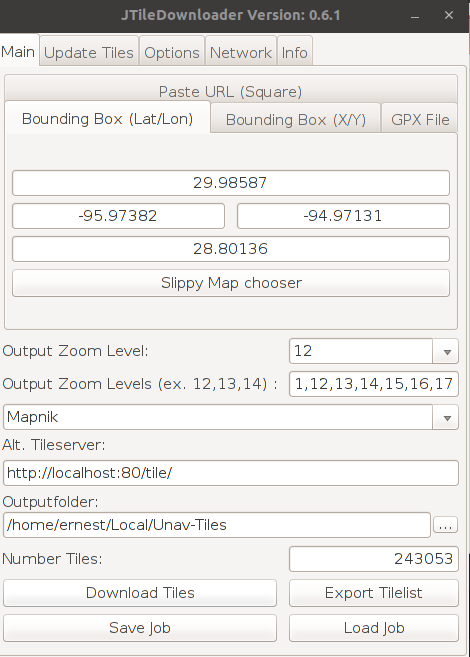
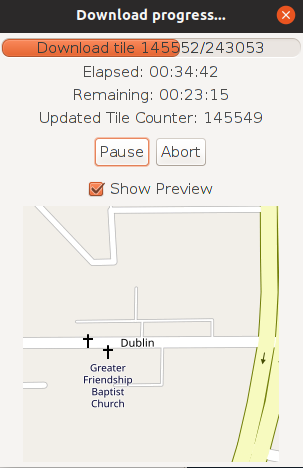
@guru good, I've seen your explanation but I see it very complicated I in this of many commands I'm lost, my question would be: could do all Spain or otherwise as would be done by parts.I currently according to the site I want to go under me tiles by jtiledownloader and then I pass them to the cell phone but it is a huge job, if you could give me a hand I would thank you.
-
Just for the record: Offline Maping is possible with Pure Maps by installing OMS Scout Server.

Hello! It looks like you're interested in this conversation, but you don't have an account yet.
Getting fed up of having to scroll through the same posts each visit? When you register for an account, you'll always come back to exactly where you were before, and choose to be notified of new replies (either via email, or push notification). You'll also be able to save bookmarks and upvote posts to show your appreciation to other community members.
With your input, this post could be even better 💗
Register Login