[Halium 9 Kernel Patching][GSI] Ubports fails to boot
-
I managed to login but it asked me for a password. I used
phabletand it looks like is accepted. But it get's stuck after that, and I can't do anything. After a few seconds the phone reboots. The file you mentioned wasn't empty, I removed everything and only placedmanualin it -
@Flohack https://del.dog/ofipomemed here's the last_kmsg log
-
It might be the hwservicemanager. I'm applying a patch rn
-
@Flohack Same story. I can ssh but as soon as I enter the pasword
phabletthe console tab freezes and the phone reboots after a few seconds. This time without any last_kmsg.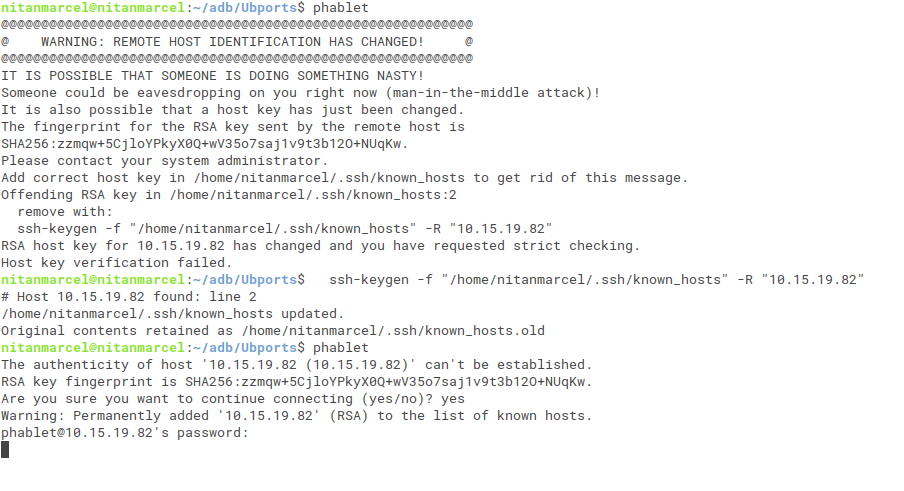
-
I managed to get an last_kmsg after a few attemps: https://paste.ubuntu.com/p/gdThm8JyfF/
-
If I'm not wrong I think this is what crashes it.
35>[ 36.966464,5] systemd-logind[3823]: Failed to start user service, ignoring: Unknown unit: user@32011.service <4>[ 36.967859,4] !entity_is_task(se) -
@nitanmarcel No that one you can ignore, its normal ^^
-
@nitanmarcel Please mount your rootfs again as described above and move out all startup jobs called lxc-* to another folder. We must prevent any interaction with cgroups and lxc. And we need to get the output of lxc-checkconfig (its not a file, rather you call this on the console)
-
@Flohack Same thing happens. I get stuck after I enter the password. I've also tried from recovery and the same thing happens.
-
Also after I connect with ssh and it freezes if I try from another tab I can't connect anymore
-
But does it bootloop?
-
Can you try this fix:
mkdir /a
mount /data/rootfs.img /a
echo manual |tee /a/etc/init/rsyslog.override
umount /a
sync
we disable syslog daemon for a while, see if that unblocks ssh -
@Flohack Yes, it goes to bootloop again. I've tried your fix but it still get's stuck after I enter my password and the same thing happens as before with lxc. The phone reboot then goes into a bootloop as soon as the phone starts
-
And yeah, if I don't ssh the phone doesn't reboot. It just stays at the Android One logo
[Edit: then it shuts down]
-
I also tried with telnet
nitanmarcel@nitanmarcel:~/adb/Ubports$ telnet 10.15.19.82 Trying 10.15.19.82... telnet: Unable to connect to remote host: Connection refused -
Sorry out of ideas

-
@Flohack No problem, thanks for trying to help
I've also tried to change my system from f2fs to ext4 and the phone didn't rebooted again, but I still can't ssh. -
@Flohack I got an idea. Instead of using ssh can't we just make a script to run the command at boot and then store it to a file? like
lxc-checkconfig >> /home/phablet/lxc-checkconfig -
@nitanmarcel Sure you can craft a one-time upstart job in /etc/init. Go for it

-
@Flohack I've tried and with no success. Nothing got saved which is strange because I tried echoing to a file and same thing happened. Nothing

Hello! It looks like you're interested in this conversation, but you don't have an account yet.
Getting fed up of having to scroll through the same posts each visit? When you register for an account, you'll always come back to exactly where you were before, and choose to be notified of new replies (either via email, or push notification). You'll also be able to save bookmarks and upvote posts to show your appreciation to other community members.
With your input, this post could be even better 💗
Register Login