How to correctly remove old scopes and apps
-
Hi,
I would need some hints how to best remove old scopes and apps from my UT E4.5 device.
When I go to Settings/About/Storage, I can still see some legacy apps like Telegram or old Dekko taking 10+MB of space.
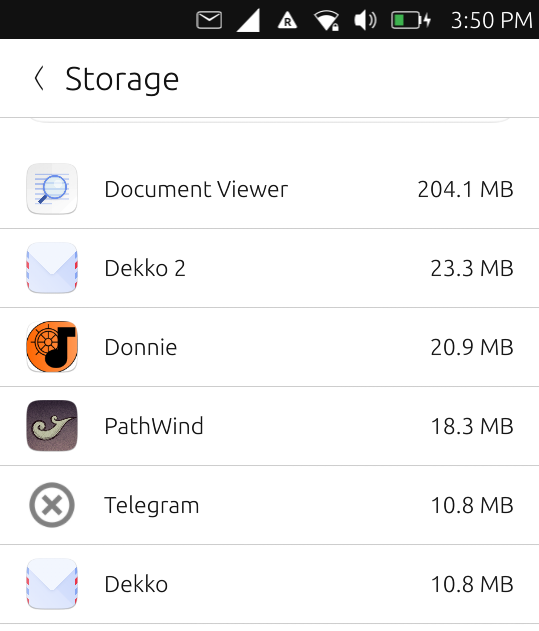
I can also see the packages in the /opt and .local folders.
However, the Apps are no longer displayed in the Open store app.Is there any correct way to remove those packages or should I just delete the folders on the file system?
Thanks
-
I am not sure if they are still listed there but you can try to uninstall them via UT Tweak Tool.
-
If you still have the packages in
/opt/click.ubuntu.com/installed, do they not show up in the app drawer? -
thanks for your both replies!
I can confirm those scopes or apps do not show up in UT Tweak Tool, Openstore App or App Menu, but in Storage and in /opt/click.ubuntu.com/
-
@mike68 OK. If they aren't showing up in the app drawer that is indeed weird.
However, you should be able to just remove the directories for those apps from under
/opt/click.ubuntu.com/and then reboot, to get rid of them. Any user cache/config/data they may have created may still exist under the user home directory after that, though. -
@dobey Ok, thanks. I'll give it a try.
-
[Solved]
Quick update: "rm -r /opt/click.ubuntu.com/[package]" did the job as FileManager did not offer a delete option. All old scopes and apps removed now. They also do not show up in the "Storage" any more.Thanks again!

Hello! It looks like you're interested in this conversation, but you don't have an account yet.
Getting fed up of having to scroll through the same posts each visit? When you register for an account, you'll always come back to exactly where you were before, and choose to be notified of new replies (either via email, or push notification). You'll also be able to save bookmarks and upvote posts to show your appreciation to other community members.
With your input, this post could be even better 💗
Register Login