Keyboard not showing up
-
Hi all,
first of all, thanks for this amazing job, I just installed Ubuntu touch on my Pixel 3a and I'm having a blast!
I also downloaded Waydroid, but I'm having a problem: the keyboard is not showing up at all, I tried to force stop the app, to disable and to enable it, but it doesn't work. I can't type anywhere. How do I fix this?
I tried looking on the forum and Internet and I feel I'm the only one having this problem haha.Thanks in advance!
-
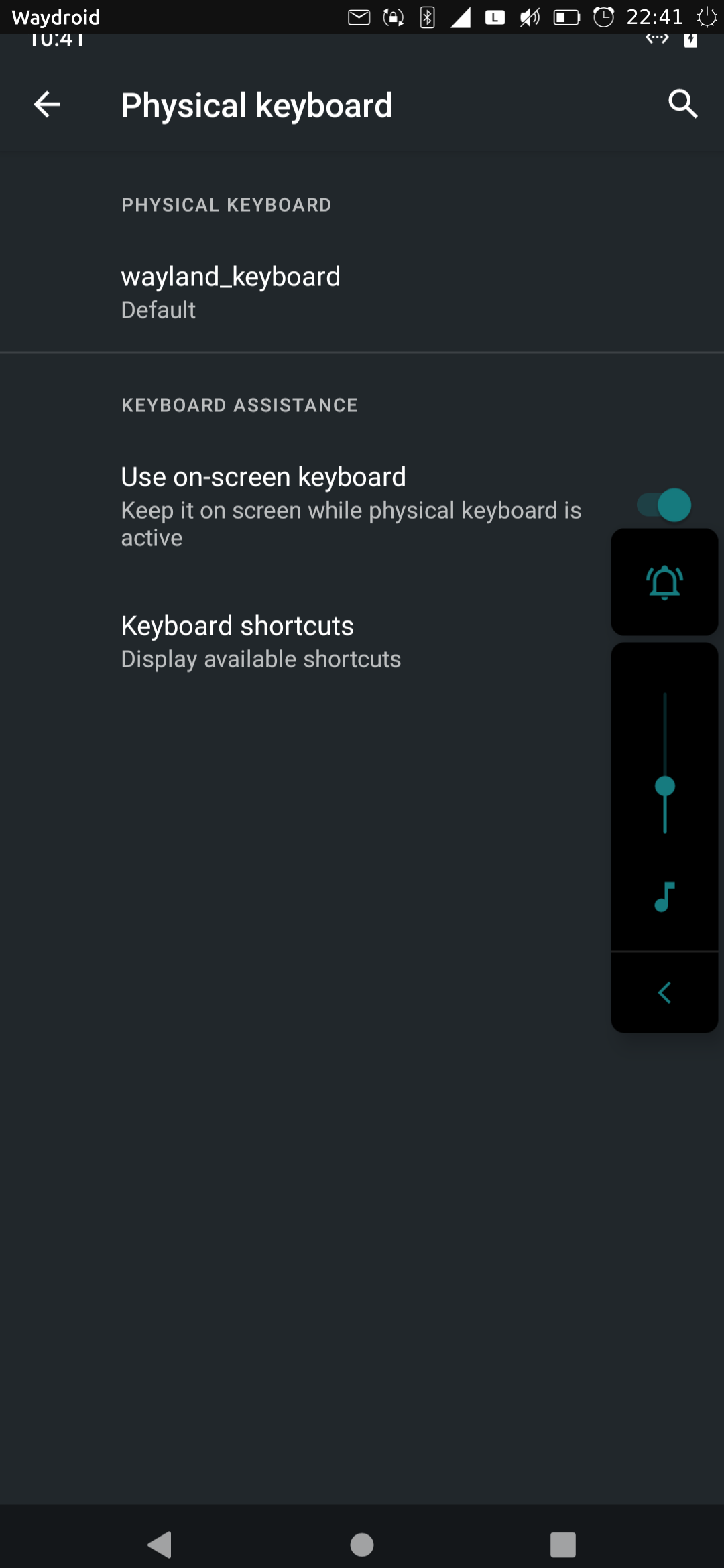
@elioneto in android system settings you need to enable it!
-
I've had that problem too. I found an easy fix in the Waydroid on UT Telegram group:
Settings > System > Languages & input > Physical keyboard > Use on-screen keyboard
In other words: exactly what was said above!

-
@moem Hey thanks very much man! Sorry for being stupid

-
@elioneto
Asking questions is never stupid



Hello! It looks like you're interested in this conversation, but you don't have an account yet.
Getting fed up of having to scroll through the same posts each visit? When you register for an account, you'll always come back to exactly where you were before, and choose to be notified of new replies (either via email, or push notification). You'll also be able to save bookmarks and upvote posts to show your appreciation to other community members.
With your input, this post could be even better 💗
Register Login