snap pop crackle! ....and nix!? The future of crackle
-
Hey there, i'm fuseteam, but you may know me better as Tobiyo Kuujikai on Telegram.
Almost 4 years ago i made post https://forums.ubports.com/topic/6283/snap-crackle-and-pop-readwrite-rootfs-is-overrated
...oh wow 11th of june, that was exactly 4 years and 5 days ago— gosh time sure flewAt the time i was looking for way to run my favorite command line tools on UT, as i wrote back then it started with remounting as readwrite. As i'm sure many of you are quite aware that is not permanent, it gets overwritten by OTA updates, and there is a chance things will not break cue white screen of death
So my motivation was, rather than fighting with the OS why don't i work with the OS and the journey at some point i past by nix, it looked perfect, if it was for it actually building the linux kernel on device to setup the thing— So i gave up on that.
Now if you listened to the Q&A last saturday the sharp eared among you may have heard something related to nix was merged— yes that was me, nix finally does not need to compile packages it can actually install packages now! Wait so what's crackle about?
Well. as nix wasn't viable at the time i search for other things. Did you know that .deb files are actually tar balls? that is you can extract them.....and the tools to do that are on UT
so i played with that, it turns out you can download from the repository with apt without installing and you can tell apt where to download it. It hit me what what is actually doing in simplfied terms. maybe if i illustrate it, it will seem stupidly simple to you too— here's the firefox deb from upstream extracted:
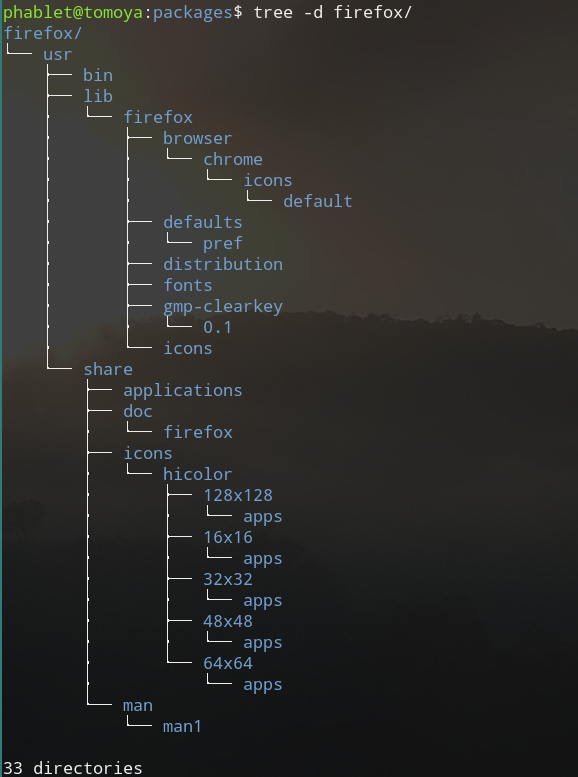
.....do you see it? Does the structure look familiar to you? where did we see that usr folder before— that's right in your
/directory.....Yes, what you're guessing is correct, all apt really does, in simplified terms, is download the deb files, and extract it over your system. So how hard can it be to extract to somewhere else? Very easy, that is how ufirefox came about— we download the deb, we extract deb, we package de folder as click; yes click too is tar bal, in fact it is based on the deb format.....or so i am told.
The challenge is telling the binaries to not look in / but somewhere else— but where? well there is specification from freedesktop (https://www.freedesktop.org/software/systemd/man/file-hierarchy.html#Home Directory) that we could use so i made mapping:
/var/cache/           -> $XDG_CACHE_HOME  ($HOME/.cache/)
/etc/                 -> $XDG_CONFIG_HOME ($HOME/.config/)
{/usr}/bin/           -> $HOME/.local/bin/
{/usr}/lib/{arch-id/} -> $HOME/.local/lib/{arch-id/}
/usr/share/           -> $XDG_DATA_HOME   ($HOME/.local/share/)
/var/log/             -> $XDG_STATE_HOME  ($HOME/.local/state/)
and wrote a bash script, to move files to these locations, then i opted to move them to ~/.local/share/crackle and symlink them instead and then it worked— but libraries weren't loading.....and how do keep track of which files belong to which packages and ahhh— utlimately i did find solutions, but something else was also apparently, i was doing this mostly on my own, it took 3 years to figure out how to remove packages, not because it is difficult, but i didn't think of— giving each package their own directory and that didn't could clear unused libraries— after all those could be shared— and another year to spot a minor mistake which made linking the libraries properly a complete mess........ did mention that crackle was born....yeah that bash script is crackle: https://gitlab.com/tuxecure/crackle-apt/crackle
At this point, i'm sure you can understand why, when i discovered that nix now no longer needs to build from scratch on arm64, i was both elated and sad
elated because now i didn't need to deal with figuring out package managment, sad because i spend 4 years figure out package management.But all is not lost, crackle can still be used to build clicks— uh what else........ uh let's first get back to nix
What is nix first of all? Nix is the package manager of nixos, it installs into
/nixok straighforward enough, it has 80k packages available— oh that's ni— 80000?! yes that's 4 zeros.
my measily, in the four years crackle was out i've accumalate 16 packages that were test (https://gitlab.com/tuxecure/crackle-apt/cracklebin)
And they work.......ok fine there are some limitations. first of all it cannot do system systemd services, you know the thing that goes in /etc/systemd/system, we'd have to write those manually.
Now back to what was merged last week: as of right now
/nixis writable by a phablet— that's about it. yes it is that simple, and that's all it took to make Nix installable— almost
You see nix has 2 modes, multi-user mode and single-user mode.As we don't support multiple users on UT (yet) i opted for the simpler single user mode and that only needs /nix to be writable.......and adds the limitation of not being able to sudo vim— but you know.....i ran into this aswell with crackle.......the solution? make a symlink to /root/.local/bin which means i can sudo su and then vim just works— now
sudo -i vimalso works.But i'm rambling....point is i added function to crackle to do that— and this is still usable with nix.
Wait did i say nix is almost installable? uh yeah about that, to install it we need both curl and xz......both of which are not shipped by default, and I don't want to increase the rootfs size— hey both of these work with crackle......
I now took crackle apart once again and made a new bash script to install nix:
#!/usr/bin/env bash
# Configuration for Apt
APTCACHE=${APTCACHE:-${XDG_CACHE_HOME:-$HOME/.cache}/apt};
APTSTATE=${APTSTATE:-${XDG_STATE_HOME:-$HOME/.local/state}/apt};
DPKGSTATE=${DPKGSTATE:-${XDG_STATE_HOME:-$HOME/.local/state}/dpkg};
APTCONFIG=${APTCONFIG:-${XDG_CONFIG_HOME:-$HOME/.config}/crackle};

# Configuration for Crackle
PKG_PATH=${PKG_PATH:-${XDG_DATA_HOME:-$HOME/.local/share}/crackle};
PKGS_DIR=${PKGS_DIR:-$PKG_PATH/$PKG};
CRACKLERC=$APTCONFIG/cracklerc;
CRACKLEENV=$APTCONFIG/environment;
CRACKLECMP=${XDG_DATA_HOME:-$HOME/.local/share}/bash-completion/completions;
CRACKDIR=${CRACKDIR:-$HOME/packages/$PKG};
CRACKLEBIN="https://gitlab.com/tuxecure/crackle-apt/cracklebin/-/archive/master/cracklebin-master.tar.gz"
PKG_PREFIX=${PKG_PREFIX:-$HOME/.local}

# Configuration for Sudo -i
SUDO_CONFIG=/root/.config
SUDO_BIN=/root/.local/bin
SUDO_STATE=/root/.local/state

# Set up aliases for apt commands
APTCONF="-o Dir::Etc=$APTCONFIG";
APT_GET="apt-get -o Dir::Cache=$APTCACHE -o Dir::State=$APTSTATE $APTCONF"
APT_CACHE="apt-cache -o Dir::Cache=$APTCACHE -o Dir::State=$APTSTATE -o Dir::Etc=$APTCONFIG"

function pkgsetup(){
    [[ -d "$DPKGSTATE" ]] || {
        mkdir -p "$DPKGSTATE";
            cp /var/lib/dpkg/status $DPKGSTATE/status;
        }

    [[ -d "$APTCACHE" ]] || mkdir -p "$APTCACHE";
    [[ -d "$APTSTATE" ]] || mkdir -p "$APTSTATE";

    [[ -d "$APTCONFIG" ]] || {
        mkdir -p $APTCONFIG/sources.list.d $APTCONFIG/preferences.d $APTCONFIG/trusted.gpg.d;

    ln -s /etc/apt/sources.list $APTCONFIG;
    [[ -n "$(ls /etc/apt/trusted.gpg.d)" ]] && ln -s /etc/apt/trusted.gpg.d/* $APTCONFIG/trusted.gpg.d/;
}
}

urldecode() { : "${*//+/ }"; echo -e "${_//%/\\x}"; }

function get_pkg_info () {
    pkg="$(basename "$1")";
    pkgname="${pkg%%_*}";
    pkgversion="${pkg%_*}";
    pkgversion="${pkgversion#*_}";
    pkgversion="$(urldecode $pkgversion)";
}

function link_path(){
    pkg_path="$1";
    xdg_lib_path="$2"
    while read file_path
    do
        ln -s $file_path $xdg_lib_path;
    done < <(find $pkg_path -type f -maxdepth 1)
}

function bin_install () {
    PKGS_DIR=${PKG_PATH}/${pkgname}
    mkdir -p ${PKGS_DIR} $PKG_PREFIX/bin;
    dpkg-deb -x "${package}" "${PKGS_DIR}";
    [ -d "$PKGS_DIR/usr/bin" ] && link_path $PKGS_DIR/usr/bin $PKG_PREFIX/bin;
}

function setup_curlxz () {
    $APT_GET update
    $APT_GET install --download-only curl xz-utils;
    while read package
    do
        get_pkg_info $package;
        bin_install;
    done < <(ls "$APTCACHE"/archives/*.deb);
}

function setup_home_manager (){
    sh <(curl --proto '=https' --tlsv1.2 -L https://nixos.org/nix/install) --no-daemon
    nix-channel --add https://github.com/nix-community/home-manager/archive/master.tar.gz home-manager
    nix-channel --update
    nix-shell '<home-manager>' -A install
}

function pkgunset(){
    rm -r $APTCACHE $APTSTATE $APTCONFIG $PKG_PATH;
    find "$PKG_PREFIX/bin" -xtype l -exec rm {} +;
}

pkgsetup;
setup_curlxz;
setup_home-manager;
pkgunset;
ok this has more cruft than it should.....but there is a reason for this.
You see now i have crackle which has functions that make command line utils usable, on the other hand we have nix with way more usable packages.
So what's the plan?
The plan is take crackle apart for useful parts and build it around nix instead.
So the goal for next iteration of crackle is
- crackle click should continue to able to build click packages from apt
- crackle setup should set up nix home-manager utilizing curl and xz from apt
- crackle sudo should continue to be able to enable sudo usage with user installed packages
- crackle sudok should continue to undo crackle sudo
The above script installs curl and xz the crackle way, then sets up nix home-manager and then removes them again and wll serve as the base to build out the features anew
If you made it this far in my post— thank you for reading my post despite its length! Feel free to use the above script to install nix on the latest focal devel and go wild. See what works and see what does not. And if something doesn't work— share logs, debug, explore options! I doubt i alone can solve these issues, but together as a community we can surely find solutions— if not maybe i'll post another rant in 4 years and 5 days

-
Oh before i go, you may be wondering how to use this home manager
well it's simple really.
after running the script in the above post you should have a file in ~/.config/home-manager/home.nix
in there you will find a section like this:
# The home.packages option allows you to install Nix packages into your
  # environment.
  home.packages = [
    # # Adds the 'hello' command to your environment. It prints a friendly
    # # "Hello, world!" when run.
    # pkgs.hello

    # # It is sometimes useful to fine-tune packages, for example, by applying
    # # overrides. You can do that directly here, just don't forget the
    # # parentheses. Maybe you want to install Nerd Fonts with a limited number of
    # # fonts?
    # (pkgs.nerdfonts.override { fonts = [ "FantasqueSansMono" ]; })

    # # You can also create simple shell scripts directly inside your
    # # configuration. For example, this adds a command 'my-hello' to your
    # # environment:
    # (pkgs.writeShellScriptBin "my-hello" ''
    #   echo "Hello, ${config.home.username}!"
    # '')
  ];
you can see the comment there explains what to put there, you here's how i edited mine
# The home.packages option allows you to install Nix packages into your
  # environment.
  home.packages = [
    pkgs.vim
    pkgs.pipx
    pkgs.cargo
    pkgs.plasma5Packages.kdeconnect-kde
    pkgs.tailscale
    pkgs.gnumake
    pkgs.gcc
    pkgs.gdb
    pkgs.strace
    pkgs.valgrind
    # # Adds the 'hello' command to your environment. It prints a friendly
    # # "Hello, world!" when run.
    # pkgs.hello

    # # It is sometimes useful to fine-tune packages, for example, by applying
    # # overrides. You can do that directly here, just don't forget the
    # # parentheses. Maybe you want to install Nerd Fonts with a limited number of
    # # fonts?
    # (pkgs.nerdfonts.override { fonts = [ "FantasqueSansMono" ]; })

    # # You can also create simple shell scripts directly inside your
    # # configuration. For example, this adds a command 'my-hello' to your
    # # environment:
    # (pkgs.writeShellScriptBin "my-hello" ''
    #   echo "Hello, ${config.home.username}!"
    # '')
  ];
then when done you run
home-manager switch, and off you goIt is
switchbecause it is atomic, you can go back to a previous configuration— but it'll let you explore home-manager --help for the other optionsand yes, if i've tested all those, they all.....work expect for kdeconnect:

This is must closer than i got with crackle tho, i imagine there will be similar errors with other GUI apps, but CLI apps ought to work—
-
ok final last word; you may run into this error on focal devel:
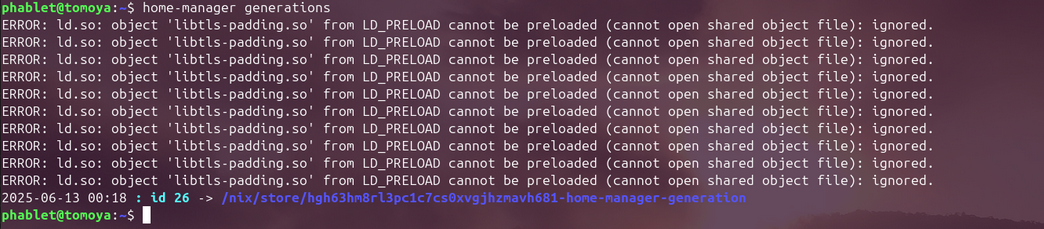
don't worry it is noisy, but it harmless
It will be fixed in noble see https://gitlab.com/ubports/development/core/hybris-support/tls-padding/-/merge_requests/4
and possibly in focal soon
-
@Fuseteam first let me say this is awesome, second if you want help I want to contribute to this.
I used nixos for while before switching to FreeBSD is has been a joy, so I say this with confidence this is finally the point where we can actually use UT as a full on linux distribution, the influx of packages here will be amazing.if you don't mind aside from reading up on the code, I will make a UI QML app so end users can just pick and install/uninstall primitive but any UI is better then terminal when walking.
looking forward to seeing a repo on gitlab.
-
@ChromiumOS-Guy said in snap pop crackle! ....and nix!? The future of crackle:
@Fuseteam first let me say this is awesome, second if you want help I want to contribute to this.
I used nixos for while before switching to FreeBSD is has been a joy, so I say this with confidence this is finally the point where we can actually use UT as a full on linux distribution, the influx of packages here will be amazing.if you don't mind aside from reading up on the code, I will make a UI QML app so end users can just pick and install/uninstall primitive but any UI is better then terminal when walking.
looking forward to seeing a repo on gitlab.
thanks, the script above is all that's needed to setup nix on UT on the latest focal devel.
I agree with the UI idea, i believe it would be best if we add a plug in system-settings like so: https://gitlab.com/ubports/development/core/lomiri-system-settings/-/merge_requests/437
if you rather see the setup script on gitlab you can find it here: https://gitlab.com/tuxecure/crackle-apt/crackle/-/blob/v0.5/crackle
note that that's the only file i have so far, i'll be building that out further, based on the earlier iteration which can be found in the bash branch= but that's just for a cli interface
I'm unsure atm how we will handle actual package management throught the UI tho but i'd say we can worry about that after we can at least setup nix via the UI
-
actually now i think about it, updates are easy enough with home-manager:
nix-channel --update
home-manager switch
The "challenge" is more in figuring out how we add and remove entries under
home.packagesin~/.config/home-manager/home.nix -
-
C ChromiumOS-Guy referenced this topic on
-
-
@ChromiumOS-Guy thanks again, i'll take a look and test it out further
-
thanks to the help of @ChromiumOS-Guy crackle is now not only able to set up nix home-manager, but also install, update, remove and list packages using nix home-manager:
https://github.com/tuxecure/crackle/releases/tag/v0.5.2
for cli applications they all seem to work so far, sans minor warnings (looking at you tailscale)
for gui applications i have not figured out how to get it be picked up by the drawer, but early reports show them launching fine from the terminal so farSo for anyone wanting to test it out, now the time to test out and see how far we can push the boundaries
-
@Fuseteam This sounds very good.
 So the goal is, that we will have a "Nix Package Store" in a future version of UT?
 -
@johndoe we are working on a plugin to lomiri system settings like Libertine plugin.
I already have most things implemented in backend, mostly lack some generation control over nix/home-manager left other then that mainly implementing the main UI, I have a design ready just need to implement it.
-
 F Fuseteam referenced this topic on
Hello! It looks like you're interested in this conversation, but you don't have an account yet.
Getting fed up of having to scroll through the same posts each visit? When you register for an account, you'll always come back to exactly where you were before, and choose to be notified of new replies (either via email, or push notification). You'll also be able to save bookmarks and upvote posts to show your appreciation to other community members.
With your input, this post could be even better 💗
Register Login