Custom builder for a library
-
Hello everybody,
has someone an example for a custom builder for a library? I tried to create an Test-App with my perl Efl binding (pELF) :beaming_face_with_smiling_eyes: (at the moment it is just an experiment whether it would be possible to write apps with enlightenment foundation libraries...)
This is my clickable file as far:
clickable_minimum_required: 8.0.0
builder: pure-qml-cmake
kill: qmlscene
dependencies_target:
    - "libefl-all-dev"
libraries:
   pEFL:
       builder: custom
       build:
         - "perl ./Makefile.PL"
         - "make"
         - "make install"
with clickable build --libs I get the following error:
Can't open perl script "./Makefile.PL": No such file or directory
Command exited with non-zero exit status 2, see above for details. This is most likely not a problem with Clickable.
cd'ing into ./libs/pEFL (where I have the source of the perl module) doesn't work, too:
bash: line 3: cd: ./libs/pEFL: No such file or directory
Command exited with non-zero exit status 1, see above for details. This is most likely not a problem with Clickable.
Thanks in advance for any help :love-you_gesture:
Max -
Okay, I could build the module with a custom perl script. Now I have the perl module files under build/all/pEFL/install or so.
How do I get these files into the click package? And what path will these file have when installed?
Thanks,
Max -
Good morning, i could compile the app for amd64 architecture
 but cross compiling didn't work:
/usr/bin/ld: skipping incompatible /usr/lib/aarch64-linux-gnu/libm.a when searching for -lm collect2: error: ld returned 1 exit status make: *** [Makefile:4178: blib/arch/auto/pEFL/pEFL.so] Error 1Has someone a clue what's the problem here? Ist arm64 the same as aarch64?
And for armfh I get the following error:
In file included from /usr/include/features.h:485,
                 from /usr/include/arm-linux-gnueabihf/sys/types.h:25,
                 from /usr/lib/x86_64-linux-gnu/perl/5.30/CORE/perl.h:697,
                 from lib/pEFL.xs:3:
/usr/include/arm-linux-gnueabihf/gnu/stubs.h:7:11: fatal error: gnu/stubs-soft.h: No such file or directory
    7 | # include <gnu/stubs-soft.h>
      |           ^~~~~~~~~~~~~~~~~~
compilation terminated.
make: *** [Makefile:1057: lib/pEFL.o] Error 1
Thanks in advance,
Max -
@PerlMax
Maybe you will have better luck on the App dev Telegram channel https://t.me/UbuntuAppDevENand sharing your project's repo will help
-
I could built the lib, but starting doesn't work:
Launching app
terminate called after throwing an instance of 'std::runtime_error'
  what():  Lost our connection with the registry
-bash: line 1: 151018 Aborted                 lomiri-app-launch hellopefl.maxperl_hellopefl_1.0.0
Started: hellopefl.maxperl_hellopefl_1.0.0
ADB_COMMAND_FAILED
How can I start a app from the terminal, so that I can see error messages?
Thanks for the hint for the dev group, I will look into it the next days...
Best wishes
Max -
@PerlMax said in Custom builder for a library:
How can I start a app from the terminal, so that I can see error messages?
Running
clickable logsshould let you see the log messages for your app, if there are any. However, given what you've posted already, it seems you are running a bash script, which runs some other process, which has hit aSIGABRTcondition.Perl is not really a supported language for building UT applications, so we'd need to see your code (preferably in a git repository) to be able to help much further. Whatever you are running on the first line of your script is failing. If it is
perl, then you might want to also check the system log on your device (/var/log/syslog) for possible apparmor DENIALs. -
Hello everybody,
I am trying again to develop a simple pEFL test app. In libertine everything works great. Unfortunately the app won't start outside the libertine environment. Apparently, efl needs to be able to read files in the $HOME directory and some other directories (see https://sourceforge.net/p/enlightenment/mailman/message/58751741/).
My idea now is to run the app in a chroot environment. Would that be possible for a normal click app? Are there any examples of other apps that do this? Or is that not such a good idea?
Thanks in advance!
Max -
Hello everybody,
I am trying again to develop a simple pEFL test app. In libertine everything works great. Unfortunately the app won't start outside the libertine environment. Apparently, efl needs to be able to read files in the $HOME directory and some other directories (see https://sourceforge.net/p/enlightenment/mailman/message/58751741/).
My idea now is to run the app in a chroot environment. Would that be possible for a normal click app? Are there any examples of other apps that do this? Or is that not such a good idea?
Thanks in advance!
MaxYou can make the application unconfined (not recommended), or use the read_path/write_path options in the apparmor file. Or, potentially better, change the library/application to read from the UT XDG data-dirs correctly.
-
@projectmoon Unfortunately this is not enough. The c library searches for config files etc. under the installation prefix (e.g. /usr/share/elementary). Perhaps it would be possible to compile efl at the UT XDG data-dir, but I didn't have luck with this so far
 That's why the solution would be to run in a chroot environment (where I could copy the files from the libertine container.. Best wishes, Max
 -
@projectmoon Unfortunately this is not enough. The c library searches for config files etc. under the installation prefix (e.g. /usr/share/elementary). Perhaps it would be possible to compile efl at the UT XDG data-dir, but I didn't have luck with this so far
That's why the solution would be to run in a chroot environment (where I could copy the files from the libertine container.. Best wishes, MaxI mean, if it uses an installation prefix, you should be able to change the prefix to anything you want. What happens if you try to compile it to an XDG data-dir?
-
so im reading and my AI : I would not use a chroot for this in a normal confined Click app.
A real
chroot()needs privilege/CAP_SYS_CHROOT, and even inside a chroot the process would still be under the same Ubuntu Touch AppArmor confinement. So it would not really solve the app-store/confined-app problem; it would mostly move the path problem somewhere harder to debug.For EFL/pEFL the better confined solution is to make the Click package look like the EFL install prefix at runtime:
- build/install EFL and pEFL into the Click package, for example under
usr/ - ship the needed
usr/share/elementary,usr/share/efreet, locale files, Perl module files, and.sofiles with the app - start the app through a wrapper script that redirects EFL, XDG, Perl, and HOME paths into the app’s own confined directories
Example launcher idea:
#!/bin/sh
set -eu

APP_DIR="$(CDPATH= cd -- "$(dirname -- "$0")" && pwd)"
APP_ID="hellopefl.maxperl"

APP_HOME="/home/phablet/.local/share/${APP_ID}"
APP_CACHE="/home/phablet/.cache/${APP_ID}"
APP_CONFIG="/home/phablet/.config/${APP_ID}"

mkdir -p "$APP_HOME" "$APP_CACHE" "$APP_CONFIG"
mkdir -p "$APP_HOME/.cache/efreet"
mkdir -p "$APP_HOME/.elementary/config"

export HOME="$APP_HOME"
export XDG_DATA_HOME="$APP_HOME/.local/share"
export XDG_CACHE_HOME="$APP_CACHE"
export XDG_CONFIG_HOME="$APP_CONFIG"
export XDG_DATA_DIRS="$APP_DIR/usr/share:/usr/local/share:/usr/share"

export ELM_PREFIX="$APP_DIR/usr"
export ELM_BIN_DIR="$APP_DIR/usr/bin"
export ELM_LIB_DIR="$APP_DIR/usr/lib/aarch64-linux-gnu"
export ELM_DATA_DIR="$APP_DIR/usr/share/elementary"
export ELM_LOCALE_DIR="$APP_DIR/usr/share/locale"

export LD_LIBRARY_PATH="$APP_DIR/usr/lib/aarch64-linux-gnu:$APP_DIR/lib/aarch64-linux-gnu:${LD_LIBRARY_PATH:-}"
export PERL5LIB="$APP_DIR/usr/lib/aarch64-linux-gnu/perl5:$APP_DIR/usr/share/perl5:${PERL5LIB:-}"

exec "$APP_DIR/usr/bin/hellopefl" "$@"
The important bit is that
/usr/share/elementaryshould become$APP_DIR/usr/share/elementaryinside the Click package, and EFL should be told about that prefix with theELM_*variables instead of trying to read/write the real device/usror/home/phablet.For Clickable, the rough shape would be:
builder: cmake
framework: ubuntu-touch-24.04-1.x

dependencies_host:
  - perl
  - make
  - pkg-config

dependencies_target:
  - libefl-all-dev

libraries:
  pEFL:
    builder: custom
    src_dir: libs/pEFL
    build:
      - cd "$SRC_DIR" && perl Makefile.PL INSTALL_BASE="$INSTALL_DIR/usr"
      - cd "$SRC_DIR" && make
      - cd "$SRC_DIR" && make install

install_data:
  "${PEFL_LIB_INSTALL_DIR}/usr": "usr"

install_root_data:
  - run-pefl.sh

install_lib:
  - "libefl.so*"
  - "libelementary.so*"
  - "libeina.so*"
  - "libevas.so*"
  - "libecore*.so*"
  - "libedje.so*"
  - "libefreet.so*"
That example will need the exact library list adjusted after running
lddon the final binary/module, but the direction is: bundle the runtime prefix, then point EFL and Perl at the bundled prefix.read_path/write_pathcan help for specific paths, but I would treat that as a last resort. A confined app should work from its own packaged resources and its own.config,.cache, and.local/sharedirectories.A helper app/broker such as Workspace could be useful during development for copying logs, staging files, checking AppArmor denials, or preparing the bundle, but I would not make the final pEFL app depend on an unconfined/root broker just to launch. That would be useful for side-loaded developer/admin workflows, not the clean confined Click solution.
- build/install EFL and pEFL into the Click package, for example under
-
i know this is old but i think its cool when it does that lol ...shows me its paying attention ....3 years+ in the making
-
Thank you very much for all the suggestions. As a first step, I’m now trying to get the elementary_config configuration program up and running.
I have now compiled efl for this purpose in a Libertine container under the prefix /opt/click.ubuntu.com/pefl.maxperl/current and am trying to start the program as suggested using the shell script run_config.sh. This allowed me to resolve the error message regarding efreetd and the missing configuration

Unfortunately, it still isn't working. Here's the error message I've been getting so far:
ERR<90576>:elementary ../src/lib/elementary/elm_module.c:114 _elm_module_find_as() Failed to load elementary module: 'prefs_iface': No such file or directory
## Copy & Paste the below (until EOF) into a terminal, then hit Enter

eina_btlog << EOF

EOF

ERR<90576>:eina_safety ../src/lib/ecore_evas/ecore_evas.c:3941 ecore_evas_software_x11_new() safety check failed: m == NULL
## Copy & Paste the below (until EOF) into a terminal, then hit Enter

eina_btlog << EOF
[...]
EOF

ERR<90576>:eina_safety ../src/lib/ecore_evas/ecore_evas.c:4056 ecore_evas_gl_x11_options_new() safety check failed: m == NULL
## Copy & Paste the below (until EOF) into a terminal, then hit Enter

eina_btlog << EOF
[...]
EOF

ERR<90576>:elementary ../src/lib/elementary/efl_ui_win.c:5572 _elm_win_finalize_internal() Cannot create window.
## Copy & Paste the below (until EOF) into a terminal, then hit Enter

eina_btlog << EOF
[...]
EOF

ERR<90576>:eo ../src/lib/eo/eo.c:1137 _efl_add_internal_end() Object of class 'Efl.Ui.Win_Legacy' - Not all of the object constructors have been executed.
## Copy & Paste the below (until EOF) into a terminal, then hit Enter

eina_btlog << EOF
[...]
EOF

ERR<90576>:ecore ../src/lib/ecore/ecore.c:796 _ecore_magic_fail() *** ECORE ERROR: Ecore Magic Check Failed!!! in: ecore_evas_callback_selection_changed_set()
## Copy & Paste the below (until EOF) into a terminal, then hit Enter

eina_btlog << EOF
[...]
EOF

ERR<90576>:ecore ../src/lib/ecore/ecore.c:798 _ecore_magic_fail()     Input handle pointer is NULL!
## Copy & Paste the below (until EOF) into a terminal, then hit Enter

eina_btlog << EOF
[....]
EOF

ERR<90576>:ecore ../src/lib/ecore/ecore.c:796 _ecore_magic_fail() *** ECORE ERROR: Ecore Magic Check Failed!!! in: ecore_evas_callback_drop_drop_set()
## Copy & Paste the below (until EOF) into a terminal, then hit Enter

eina_btlog << EOF
[...]
EOF

ERR<90576>:ecore ../src/lib/ecore/ecore.c:798 _ecore_magic_fail()     Input handle pointer is NULL!
## Copy & Paste the below (until EOF) into a terminal, then hit Enter

eina_btlog << EOF
[...]
EOF

ERR<90576>:ecore ../src/lib/ecore/ecore.c:796 _ecore_magic_fail() *** ECORE ERROR: Ecore Magic Check Failed!!! in: ecore_evas_callback_drop_motion_set()
## Copy & Paste the below (until EOF) into a terminal, then hit Enter

eina_btlog << EOF
[...]
EOF

ERR<90576>:ecore ../src/lib/ecore/ecore.c:798 _ecore_magic_fail()     Input handle pointer is NULL!
## Copy & Paste the below (until EOF) into a terminal, then hit Enter

eina_btlog << EOF
[...]
EOF

ERR<90576>:ecore ../src/lib/ecore/ecore.c:796 _ecore_magic_fail() *** ECORE ERROR: Ecore Magic Check Failed!!! in: ecore_evas_callback_drop_state_changed_set()
## Copy & Paste the below (until EOF) into a terminal, then hit Enter

eina_btlog << EOF
[...]
EOF

ERR<90576>:ecore ../src/lib/ecore/ecore.c:798 _ecore_magic_fail()     Input handle pointer is NULL!
## Copy & Paste the below (until EOF) into a terminal, then hit Enter

eina_btlog << EOF
[...]
EOF

ERR<90576>:evas_main ../src/lib/evas/canvas/evas_object_smart.c:746 _efl_canvas_group_efl_object_destructor() efl_canvas_group_del() was not called on this object: 0x40000000638f (Efl.Ui.Win_Legacy)
## Copy & Paste the below (until EOF) into a terminal, then hit Enter

eina_btlog << EOF
[...]
EOF
Maybe it's because EFL doesn't support Wayland? Or maybe EFL can't find the right display? Everything works perfectly in Libertine... Right now, I'm just at a loss...
You can find the current status at https://github.com/MaxPerl/pefl.maxperl
Thanks in advance, Max
-
I've finished a first small test application (a simple video player). You can find it under https://github.com/MaxPerl/pefl.maxperl
All in all, it works pretty well. However, there are a few limitations:
-
I haven't yet managed to get the Wayland engine from efl to work (I'm hoping for Mir 2.x). This may lead to suboptimal performance (especially at the moment no hw acceleration), but more importantly, to an error with rotation. In landscape mode there is a well known Issue with Xwayland: Inputs on the right side of the screen do not work in landscape mode (see also the problem in uWolf, fix could come when this is merged: https://gitlab.com/ubports/development/core/lomiri/-/merge_requests/207). I also can't resolve it through settings X-Lomiri-Rotates-Window-Contents=false and/or X-Lomiri-Supported-Orientations=portrait at the moment (see ubports/development/core/lomiri#184)
-
Maliit virtual keyboard does not work at the moment. Apparently, there’s also a way for Xwayland apps to integrate this via the DBus interface. But right now, that’s too complicated for me. In the meantime, I’ve programmed my own little virtual keyboard (though it’s not really necessary for a video player. You can test it in the file-open dialog at the search field. Works pretty well for me).
-
I’m currently working on a connection to the Content Hub (at least receiving data from other apps would be nice). But it doesn't seem that straightforward if an app doesn't use Qt or QML at all. I've already tried launching the app via Qt/QML instead of a Bash script, but apparently that doesn't work with Xwayland apps? If anyone here has experience with this, I'd appreciate any suggestions. Maybe I’ll start a separate thread regarding Content Hub as well. Surely that should work without Qt/QML????
Best wishes, Max
-
-
P PerlMax referenced this topic
-
The state of Content-Hub is strange. When I open the app and then send myself files via the File Manager, for example, it seems to work. However, if the app isn't already open the first time and is essentially opened through the Content Hub, it only works once
-
There is also a visual issue that two windows are now opening: one titled "pefl" (the actual app) and one titled "X11 Support." This problem also occurs in uWolf by @chromiumos-guy , for example. However, it has somehow been resolved in Min Browsers and @pparent apps (which also run on Xwayland). I'd appreciate any advice...
Here a screenshot
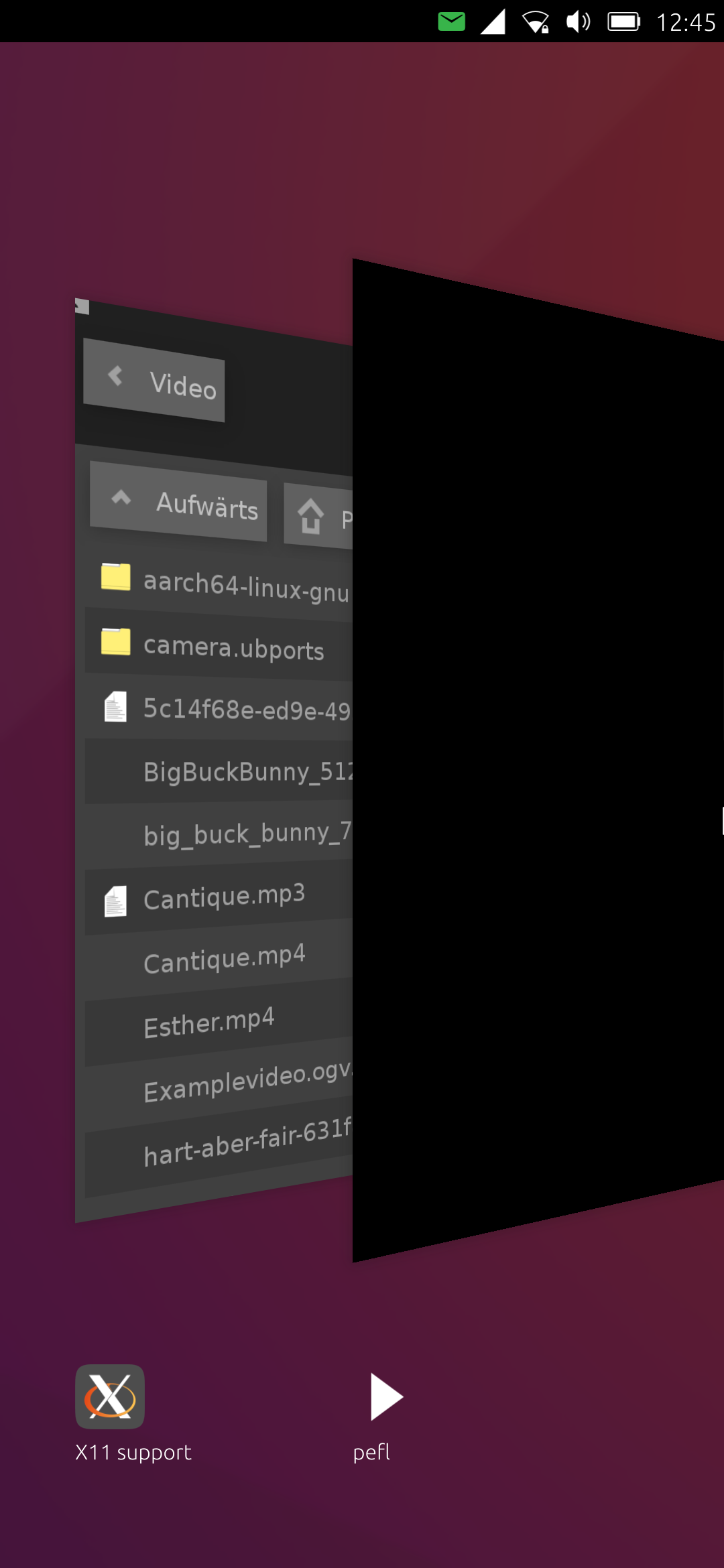
-
-
@pparent 24.04-1 I think (the stable branch)
-
Yes but what version precisely? Because there was an important change about that between 24.04-1.2 and 24.04-1.3 .
Can you re-upload the screenshot we cannot see it!
-
my UT version is 24.04-1.3
here again the screenshot:

Can you see it now?





Hello! It looks like you're interested in this conversation, but you don't have an account yet.
Getting fed up of having to scroll through the same posts each visit? When you register for an account, you'll always come back to exactly where you were before, and choose to be notified of new replies (either via email, or push notification). You'll also be able to save bookmarks and upvote posts to show your appreciation to other community members.
With your input, this post could be even better 💗
Register Login