Powersave mode extrem
-
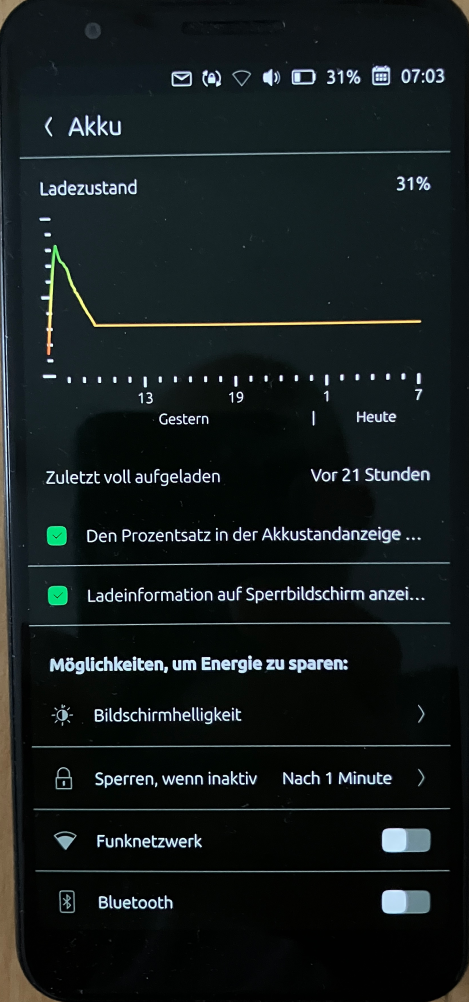
Two days ago, I charged a Pixel 3a (24.04-1.3 rc) to 90%. It is now still at 37%. The scaling governor is active. This reduces power consumption to 22mA. When the scaling governor is not active, power consumption drops to only ~240mA
The device can receive calls and text messages. The alarm clock works too. (Nokia 3210 mode

The same behavior on my daily-use Pixel 3a. Without using Wi-Fi, the battery lasts at least 2 days.
I’ve tried to build a script that turns off Wi-Fi when the screen is turned off and keeps the scaling governor always on for all cores. Unfortunately, without success so far. It should be a solution that still works even after an update. I currently don’t see any loss of functionality.
-
I found the reason for my increased battery drain when using Wi-Fi.
On January 26, 2026, I installed an app called "UB Connect" from the OpenStore. ubconnect
I uninstalled it shortly after. The app wasn't uninstalled cleanly, and a ubconnect.daemon.service remained in the system.
Whenever Wi-Fi was turned on, this daemon would automatically start, but it failed because the app was missing. This prevented Ubuntu Touch from going into power-saving mode after the screen was turned off.After uninstalling and deleting all leftover files from the ubconnect app, Ubuntu Touch goes back into power-saving mode with Wi-Fi on, and the battery consumption is minimal like with mobile data.
-
leftover files from the ubconnect app,
Where did you find these files please? I may have a similar situation.
Is currently using an Op5t
Also owns an Op1, a BQ E4.5, an Xperia X, a Nothing Phone 1, and a Rabbit R1 as well as a BQ tablet and a Pinetab2. Please, someone... make it stop. -
@Moem you might wanna know that more applications does this daemon copy thing and after uninstall the service is there https://codeberg.org/tautologia/ubconnect/src/branch/master/ubconnect/daemon/install.sh
for example that smartwatch app -
@uxes Thank you for the hint... I took a leap of faith and ran
systemctl --user stop ubconnect-daemon.serviceand got a command prompt... no errors. I took this as encouragement and ransystemctl --user disable ubconnect-daemon.serviceand it told me something with UBconnect in it was removed. I think that was probably useful!As for smartwatch apps, I'm still using those, so they can stay.
-
I was monitoring the journal with “sudo journalctl -f” while I turned the Wi-Fi on and off. I noticed that when turning on the Wi-Fi, a connection attempt by the daemon fails.
sudo journalctl -f
Mai 20 19:14:25 ubuntu-phablet systemd[2850]: ubconnect-daemon.service: Main process exited, code=exited, status=1/FAILUREMai 20 19:14:25 ubuntu-phablet systemd[2850]: ubconnect-daemon.service: Failed with result 'exit-code'.Mai 20 19:14:30 ubuntu-phablet systemd[2850]: ubconnect-daemon.service: Scheduled restart job, restart counter is at 89.Mai 20 19:14:30 ubuntu-phablet systemd[2850]: Started ubconnect-daemon.service - UB Connect Daemon.Mai 20 19:14:30 ubuntu-phablet aa-exec[5041]: [5041] aa-exec: ERROR: Failed to execute "/opt/click.ubuntu.com/ubconnect/current/usr/bin/ubconnect-daemon": No such file or directoryMai 20 19:14:30 ubuntu-phablet systemd[2850]: ubconnect-daemon.service: Main process exited, code=exited, status=1/FAILUREMai 20Pixel 3a, works with NextCloud, pihole, Wireguard VPN, Trilium, GhostCloud, Paperless ngx...and a lot of great apps from the Open Store.
Lenovo Tab M10 HD TB-X306X LTE -
dekko does it too.
IIRC every app that is installing a systemd service I have looked at don't remove it when uninstalled. -
I was monitoring the journal with “sudo journalctl -f” while I turned the Wi-Fi on and off.
Thank you! That's a bit above my paygrade.

-
Run the following commands in the Terminal.
systemctl --user stop ubconnect-daemon.service
systemctl --user disable ubconnect-daemon.service
rm -f ~/.config/systemd/user/ubconnect-daemon.service
systemctl --user daemon-reload
systemctl --user status ubconnect-daemon.service
result:
Unit ubconnect-daemon.service could not be found.Pixel 3a, works with NextCloud, pihole, Wireguard VPN, Trilium, GhostCloud, Paperless ngx...and a lot of great apps from the Open Store.
Lenovo Tab M10 HD TB-X306X LTE -
@Linus67 As I said, the first two were what I did, after figuring out they might be helpful.
Can I be a little proud of myself for figuring that out? I'm not a terminal user at all.Is currently using an Op5t
Also owns an Op1, a BQ E4.5, an Xperia X, a Nothing Phone 1, and a Rabbit R1 as well as a BQ tablet and a Pinetab2. Please, someone... make it stop. -
rm -f ~/.config/systemd/user/ubconnect-daemon.service
Thanks to this hint, I knew where to find it and removed it using the file manager.
All clear now!The advantage of using the GUI in this case was that it showed me what else lived there. There was another daemon that was no longer needed. So that was helpful.
-
@gpatel-fr yes that is just missing thing of click packages since they don’t have some kind of postinstall and postuninstall hooks to insert and remove those systemd services
-
It's a feature, taken from the click documentation:
4.3.2 Specification • Only system packages (i.e. .debs) may declare hooks. Click packages must be declarativeinclude code executed outside AppArmor confinement, which precludes declaring hooks. -
@Moem If you're still experiencing increased battery drain when using Wi-Fi,
go to Wi-Fi -> Network Settings -> Saved Networks and tap “Forget” to remove all saved networks. Then reconnect to your home Wi-Fi network.I also had a few stale connections here—sometimes even two Wi-Fi icons in the status bar.
-
If you're still experiencing increased battery drain when using Wi-Fi,
go to Wi-Fi -> Network Settings -> Saved Networks and tap “Forget” to remove all saved networks.Thanks... the truth of the matter is that I've just migrated to a different device. So there are no saved networks. But also I don't know the state of my current battery.
-
@Moem
After clearing the saved Wi-Fi connections, power consumption is minimal.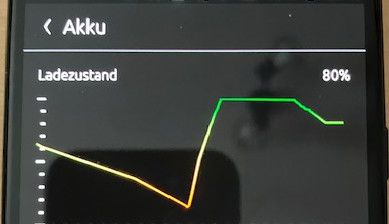
-
@Linus67 so what was the conclusion here for light users? Powersave or scaling? Suspension setting on or off? Thanks
-
@moodroid The “Prevent background suspension” setting should be set to OFF. As described in the Ubuntu Touch Wiki.
By “Power Save,” I mean the following:
- Set CPU cores to half load
- Turn off Wi-Fi
- Turn off mobile data
- Turn off Bluetooth
- Turn off location services
- Enable 2G (optional)
With these settings, the device enters deep sleep mode and consumes less than 22 mA. (1-2% battery consumption at night) If this is not the case, you will need to check for faulty services or configurations that are preventing deep sleep mode. In my case, I created a script with a log file that records the power consumption of the idle device in a text file. It was always over 200 mA. Only after cleaning up faulty services linked to installations did the consumption drop to ~22 mA.
The battery on my 9-year-old Pixel 3a now lasts about 4 days with moderate use. I call it “NOKIA 3210 mode.” You can be reached via text and phone for days on a single battery charge. If needed, you can also take pictures, check emails and calendar events, send texts, or make calls, and all other features of a modern smartphone are available. (Navigation, internet, NextCloud, cloud music...)
-
@Linus67 thanks - that’s great. So when you say set cpu cores to half load, how do I do that? Is that the powersave governor?
-
This is my current script
#!/bin/bash
# ====================================================================
# NOKIA 3210 MODUS: CPU throttling + All offline services (Pixel 3a 24.04-1.3 rc)
# ====================================================================

if [ "$EUID" -ne 0 ]; then
    echo "ERROR: Please run the script using: sudo $0"
    exit 1
fi

echo "Enable Nokia 3210 mode..."

# 1. Force CPU cores into power-saving mode
for governor in /sys/devices/system/cpu/cpu*/cpufreq/scaling_governor; do
    if [ -f "$governor" ]; then
        echo "powersave" > "$governor"
    fi
done
echo "[✓] CPU throttling enabled."

# 2. Turn off Wi-Fi
nmcli radio wifi off
echo "[✓] Wi-Fi disabled."

# 3. Turn off location tracking (GPS)
sudo dbus-send --system --type=method_call --print-reply --dest=com.lomiri.location.Service /com/lomiri/location/Service org.freedesktop.DBus.Properties.Set string:com.lomiri.location.Service string:IsOnline variant:boolean:false
echo "[✓] Location tracking disabled."

# 4. Turn off Bluetooth
rfkill block bluetooth
echo "[✓] Bluetooth disabled."

# 5. Turn off mobile data
sudo -u phablet DBUS_SESSION_BUS_ADDRESS="unix:path=/run/user/32011/bus" dbus-send --session --type=method_call --print-reply --dest=com.lomiri.connectivity1 /com/lomiri/connectivity1/Private org.freedesktop.DBus.Properties.Set string:com.lomiri.connectivity1.Private string:MobileDataEnabled variant:boolean:false
echo "[✓] Mobile data disabled."

# 6. Greenline-Service stop at user level
XDG_RUNTIME_DIR=/run/user/32011 sudo -u phablet systemctl --user stop greenline.service 2>/dev/null
echo "[✓] greenline.service stopped."

echo "------------------------------------------------"
echo "Success! CPU, wireless modules and GPS are in sleep mode."
sleep 3
These script lines have been compiled from various sources and optimized for my Pixel 3a running UT 24.04-1.3 rc. Many thanks to the experts in this forum for their helpful tips on some of the commands.


Hello! It looks like you're interested in this conversation, but you don't have an account yet.
Getting fed up of having to scroll through the same posts each visit? When you register for an account, you'll always come back to exactly where you were before, and choose to be notified of new replies (either via email, or push notification). You'll also be able to save bookmarks and upvote posts to show your appreciation to other community members.
With your input, this post could be even better 💗
Register Login