[Release] HomeSpike v1.0 — a real home screen for Ubuntu Touch (multi-page, dock, drag-to-reorder, three placement modes, true multitasking)
-
Source / install: https://github.com/TeamIDE/HomeSpikev1 · License: GPL-2.0-or-later
What it is
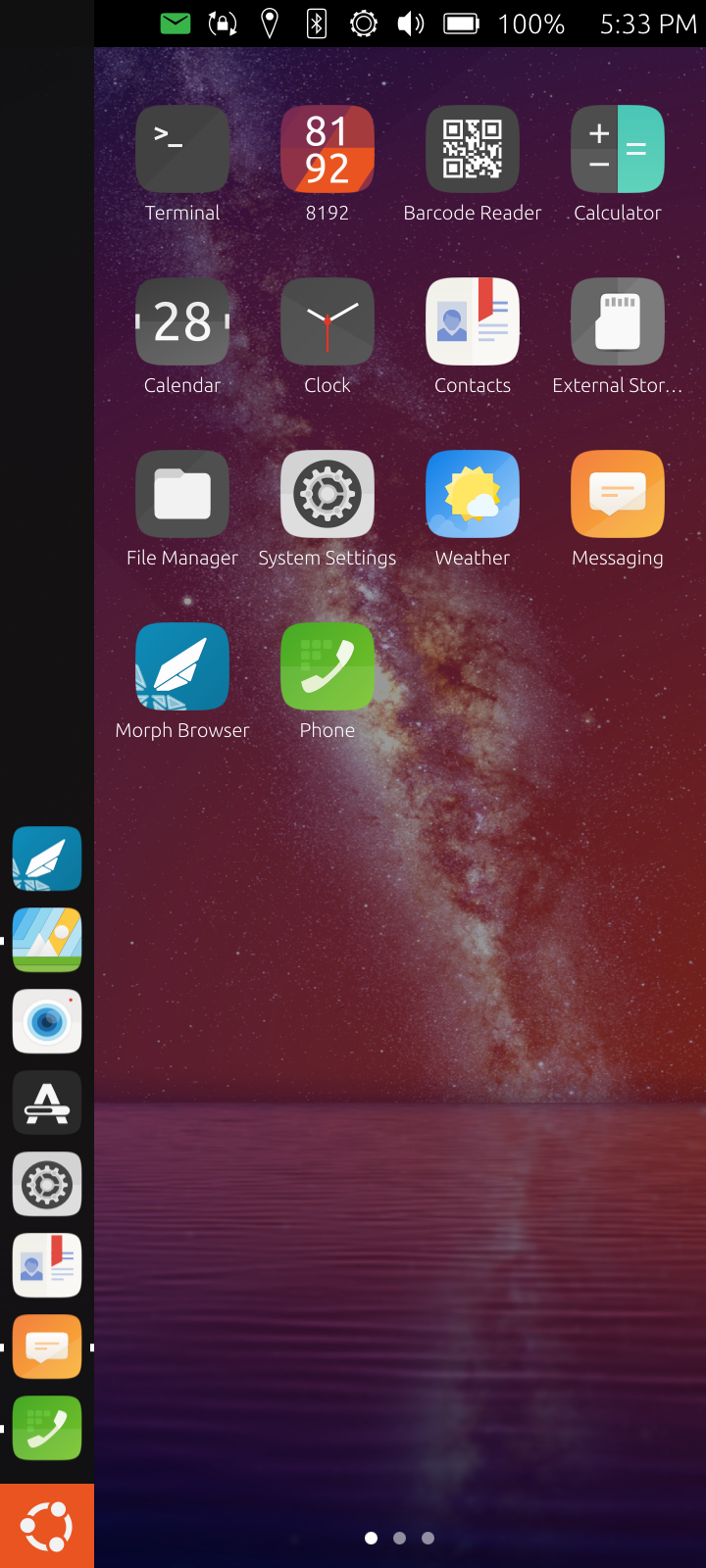
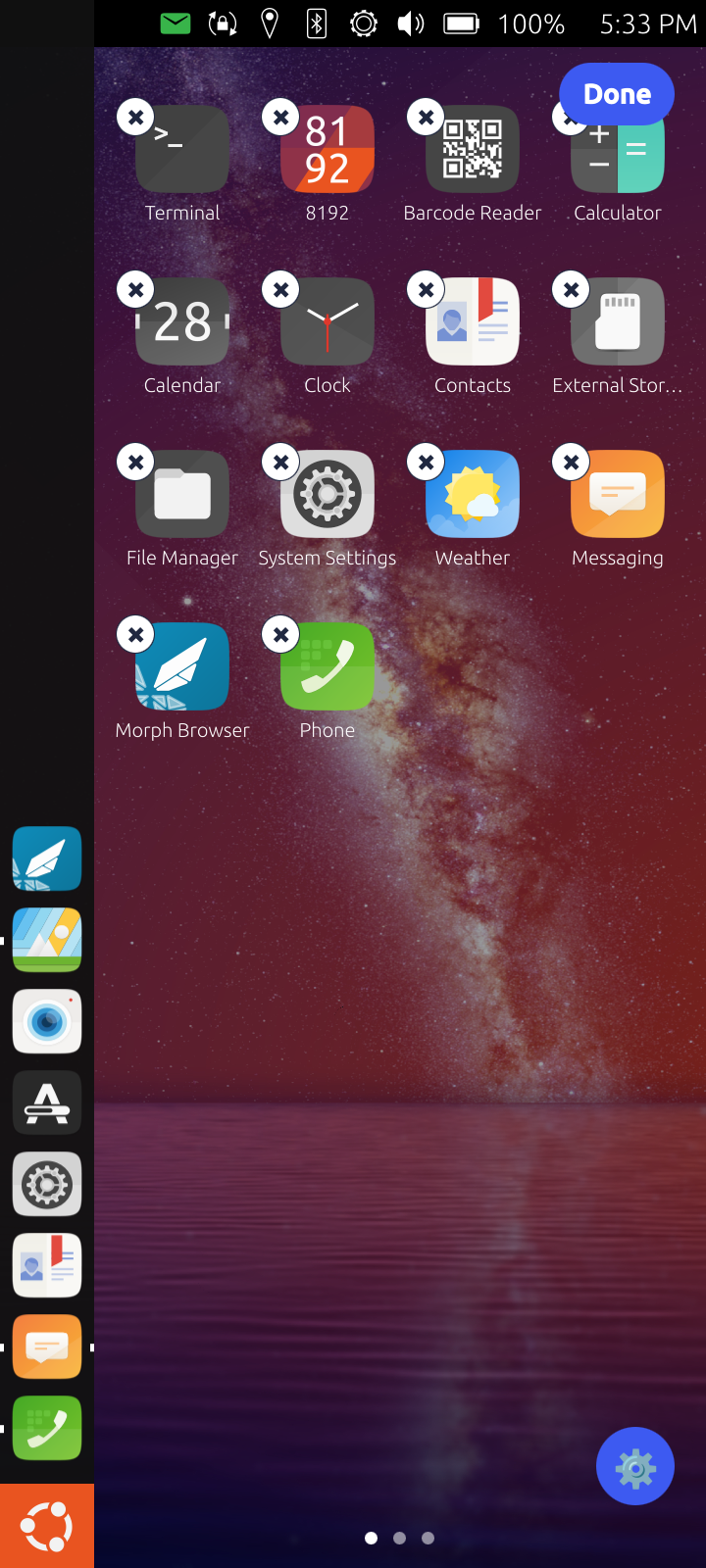
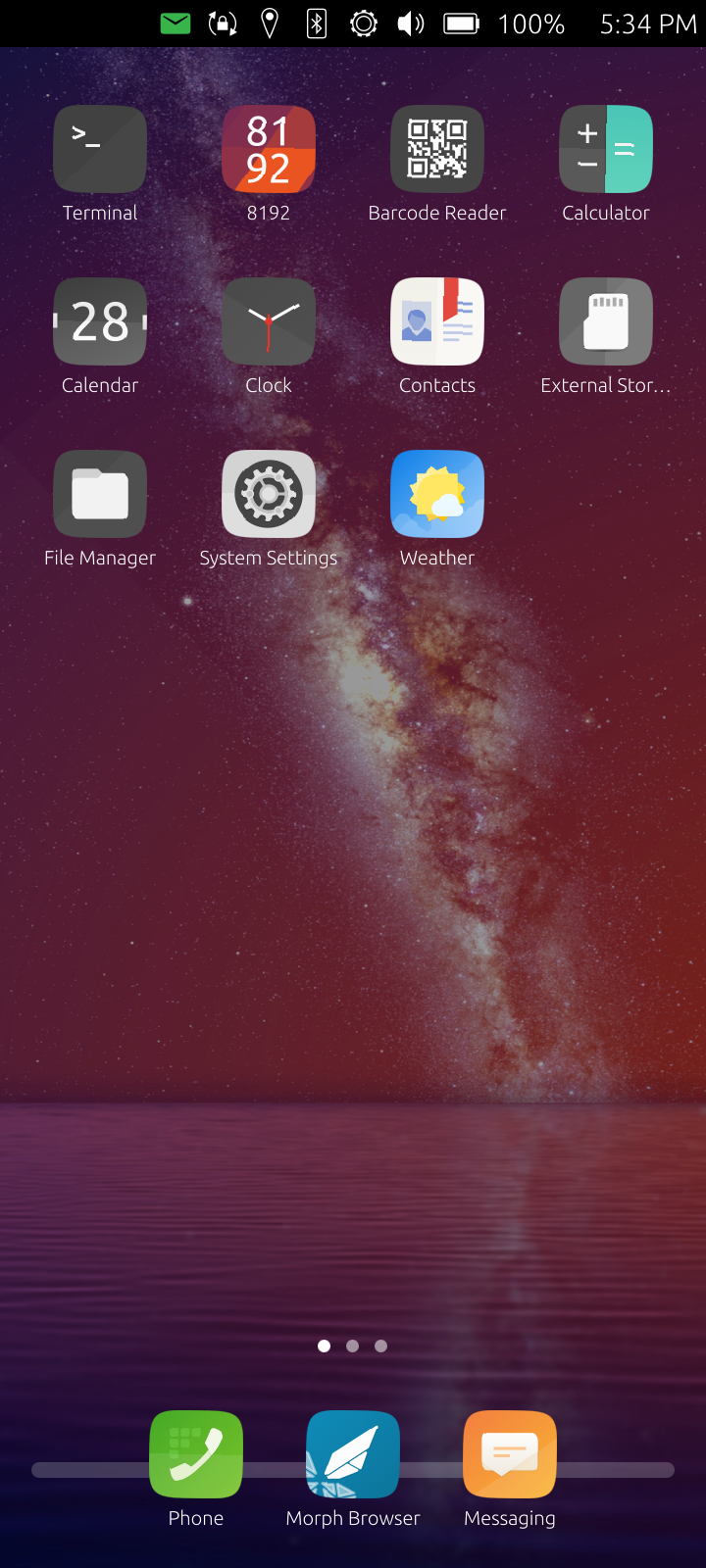
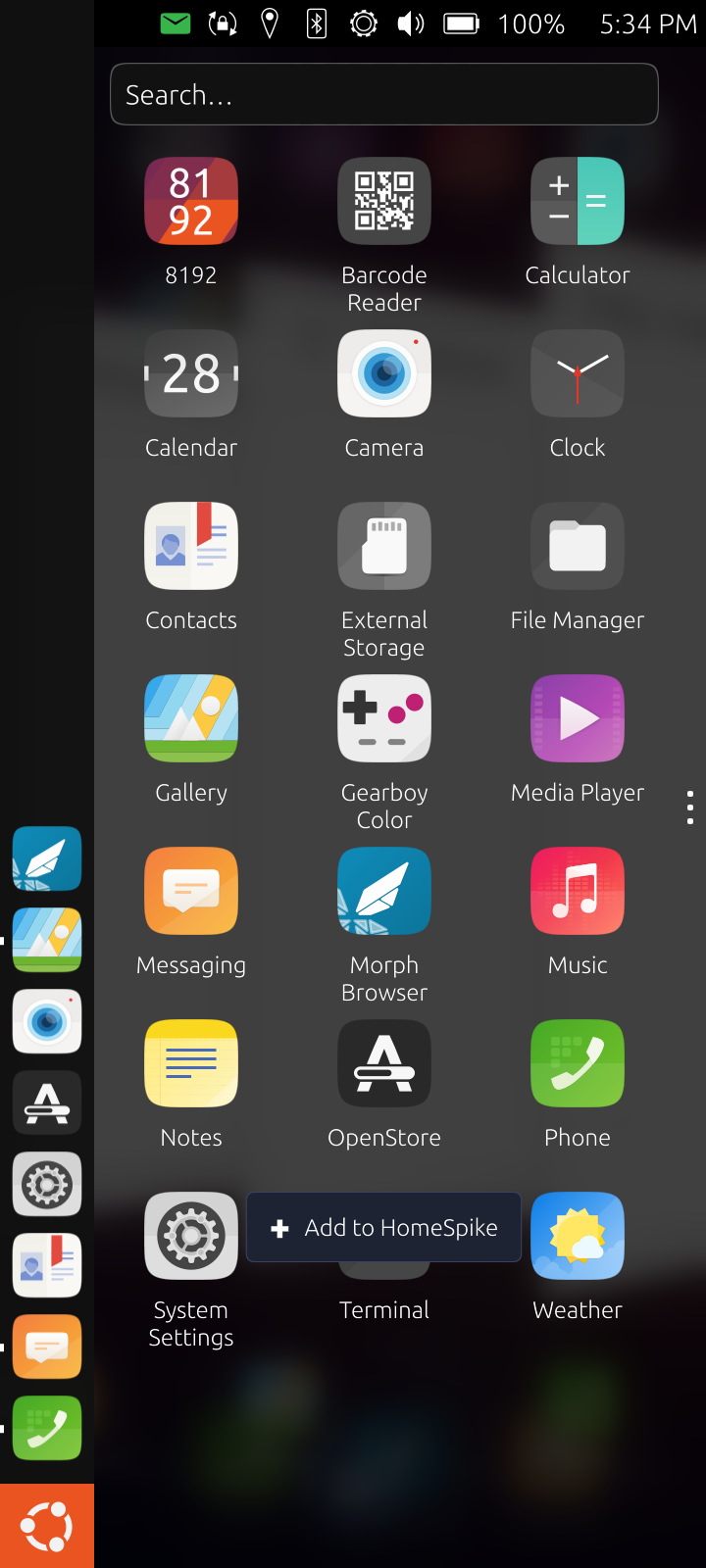
HomeSpike is a fullscreen home surface for Ubuntu Touch (Lomiri) that replaces "drawer-as-default" with what most people actually expect from a phone: a wallpapered home grid you land on after unlock, swipeable pages of icons, an iOS-style dock, and an edit mode where you long-press to drag icons around or remove them. New apps you install auto-add to your last page. The Lomiri drawer is still there (the patched long-press inside it gives you an "Add to HomeSpike?" prompt), but it's no longer the first thing you see.
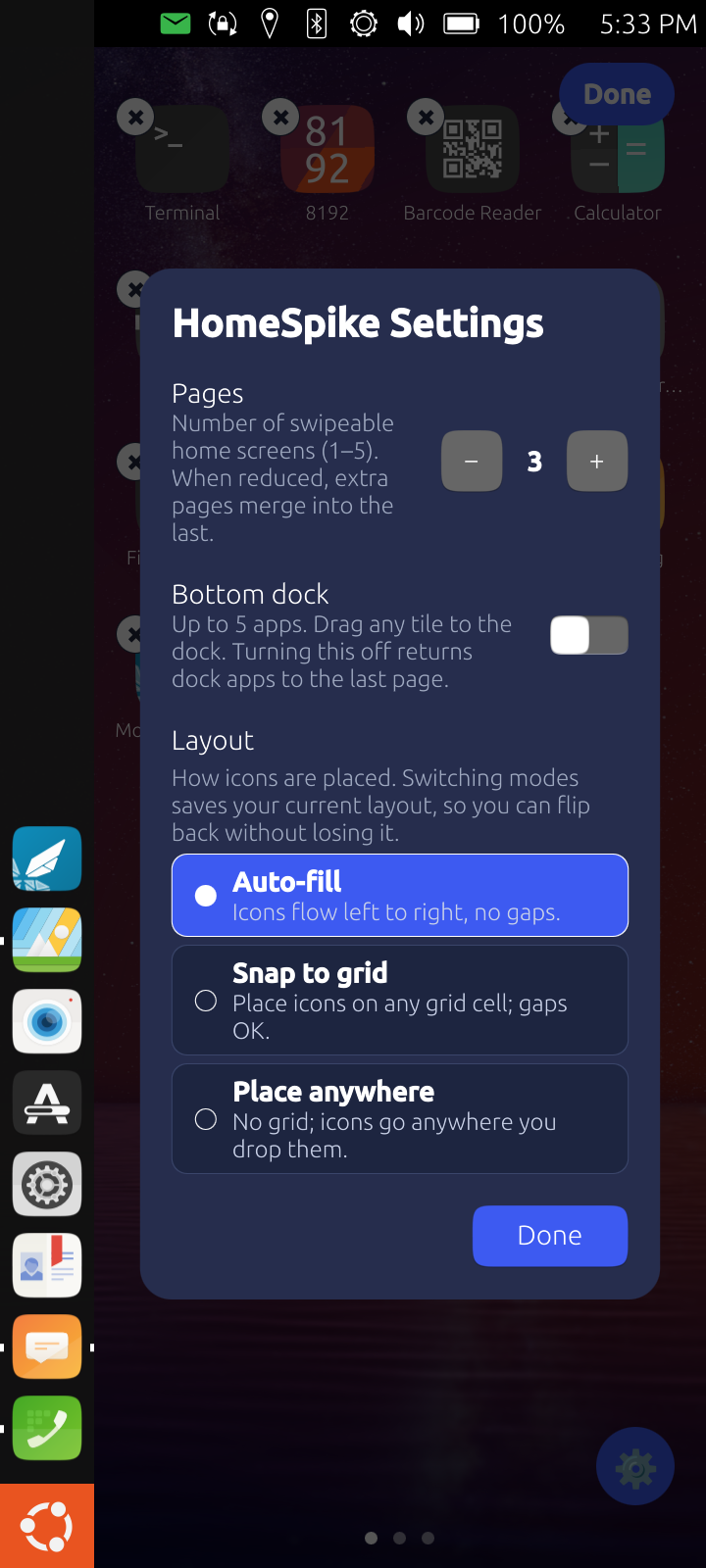
It ships three placement modes so you can lay icons out the way you actually want: auto-fill (icons reflow with no gaps), snap-to-grid (place on any cell, gaps allowed), or place-anywhere (drop wherever, overlaps OK). Each mode keeps its own saved layout — switching modes never destroys the previous arrangement.
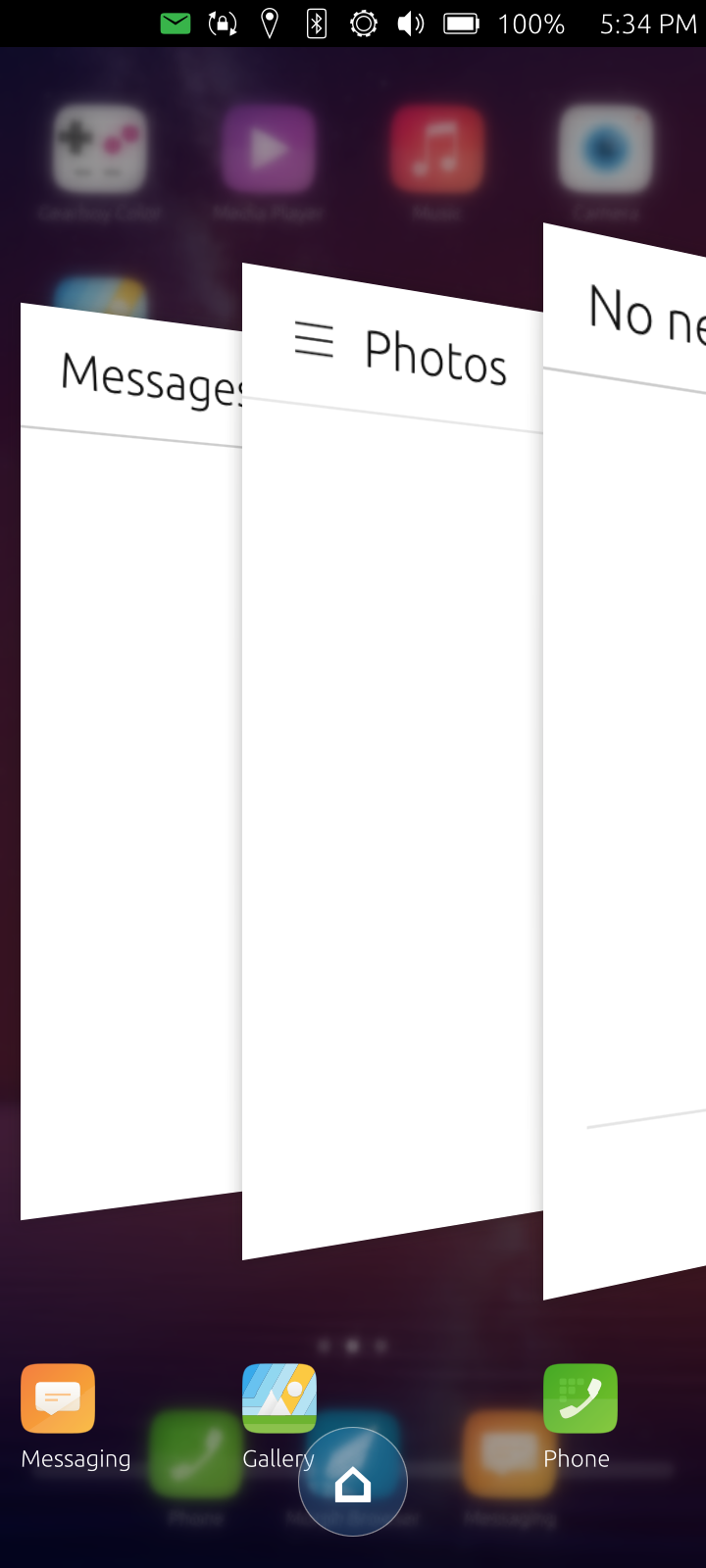
It also fixes a fundamental gap in Lomiri's staged mode (the phone form factor): there was no "show desktop" concept at all — Lomiri's design assumed one app always fills the screen. Tapping the Ubuntu logo (BFB) or the new spread home button now reliably returns you to HomeSpike, with the running apps still alive in the background. Real multitasking with a real home screen.
I built it because Ubuntu Touch in 2014 made a bet on "scopes as cards" replacing home screens with widgets, and that bet hasn't aged well. Every other mobile Linux shell since (Plasma Mobile, Phosh, even Android-via-Halium) has done the opposite. After daily-driving UT on a OnePlus Nord N100 and finding myself wanting somewhere to put apps in an order I chose, I stopped wishing for it and wrote it.
How it works
It's all QML on top of stock Lomiri — no shell fork. HomeSpike loads as a Loader inside Lomiri's own Stage.qml, replacing the original Wallpaper element. Because it lives in the lomiri process and isn't a separate application surface, it never appears in the app spread, never needs autostart, and never has a .desktop file.
The four Lomiri files we touch (Shell.qml, Stage.qml, Stage/Spread/Spread.qml, Launcher/Drawer.qml) are shipped as full replacement copies under app/lomiri-overrides/ — install is plain backup-and-replace, no sed. Original files are kept as .orig and uninstall.sh cleanly reverts. Installer is idempotent and OTA-survivable (re-run after a system update).
For "go home" to actually work, HomeSpike teaches the stage a new concept: a homeShown flag that promotes the HomeSpike Loader above the app delegates on demand (BFB / spread home button) and demotes it again when an app gains focus. Without this, Lomiri's staged appDelegate state insisted on rendering the focused app full-size even when minimised, hiding HomeSpike. There's a small Mir-focus-echo grace window so the previous app's lingering focus state doesn't immediately flip the overlay back off.
HomeSpike itself reuses Lomiri's own primitives instead of reinventing: app inventory comes from AppDrawerModel (the same model the drawer uses), wallpaper comes from AccountsService.backgroundFile (the same one Settings writes when you change wallpaper), icons render with LomiriShape (same rounded-rect tile primitive). State (per-mode layouts, dock contents, hidden apps, page count, dock settings) persists to ~/.config/home-spike/home-spike.conf via Qt.labs.Settings. The Drawer→HomeSpike "add" is a file-inbox the running HomeSpike polls every 1.5 seconds — no D-Bus dance, just a file.
Features
Multi-page swipeable home (1–5 pages, configurable)
Optional iOS-style dock at the bottom (max 5 apps, persistent across pages, adjustable plate height). When the dock is on, Lomiri's left launcher panel auto-collapses so HomeSpike owns the full screen.
Three placement modes with independent saved layouts:
Auto-fill (reflow, no gaps)
Snap to grid (place on cells, gaps allowed, swap on collision)
Place anywhere (drop anywhere on the page, overlaps allowed)
Edit mode (long-press): drag-to-reorder, drag-to-edge auto-flips page, X-badge removes an icon (stays installed, just hidden from home)
Drag between dock and grid in both directions
True multitasking + reliable home: BFB or the spread home button always returns to HomeSpike; running apps stay alive in the background and resume instantly when re-tapped
Home button in the right-swipe app spread — tap to return to HomeSpike without minimising each app individually
Wallpaper inherits whatever you set in Settings → Background
New installs auto-append to the last page (snap → first free cell; place-anywhere skips, since it's intentionally manual)
Long-press an app in the swipe-left drawer → "Add to HomeSpike?" prompt → it appears on your home within ~2 seconds
Per-arch portable — no qmlscene wrapper script, no arch-specific paths; HomeSpike runs inside lomiri so it picks up whatever Lomiri sees
Tested on
OnePlus Nord N100 (billie2), Ubuntu Touch 24.04 noble. The design is generic to Lomiri 24.04 — should work on every device on that channel. If you try it on something else, please let me know.
How to install
Currently distributed as a self-hosted installer (not OpenStore — see "Why not OpenStore" below). Phone connected via adb, developer mode on:
git clone https://github.com/TeamIDE/HomeSpikev1.git
cd HomeSpikev1
PIN=<your-phablet-sudo-pin> ./deploy/install.shTo revert:
PIN=<your-phablet-sudo-pin> ./deploy/uninstall.sh
Why not OpenStore
OpenStore ships Click packages, which are AppArmor-sandboxed and explicitly cannot modify system files, remount / rw, or hook into Lomiri's shell QML — i.e., every single thing that makes HomeSpike the home rather than an app you open. A confined Click version would just be "HomeSpike Launcher: an app drawer you have to tap to enter," which loses 90% of the value. So this ships as a self-hosted installer for now. A clean long-term answer is upstreaming the home-surface mechanism into Lomiri proper — I'd like to do that once the design has settled in real-world use.
Caveats up front
Modifies four Lomiri shell files. Read install.sh before running. Backups are made for each (.orig next to the live file); uninstall.sh restores them.
OTA wipes overrides. Re-run install.sh after any system update. Takes a couple seconds.
Iterating on the overrides logs you out to the greeter. Lomiri caches QML aggressively, so the dev refresh path pkills lomiri — you'll see the greeter, unlock to continue. Normal use (just running HomeSpike) doesn't restart anything.
Removes the OpenStore-link long-press in the drawer. That gesture now goes to "Add to HomeSpike?" instead. Can be restored as a different gesture later if there's demand.
No widget API yet. This release is the home surface itself. A widget system (with a real provider API) is the next milestone — the current QML is the scaffolding for an eventual ImGui+Lua reimplementation that'll host third-party widgets behind the same load-point.
Source + issues
GitHub: https://github.com/TeamIDE/HomeSpikev1
License: GPL-2.0-or-later. No warranty. PRs welcome — especially "tested on <your device>" confirmations and Lomiri-version-drift fixes for the override copies.
TL;DR
"I wanted a home screen on Ubuntu Touch. UT doesn't really have one — the drawer is the default surface and there's no place to arrange icons how you want. So I wrote one. It's a QML tree loaded inside Lomiri's own Stage.qml + four small Lomiri shell-file overrides. Multi-page, dock, drag-to-reorder, three layout modes (auto-fill / snap-to-grid / place-anywhere — each with its own saved layout), long-press in the system drawer adds apps to it, spread gets a home button, BFB minimises any open app and reveals HomeSpike — true multitasking with a real home screen. Backups + uninstaller included. Source linked below."
-
 Z Zer0 referenced this topic
-
Z Zer0 referenced this topic
-
-
OpenStore ships Click packages, which are AppArmor-sandboxed and explicitly cannot modify system files, remount / rw, or hook into Lomiri's shell QML
Well, That's half true.
You can publish applications not sandboxed, that can write to system files, see Ubuntu Touch Tweak Tool for instance.
But you have to ask for that and your files need to be reviewed by UT Devs.But sure if you can deal with UBPorts Devs to merge your work to Ubuntu Touch that would be the best.
2015-2023 : Meizu MX4 ☠️⚰️✝️
2023-2024 : Nexus 5 ☠️⚰️✝️
2024-***** : FPOS Fairphone 5
🇲🇫🇬🇧 -
Can this be installed alongside Lomiri Plus from the Ambot Installer?
-
@Keneda i did not know this. thanks
-
@projectmoon I wouldn't try. This is only for ut vanilla. best case its buggy. worst case it bricks and the uninstaller doesn't help
-
@Zer0 I would assume so, yes.
Hello! It looks like you're interested in this conversation, but you don't have an account yet.
Getting fed up of having to scroll through the same posts each visit? When you register for an account, you'll always come back to exactly where you were before, and choose to be notified of new replies (either via email, or push notification). You'll also be able to save bookmarks and upvote posts to show your appreciation to other community members.
With your input, this post could be even better 💗
Register Login