Unable to format userdata
-
Hi all,
I have an X306FA and as there is no Android 11 firmware for this model available I took the risk and flashed TB_X306F_S230626_230530_BMP (since A only seem to stand for Alexa).
It was a success and I confirmed I could boot into Android 11.
I then followed the instructions from https://gitlab.com/ubports/porting/community-ports/android11/lenovo-tab-m10-hd/lenovo-m10-hd
It worked all well until
fastboot format:ext4 userdata:Warning: userdata type is raw, but ext4 was requested for formatting. FAILED (remote: 'Could not open partition') fastboot: error: Command failedThis seems to be weird, since the partition is available
fastboot getvar all:(bootloader) partition-type:userdata:raw (bootloader) has-slot:userdata:no (bootloader) is-logical:userdata:no(There doesn't seem to be a size entry tho)
Erase also not working:
Erasing 'userdata'
FAILED (remote: 'Partition doesn't exist')
I then went into the recovery and did a factory reset for data and system. No change. I then decided to flash the userdata again with fastboot since I thought maybe the inital boot to android changed something but I there is no change. I took the firmware from the github repo: https://github.com/rubencarneiro/amar_row_wifi/releases
I confirmed I use the recommended fastboot version:
fastboot version 30.0.0-6374843Now I do not have any ideas left...
-
@sepatu Are you using a standalone fastboot copy? Which OS are you using? I use Ubuntu and whenever I have error using fastboot, I just use the fastboot copy I downloaded. Make sure you run your local copy instead of the system one by changing directory to where the fastboot is then use
./fastboot <command> -
@kugiigi I use arch linux, and the fastboot is the correct version as mentioned in the readme. Confirmed with
./fastboot --version. I also tried it with my sdk installed fastboot (v35), with the same results.I'm trying it with the official UBPorts installer now, and sse if I have success there. But the downloads there are very slow at ~80kbps, so it probably need a couple more hours until I can test it.
-
@sepatu Hi, I ran into the same issue. I did all the other install-steps. And after installation I did the format of userdata in recovery mode. This worked for me.
-
@zedr0k You mean right after
fastboot flash system ./ubuntu.img? -
@sepatu Right. After the last step (
fastboot flash system ./ubuntu.img) I rebooted into recovery and did the format of userdata. Then rebooted into ubports. First boot need a few minutes. -
Oh perhaps you're in the wrong fastboot? fastboot is different from fastbootd. Not sure where you're supposed to format userdata though.
-
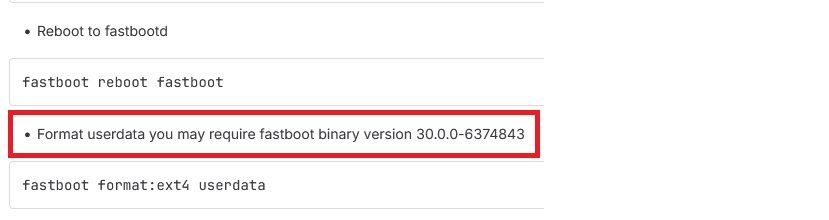
It must be done in fastbootd and an elevated prompt - I had to put ./ in front (using M$ Windows).
Glad to see you used the work around and it worked.

-
thank you. I missed the "fastboot reboot fastboot" step. My mistake (I should have read more carefully). Thank you very much for your work.

Hello! It looks like you're interested in this conversation, but you don't have an account yet.
Getting fed up of having to scroll through the same posts each visit? When you register for an account, you'll always come back to exactly where you were before, and choose to be notified of new replies (either via email, or push notification). You'll also be able to save bookmarks and upvote posts to show your appreciation to other community members.
With your input, this post could be even better 💗
Register Login