Merezhyvo browser
-
@naz.R said in Merezhyvo browser:
webrtc leak
even using Tor.. Our Public address ip shown.
Added to the list, thanks again
Hello @naz.r
noticed you never replied on this topic. I don't know anything on this matter, however I have seen opinions about that saying it was impossible to really hide IP address with webrtc, it was a problem with webrtc, not browsers implementing it. Out of curiosity, what's your point of view on this ?
-
@naz.R In terms of security:
- can they be deleted if we decide?
- are the tabs independent of each other in terms of cookies. For example, can cookies from one web page «see» what another web page is doing?
-
@domubpkm said in Merezhyvo browser:
@naz.R In terms of security:
- can they be deleted if we decide?
- are the tabs independent of each other in terms of cookies. For example, can cookies from one web page «see» what another web page is doing?
In Merezhyvo you can wipe everything the browser has stored for a site with one click.
Each tab has a “Delete all data and close” button (with broom and x-mark icon one). When you click it, the browser deletes all data it has for that site (cookies, local storage, cache, etc.) and then closes the tab.Right now there isn’t a separate option to delete only cookies while keeping other data, but full site wipe is always available per tab.
About cookies and tab independence
Tabs are not completely isolated from each other – cookies are shared per browser profile, not per tab.
If you open the same website in two tabs (for example, example.com), they will see the same cookies. That’s how things like “stay logged in” work across tabs.
One website cannot read cookies of a different website (for example, example.com cannot read cookies of bank.com). This is enforced by the browser’s same-origin security rules.
However, if several sites all include the same third-party scripts or trackers, those third parties can use their own cookies to recognize you across sites.
Trackers blocking task, including third-party cookies blocking, is still iт my ToDo list, so for now it is like that.
In short: you can always fully wipe data for a site from a tab, and websites can’t directly read each other’s cookies, but tabs do share the same cookie jar for the same site.
-
@gpatel-fr said in Merezhyvo browser:
@naz.R said in Merezhyvo browser:
webrtc leak
even using Tor.. Our Public address ip shown.
Added to the list, thanks again
Hello @naz.r
noticed you never replied on this topic. I don't know anything on this matter, however I have seen opinions about that saying it was impossible to really hide IP address with webrtc, it was a problem with webrtc, not browsers implementing it. Out of curiosity, what's your point of view on this ?
Actually, "Added to the list" was my reply there.
Yes, right webRTC IP leak is the issue of the technology itself. So the approach is simple: if someone really cares about hiding their IP, the only fully honest option is to disable WebRTC entirely.
In Merezhyvo I plan to make WebRTC configurable and very straightforward:
- Always enabled – WebRTC works normally.
- Always disabled (hard) – WebRTC APIs are effectively turned off.
- Disabled (hard) when Tor is enabled – if you use Tor in the browser, WebRTC is cut off to avoid surprises. And vice versa, if Tor is off, then webRTC is on.
I am working on it and hope to include it into the next release.
-
@naz.R said in Merezhyvo browser:
However, if several sites all include the same third-party scripts or trackers, those third parties can use their own cookies to recognize you across sites.
Trackers blocking task, including third-party cookies blocking, is still iт my ToDo list, so for now it is like that.
Thanks for the explanation. It is therefore up to everyone to decide whether they want currently to open several tabs at the same time, especially in the case of personal accounts.
-
@domubpkm said in Merezhyvo browser:
@naz.R said in Merezhyvo browser:
However, if several sites all include the same third-party scripts or trackers, those third parties can use their own cookies to recognize you across sites.
Trackers blocking task, including third-party cookies blocking, is still iт my ToDo list, so for now it is like that.
Thanks for the explanation. It is therefore up to everyone to decide whether they want currently to open several tabs at the same time, especially in the case of personal accounts.
I think I have to add here following:
Merezhyvo has one extra twist:
For performance on phones, the browser keeps only one active tab at a time.
When you switch to another tab, the previous one is deactivated and stops running code.So in practice:
Sites still share cookies in the usual “per domain” way,But there is never a moment when two different tabs are actively running JavaScript in parallel, only the currently selected tab is alive and executing.
-
@naz.R said in Merezhyvo browser:
So in practice:
Sites still share cookies in the usual “per domain” way,But there is never a moment when two different tabs are actively running JavaScript in parallel, only the currently selected tab is alive and executing
I understand (I think) what you're saying, but does this change anything about the action / effect of third-party cookies?
Does this mean that even if they are there, they are asleep and have no negative spying action? -
@domubpkm said in Merezhyvo browser:
@naz.R said in Merezhyvo browser:
So in practice:
Sites still share cookies in the usual “per domain” way,But there is never a moment when two different tabs are actively running JavaScript in parallel, only the currently selected tab is alive and executing
I understand (I think) what you're saying, but does this change anything about the action / effect of third-party cookies?
Does this mean that even if they are there, they are asleep and have no negative spying action?no, it doesn't
the third-party cookie blocker is going to be in the next release after the next one, I believe. -
@naz.r Not sure what I'm saying so sorry if I say something stupid:
Does certain data pass through a clipboard internal to the app (therefore different from the UT clipboard). If this is indeed the case, would it be possible to have a mechanism that allows its contents to be erased (security)? -
@domubpkm said in Merezhyvo browser:
@naz.r Not sure what I'm saying so sorry if I say something stupid:
Does certain data pass through a clipboard internal to the app (therefore different from the UT clipboard). If this is indeed the case, would it be possible to have a mechanism that allows its contents to be erased (security)?You’re not saying anything stupid at all - Ubuntu Touch really does have a slightly weird situation with clipboards.
Merezhyvo itself doesn’t implement a separate “in-app” clipboard or any clipboard history. When you copy text in the browser, it goes to the clipboard that is exposed to confined apps on Ubuntu Touch.
However, because of how Ubuntu Touch sandboxes native apps, Libertine/X11 apps, Waydroid, etc., there isn’t a single global clipboard that everything shares. That’s why text copied in Merezhyvo often can’t be pasted into a native app (and vice versa) - they’re effectively using different system clipboards, not something I created inside the browser.
One related security detail: the built-in password autofill never uses the clipboard at all. Saved passwords are sent directly from the browser’s password storage into the page’s form fields over an internal IPC channel, and only live in memory long enough to fill the form. They are not put onto the Ubuntu Touch clipboard and not kept in any separate “hidden” clipboard inside the app.
-
@naz.R said in Merezhyvo browser:
One related security detail: the built-in password autofill never uses the clipboard at all.
Glad to hear that!

-
@naz.r Other points (nothing blocking):
- make the zoom of a page we choose persistent?
- zoom on the development tools. Tiny currently.
- make the virtual keyboard cursor, removable on the right and left horizontal ?
- allow the smartphone settings theme to apply? doesn't seem to be the case, for example on a github page. I can't get out of the dark theme.
-
@domubpkm said in Merezhyvo browser:
@naz.r Other points (nothing blocking):
- make the zoom of a page we choose persistent?
- zoom on the development tools. Tiny currently.
- make the virtual keyboard cursor, removable on the right and left horizontal ?
- allow the smartphone settings theme to apply? doesn't seem to be the case, for example on a github page. I can't get out of the dark theme.
Thank you for your active position. It really inspires me to continue working on this project and develop it further.
I added all these wishes to my ToDo list (some were already there).
Right now I'm focusing on the basic functionality, with an emphasis on privacy and security. But I'm also trying to add a little something related to usability.
But sooner or later, the time will come for the implementation of each idea.
And, yes, there is only one dark theme for now. My goal is to make a fully functional and secure browser first. And then I will focus more on other stuff. -
@naz.R said in Merezhyvo browser:
My goal is to make a fully functional and secure browser first.
I agree with you 100% ! Safety first.
But as this browser “inspires me”, I test and pass on the info. -
@domubpkm really glade you like it.
By the way have you had a chance to try it in desktop mode, with an external browser?
Merezhyvo is fully convergent one. -
@naz.R said in Merezhyvo browser:
By the way have you had a chance to try it in desktop mode, with an external browser?
Merezhyvo is fully convergent oneNot me at the moment. I don't have the cable for it.
-
@domubpkm said in Merezhyvo browser:
@naz.R said in Merezhyvo browser:
By the way have you had a chance to try it in desktop mode, with an external browser?
Merezhyvo is fully convergent oneNot me at the moment. I don't have the cable for it.
got it.
I use a cheap miracast dongle for connection to a regular PC monitor. It works well enough, not the best, but really well enough. -
version 0.4.3 has been released
Change log:
0.4.3 - 2025-12-06
Added- Pull-to-refresh gesture to reload pages
- In-app certificate validation with a security indicator, warning screen, and certificate info popover
- Configurable HTTPS mode (Strict / Preferred)
- WebRTC privacy modes (Always allowed / Always blocked / Blocked when Tor is enabled)
- UI improvements
Changed
- Updated Electron/Chromium engine (Chromium 142.0.7444.177)
-
-
Hi @naz.r
Small virtual keyboard malfunction maybe :
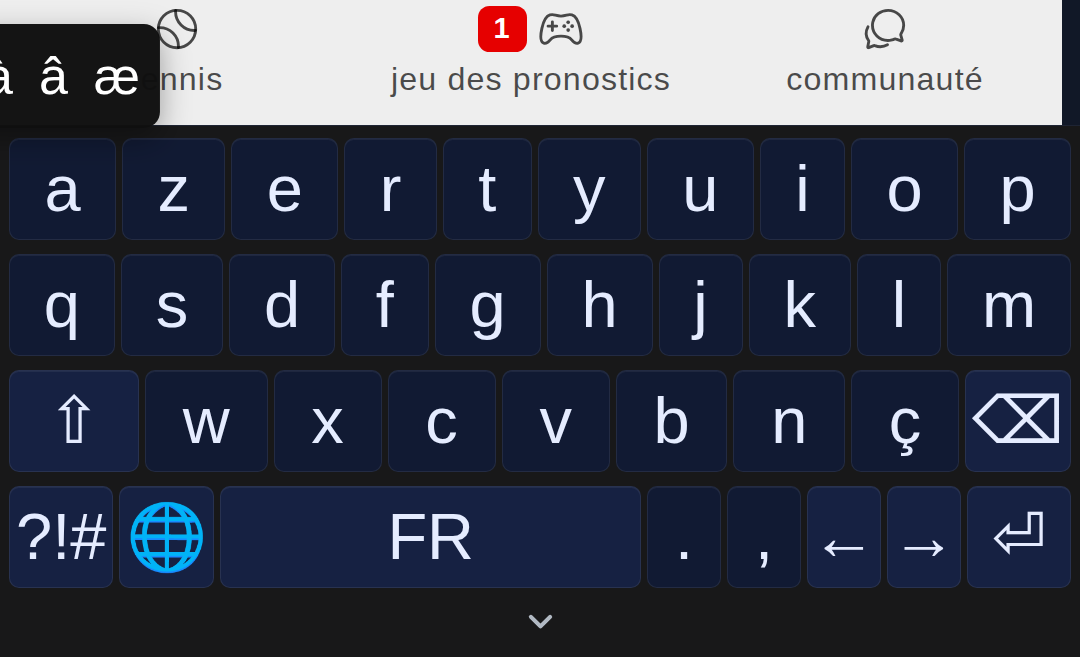
Problem displaying accented characters on the Azerti keyboard 'a'. On the other hand, the choices of the different accented characters do not disappear from the display if a choice is not made.
Hello! It looks like you're interested in this conversation, but you don't have an account yet.
Getting fed up of having to scroll through the same posts each visit? When you register for an account, you'll always come back to exactly where you were before, and choose to be notified of new replies (either via email, or push notification). You'll also be able to save bookmarks and upvote posts to show your appreciation to other community members.
With your input, this post could be even better 💗
Register Login