Rednote 9 pro 6gb (M2003J6B26) - Cleaning up - Formatting cache partition
-
Hi, I'm trying to install ubuntu ports, but I can't do it.
Smartphone:
Rednote 9 pro 6gb (M2003J6B26)
MIUI GLOBAL 14.0.5 stable
Android 12
Kernel 4.14.190Installation hold on " - Cleaning up - Formatting cache partition".
Smartphone screen: black with FASTBOOK in orange.How can I resolve it?
Thanks
-
@ProvoUbuntu said in Rednote 9 pro 6gb (M2003J6B26) - Cleaning up - Formatting cache partition:
MIUI GLOBAL 14.0.5 stable
I think that may be the problem. You should always follow the directions of the installer and the device page. This is on the device page for Joyeuse:
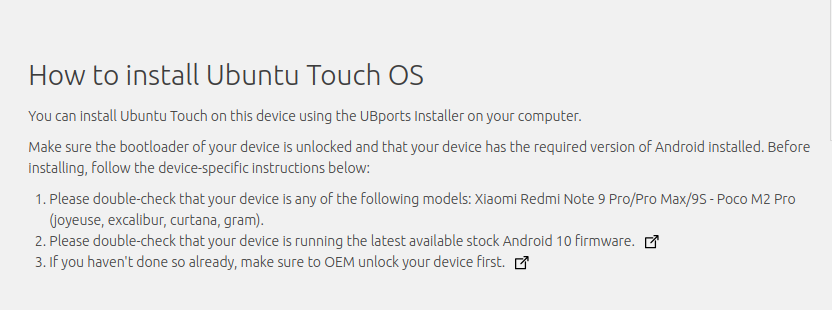
I'm not sure what 'Rednote' is but I'm going to assume you mean Xiaomi Redmi Note 9 Pro. The device page for that device is here, but do check very carefully whether that is the correct one.
https://devices.ubuntu-touch.io/device/joyeuse/
In any case, if the device page tell you you need a certain Android version, that really means that you need a certain Android version.
-
@ProvoUbuntu
Hello.
You have to, first, install a stock from with Android version 10.
If you starting from Android 12, iIt's the reason why it fails.
You could join us on Telegram in https://t.me/WelcomePlus
There is a cookbook to install easily Ubuntu Touch on this devices. -
@Vlad-Nirky
Thanks.
1)miflash_unlock_en_7.6.727.43 (warning. MIui account: 7 days to wait for every error)
2)joyeuse_global_images_V12.0.3.0.QJZMIXM_20210419.0000.00_10.0_global_0801ff7d09.tgz
Free Download Manager- https://hugeota.d.miui.com/V12.0.3.0.QJZMIXM/joyeuse_global_images_V12.0.3.0.QJZMIXM_20210419.0000.00_10.0_global_0801ff7d09.tgz
- bigota.d.miui.com e bkt-sgp-miui-ota-update-alisgp.oss-ap-southeast-1.aliyuncs.com
3)MiFlash20220507 (clean all)
4)USB debug on miui 12 android 10
5)ubports installer


Hello! It looks like you're interested in this conversation, but you don't have an account yet.
Getting fed up of having to scroll through the same posts each visit? When you register for an account, you'll always come back to exactly where you were before, and choose to be notified of new replies (either via email, or push notification). You'll also be able to save bookmarks and upvote posts to show your appreciation to other community members.
With your input, this post could be even better 💗
Register Login