Powersave mode extrem
-
My personal use of cell phones:
- Calls + text messages: I want to be reachable at all times
- I only use the browser, email, messaging apps, cloud services, and other apps when necessary (like a camera)
Most days, the phone is unused for 90% of the time it’s turned on. So for 90% of my usage, even a Nokia 3210 (with up to 260 hours of battery life) would suffice.
Task: Given this usage pattern, how can I maximize battery life?
Workaround:
Install and open “UT Tweak Tools”
For all apps: Prevent background suspension = ON- Location services = OFF
- Bluetooth = OFF
- Wi-Fi = OFF
- Mobile data = OFF
- G2 network (optional)
Then run the script in the terminal:
...
#!/bin/bash
#Enables power-saving mode on all CPU coresfor governor in /sys/devices/system/cpu/cpu*/cpufreq/scaling_governor; do
echo "powersave" | sudo tee "$governor" > /dev/null
doneecho “Power-saving mode has been enabled for all cores.”
...New scenario:
- The phone enters deep sleep mode after a few minutes
- You remain reachable by phone and text message
- Set alarms and timers function normally
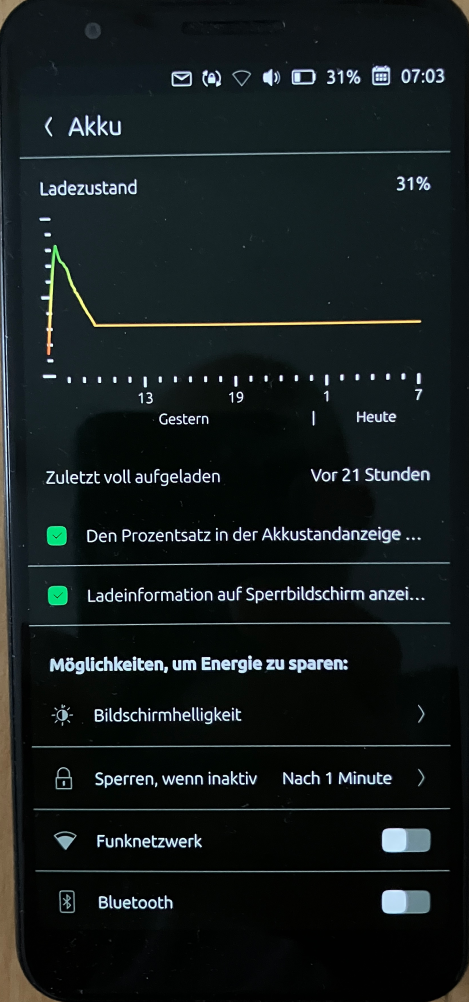
- Power consumption drops to an incredible ~22mA (Pixel 3a)
As a result, in this state, the battery level drops by only about 1–3% over a 10-hour period. (Tested on the Pixel 3a) Theoretically, a full charge lasts more than a week with minimal use. (see pritscreen)
Advantage: There are hardly any restrictions. You can turn on mobile data or Wi-Fi at any time and use any app with an internet connection. Afterward, turn Wi-Fi and mobile data off again.
Usage:
With appropriate usage habits, this can be the default mode. The reduced processor performance is barely noticeable. Only launching apps takes 1–2 seconds longer.The cores can be restored to normal performance using this script.
...
#!/bin/bash
#Enables Schedutil mode (default) on all CPU coresfor governor in /sys/devices/system/cpu/cpu*/cpufreq/scaling_governor; do
echo "schedutil" | sudo tee "$governor" > /dev/null
doneecho “Default mode (schedutil) has been enabled for all cores.”
..,It would be perfect if a “super power-saving mode” like that could be built into UT.
-
@Linus67 Why do you want to prevent background suspension? I think for your use case it would be better leaving it off, it uses less battery.
-
In the context of IT and apps (smartphones or PCs)
On mobile phones (such as Android or iOS) and computers, background suspension means that an app is temporarily frozen.So, in this case, background suspension set to ON means the app is frozen.
-
background suspension set to ON means the app is frozen.
But that's not what UTTT does. It sets PREVENT background suspension to ON. In other words, it sets background suspension to OFF.
For most apps on UT, background suspension is set to ON by default.
-
@Moem
Yes, I thought so too, and it matches the description in the wiki. https://wiki.ubuntuusers.de/Ubuntu_Touch/UT_Tweak_Tool/In my tests, however, the opposite was true. There might be another reason for this. I’ll repeat the test with different scenarios and log the power consumption in sleep mode.
-10 hours of standby (all apps with background suspension)
-10 hours of standby (all apps without background suspension)In any case, battery consumption in standby mode (accessible only via phone calls and text messages + alarm clock function) can be reduced to a minimum. It feels like a Nokia 3210 with up to 260 hours of battery life, with the difference that modern smartphone features are available at all times.
-
Thanks for sharing this tip!
I tried it on my Fairphone 5.
While I did not use it for all the time since the 2 days and a few hours I enabled it (forgot about it after restarting the phone) I could see that my estimation of the enery consumption of my ravenous Fairphone 5 was a bit exagerated.
The phone got from 85% to 50% in about 50 hours so while not good it's not as catastrophic I was thinking. Mind that I did not disable Bluetooth, cellular and wifi, only Gps is off.
It would be perfect if a “super power-saving mode” like that could be built into UT.
In my opinion the use case is a bit off the general usage AND it has potential and difficult to debug problems with other uses, so it would be best to bake this into an app to avoid too much complaining from not very experienced users.
I'd say that it would be a good fit for TweakUT since it's already an unconfined app and it is managing already the background state of apps, so manual changes to background state could be coordinated with automatic changes when enabling reduced power use.
It would be perfect if there was an API to allow an unconfined app like TweakUT to add an indicator in the top level status too, for rapid access.
Edit to correct 50 hours instead of 5 (!)
-
Just want to point you to discussions here.
https://forums.ubports.com/topic/12184/battery-saving-low-power-mode-within-os-discussions
I long for an toggle-able option like this available from the battery pulldown.
With some knowledge of QML and the layout of lomiri-system-settings I believe its possible to implement. -
The phone got from 85% to 50% in about 50 hours
Holy hell, that's amazing.
-
Just to clarify what the scaling governor is because there is some confusion that it magically improves battery life: The scaling governor (as I had already said in a post some years ago) essentially doesn't allow the CPU to increase its frequency and thus saves power. Note that performance doesn't scale linearly with frequency so the processor is most power efficient during low frequencies. However, while the device is idle, an optimized OS does many other things including changing the governor to save power like disabling the performance cores. So, any benefits should be observed only while using the phone, unless of course the port is not optimized at all.
-
Two days ago, I charged a Pixel 3a (24.04-1.3 rc) to 90%. It is now still at 37%. The scaling governor is active. This reduces power consumption to 22mA. When the scaling governor is not active, power consumption drops to only ~240mA
The device can receive calls and text messages. The alarm clock works too. (Nokia 3210 mode

The same behavior on my daily-use Pixel 3a. Without using Wi-Fi, the battery lasts at least 2 days.
I’ve tried to build a script that turns off Wi-Fi when the screen is turned off and keeps the scaling governor always on for all cores. Unfortunately, without success so far. It should be a solution that still works even after an update. I currently don’t see any loss of functionality.
-
I found the reason for my increased battery drain when using Wi-Fi.
On January 26, 2026, I installed an app called "UB Connect" from the OpenStore. ubconnect
I uninstalled it shortly after. The app wasn't uninstalled cleanly, and a ubconnect.daemon.service remained in the system.
Whenever Wi-Fi was turned on, this daemon would automatically start, but it failed because the app was missing. This prevented Ubuntu Touch from going into power-saving mode after the screen was turned off.After uninstalling and deleting all leftover files from the ubconnect app, Ubuntu Touch goes back into power-saving mode with Wi-Fi on, and the battery consumption is minimal like with mobile data.
-
leftover files from the ubconnect app,
Where did you find these files please? I may have a similar situation.
Is currently using an Op5t
Also owns an Op1, a BQ E4.5, an Xperia X, a Nothing Phone 1, and a Rabbit R1 as well as a BQ tablet and a Pinetab2. Please, someone... make it stop. -
@Moem you might wanna know that more applications does this daemon copy thing and after uninstall the service is there https://codeberg.org/tautologia/ubconnect/src/branch/master/ubconnect/daemon/install.sh
for example that smartwatch app -
@uxes Thank you for the hint... I took a leap of faith and ran
systemctl --user stop ubconnect-daemon.serviceand got a command prompt... no errors. I took this as encouragement and ransystemctl --user disable ubconnect-daemon.serviceand it told me something with UBconnect in it was removed. I think that was probably useful!As for smartwatch apps, I'm still using those, so they can stay.
-
I was monitoring the journal with “sudo journalctl -f” while I turned the Wi-Fi on and off. I noticed that when turning on the Wi-Fi, a connection attempt by the daemon fails.
sudo journalctl -f
Mai 20 19:14:25 ubuntu-phablet systemd[2850]: ubconnect-daemon.service: Main process exited, code=exited, status=1/FAILUREMai 20 19:14:25 ubuntu-phablet systemd[2850]: ubconnect-daemon.service: Failed with result 'exit-code'.Mai 20 19:14:30 ubuntu-phablet systemd[2850]: ubconnect-daemon.service: Scheduled restart job, restart counter is at 89.Mai 20 19:14:30 ubuntu-phablet systemd[2850]: Started ubconnect-daemon.service - UB Connect Daemon.Mai 20 19:14:30 ubuntu-phablet aa-exec[5041]: [5041] aa-exec: ERROR: Failed to execute "/opt/click.ubuntu.com/ubconnect/current/usr/bin/ubconnect-daemon": No such file or directoryMai 20 19:14:30 ubuntu-phablet systemd[2850]: ubconnect-daemon.service: Main process exited, code=exited, status=1/FAILUREMai 20Pixel 3a, works with NextCloud, pihole, Wireguard VPN, Trilium, GhostCloud, Paperless ngx...and a lot of great apps from the Open Store.
Lenovo Tab M10 HD TB-X306X LTE -
dekko does it too.
IIRC every app that is installing a systemd service I have looked at don't remove it when uninstalled. -
I was monitoring the journal with “sudo journalctl -f” while I turned the Wi-Fi on and off.
Thank you! That's a bit above my paygrade.

-
Run the following commands in the Terminal.
systemctl --user stop ubconnect-daemon.service
systemctl --user disable ubconnect-daemon.service
rm -f ~/.config/systemd/user/ubconnect-daemon.service
systemctl --user daemon-reload
systemctl --user status ubconnect-daemon.service
result:
Unit ubconnect-daemon.service could not be found.Pixel 3a, works with NextCloud, pihole, Wireguard VPN, Trilium, GhostCloud, Paperless ngx...and a lot of great apps from the Open Store.
Lenovo Tab M10 HD TB-X306X LTE -
@Linus67 As I said, the first two were what I did, after figuring out they might be helpful.
Can I be a little proud of myself for figuring that out? I'm not a terminal user at all.Is currently using an Op5t
Also owns an Op1, a BQ E4.5, an Xperia X, a Nothing Phone 1, and a Rabbit R1 as well as a BQ tablet and a Pinetab2. Please, someone... make it stop. -
rm -f ~/.config/systemd/user/ubconnect-daemon.service
Thanks to this hint, I knew where to find it and removed it using the file manager.
All clear now!The advantage of using the GUI in this case was that it showed me what else lived there. There was another daemon that was no longer needed. So that was helpful.



Hello! It looks like you're interested in this conversation, but you don't have an account yet.
Getting fed up of having to scroll through the same posts each visit? When you register for an account, you'll always come back to exactly where you were before, and choose to be notified of new replies (either via email, or push notification). You'll also be able to save bookmarks and upvote posts to show your appreciation to other community members.
With your input, this post could be even better 💗
Register Login