Help testing new legacy image
-
Decided to try the magic-device-tool to see if that'd make any difference. Nope!
Pretty much the same output (below) as flashing via terminal.
=======
Created filesystem with 11/51296 inodes and 6651/204800 blocks
target reported max download size of 134217728 bytes
erasing 'userdata'...
FAILED (remote: unknown command)
finished. total time: 0.002s
Creating filesystem with parameters:
Size: 4194304000
Block size: 4096
Blocks per group: 32768
Inodes per group: 8000
Inode size: 256
Journal blocks: 16000
Label:
Blocks: 1024000
Block groups: 32
Reserved block group size: 255
Created filesystem with 11/256000 inodes and 34123/1024000 blocks
target reported max download size of 134217728 bytes
erasing 'system'...
FAILED (remote: unknown command)
finished. total time: 0.002s
erasing 'recovery'...
FAILED (remote: unknown command)
finished. total time: 0.002s
rebooting into bootloader...
OKAY [ 0.002s]
finished. total time: 0.253s
Please wait2017/05/27 21:13:42 Device is |frieza|
2017/05/27 21:13:42 Flashing version 5 from ubports-touch/legacy channel and server http://system-image.ubports.com to device frieza
2017/05/27 21:14:06 Cache formatting was not successful, flashing may fail, check your partitions on device
2017/05/27 21:14:17 Start pushing /home/ronnie/.cache/ubuntuimages/ubports-touch/legacy/frieza/version-5.tar.xz to device
2017/05/27 21:14:17 Start pushing /home/ronnie/.cache/ubuntuimages/pool/keyring-4c4e7ef380ebcfa2c31084efa199138e93bfed8fc58aa3eb06bdf75a78af9b57.tar.xz to device
2017/05/27 21:14:17 Start pushing /home/ronnie/.cache/ubuntuimages/gpg/image-master.tar.xz to device
2017/05/27 21:14:17 Start pushing /home/ronnie/.cache/ubuntuimages/pool/ubports-f683ce0eac8665810600110821a12e5ad615e5d509507c90cea46a0f254adc23.tar.xz to device
2017/05/27 21:14:17 Start pushing /home/ronnie/.cache/ubuntuimages/gpg/image-signing.tar.xz to device
2017/05/27 21:14:17 Start pushing /home/ronnie/.cache/ubuntuimages/pool/device-6d8854a9ee3fd34df55940ae6e19a6968b14418a7fd01fbf1e17624d0129ef23.tar.xz to device
2017/05/27 21:14:17 Done pushing /home/ronnie/.cache/ubuntuimages/ubports-touch/legacy/frieza/version-5.tar.xz to device
2017/05/27 21:14:18 Done pushing /home/ronnie/.cache/ubuntuimages/pool/keyring-4c4e7ef380ebcfa2c31084efa199138e93bfed8fc58aa3eb06bdf75a78af9b57.tar.xz to device
2017/05/27 21:14:18 Done pushing /home/ronnie/.cache/ubuntuimages/gpg/image-master.tar.xz to device
2017/05/27 21:14:18 Done pushing /home/ronnie/.cache/ubuntuimages/gpg/image-signing.tar.xz to device
2017/05/27 21:14:44 Done pushing /home/ronnie/.cache/ubuntuimages/pool/device-6d8854a9ee3fd34df55940ae6e19a6968b14418a7fd01fbf1e17624d0129ef23.tar.xz to device
2017/05/27 21:15:20 Done pushing /home/ronnie/.cache/ubuntuimages/pool/ubports-f683ce0eac8665810600110821a12e5ad615e5d509507c90cea46a0f254adc23.tar.xz to device
2017/05/27 21:15:20 Created ubuntu_command: /home/ronnie/.cache/ubuntuimages/ubuntu_commands360842843
2017/05/27 21:15:21 Rebooting into recovery to flashWait until it reboots on its own!
Do not reboot manually!Cleaning up..
Exiting script. Bye Bye
======
And, from there, even after waiting for 25 minutes I see the infamous yellow 'Installing Ubuntu update' text.

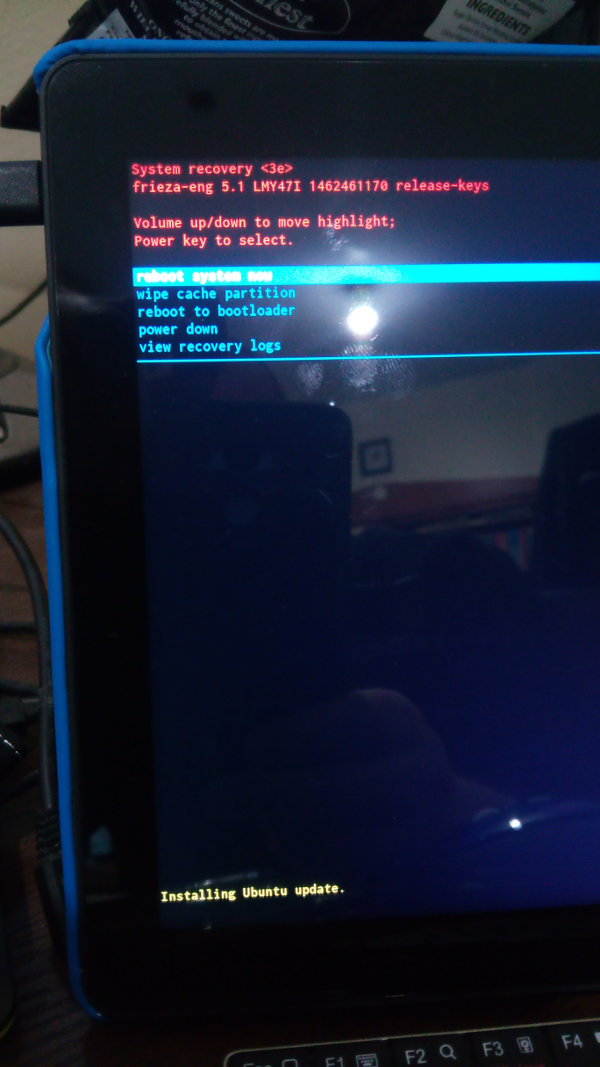
If I choose 'reboot system now' it boots up, again, back to a fresh install of OTA-15!
Thanks!
RonnieFull Circle Magazine
http://fullcirclemagazine.org -
Have just updated both bq 5hd and m10 with the latest Ubuntu update r3 and r5. All went well and seems OK. Just for my info in case I missed it somewhere. On the m10 there are no apps showing in the x app scope. I take it this is correct. Can these be installed from elsewhere yet? If so how.
As for people having issues flashing the m10 I used the magic device tool on both of mine. On the m10 it did hang for quit awhile half way through before completing through to the cleaning up bye bye message. Then it took quite along time to reboot itself out of recovery. Don't know if this helps anyone but it did take a lot longer than the 5hd. So long in fact I was begin to think there might be an issue, and yes there is a bug that delays the start up of the tablet buts far thats all I've found. -
@Lakota
thanks for the info. so its better to chill and cocking a tea and not lose hope to fast. I will flash than only on free days .
Thanks a lot, such little messages helps a lot
-
@ronnietucker mine seemed to take ages before it started up again with I think a spinning Ubuntu symbol then took ages to actually start up properly. Can't remember exactly how long but I did wander off for abit came back still nothing then it started up. I know this is vague but it could have been 25 muns or so.
-
My M10 FHD is now running with UBports.
My problem on the device was the cache.
Starting the tablet in fastboot mode
The connecting it via USB to the computer
in Terminal:$ adb shell "df -h"
Filesystem Size Used Available Use% Mounted on
tmpfs 981.1M 36.0K 981.0M 0% /dev
tmpfs 981.1M 12.0K 981.0M 0% /tmp
/dev/block/platform/mtk-msdc.0/by-name/userdata
9.3G 76.2M 9.2G 1% /data
/dev/block/platform/mtk-msdc.0/by-name/system
3.8G 3.7G 52.4M 99% /cachesee cache was 99% full
now it is:$ adb shell "df -h"
Filesystem Size Used Available Use% Mounted on
tmpfs 981.1M 36.0K 981.0M 0% /dev
tmpfs 981.1M 12.0K 981.0M 0% /tmp
/dev/block/platform/mtk-msdc.0/by-name/userdata
9.3G 76.2M 9.2G 1% /data
/dev/block/platform/mtk-msdc.0/by-name/system
3.8G 8.1M 3.8G 0% /cacheThat was done by:
adb shell "make_ext4fs /dev/block/platform/mtk-msdc.0/by-name/system"
adb reboot recovery
adb reboot bootloader -
Just updating device status. Already reported on Launchpad.
Device: LG Nexus 5 hammerhead.
System image: Legacy / version 15.
Issues:
1.date/time reset after reboot.(2-26-1970).
2.battery marks half of it's real capacity, (50% = 100%, 40% = 80%, etc).
3.display only wake up if power button is pressed 3 times.
4.can't play any videos using media player.Everything else works ok.
Thanks. -
Thank you everyone for your response to this thread! We appreciate your help in testing these images.
However, it has now served its purpose. All of our images are off the ground and flashable.
If you need further support, please post in the Support category on this forum.
Thanks again!
-
If you are still experiencing issues, please file a bug report.


Hello! It looks like you're interested in this conversation, but you don't have an account yet.
Getting fed up of having to scroll through the same posts each visit? When you register for an account, you'll always come back to exactly where you were before, and choose to be notified of new replies (either via email, or push notification). You'll also be able to save bookmarks and upvote posts to show your appreciation to other community members.
With your input, this post could be even better 💗
Register Login