Copy or cut with terminal
-
If I understand correctly, the only way that currently should work with the Pinephone to copy or cut a file from one directory to another is to use the terminal. This way should also work with all UT smartphones.
I tried different usual syntaxes on UT smartphones (Pinephone RC, OPO DEV ) and it doesn't work and I don't understand why!
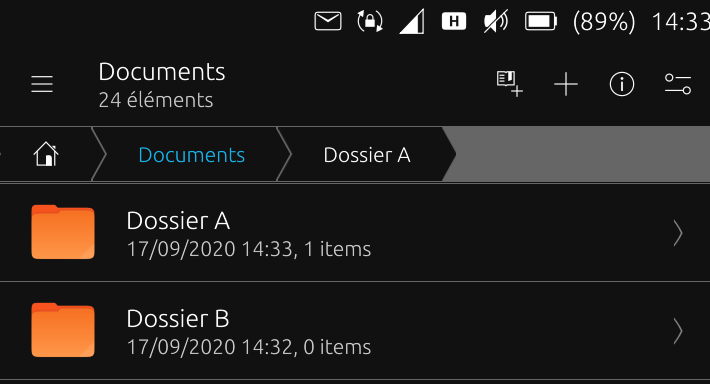
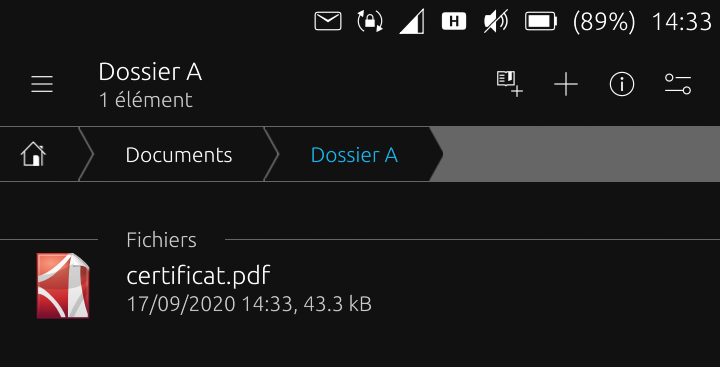
An example: considering Folder A and Folder B, (screenshots as a basis for the example), which are the right synthaxes to copy certificate.pdf from Folder A to Folder B or move certificate.pdf to Folder B?
Ps: please check that this works well (in DEV or RC ) before your feedback !
In advance, thank you very much !! -
@domubpkm: It would have helped those trying to help if you had shown what you had already tried and what were the error messages, if any. Saves others from trying the same, or else helps us see where it might have gone wrong. As it is now, trying to help feels like setting out on some kind of treasure hunt.
(For those, as I was, not aware of why a simple copy / paste in the File Manager app doesn't work on the PinePhone: Pasting seems to cause Lomiri to crash)
To copy certificat.pdf from
~/Documents/Dossier Ato~/Documents/Dossier Btry the following in the Terminal app:~$ cp ~/Documents/Dossier\ A/certificat.pdf ~/Documents/Dossier\ Bto move the file instead:
~$ mv ~/Documents/Dossier\ A/certificat.pdf ~/Documents/Dossier\ BThe issue here I think is the space in the folder name. This needs to be escaped. It can be done with the
\character, or by enclosing the folder name within double quotes. But in general use of spaces is discouraged in folder names, as it can be somewhat inconvenient on the command line. You could consider using underscores (_) instead. -
@arubislander Currently tested on BQ E5 HD dev : ONLY double quotes work . I will test more tonight.
Thank you. -
Not specifically to my problem, but confirmation that generally speaking, the cp and mv commands work well in the Pinephone!

-
Command line tools that manipulate the filesystem will tend to work on any distribution. If you can pull up a terminal, the screen is legible and the (on screen) keyboard responds to what you type, then you are usually good to go.
Only thing like missing packages or incorrectly configured permissions, will be able to foil you now and then. But those instances are rare. -
@arubislander The usefulness of the cp and mv commands is that they can be currently being used as a workaround for a very annoying bug on the Pinephone : https://gitlab.com/ubports/community-ports/pinephone/-/issues/53

Hello! It looks like you're interested in this conversation, but you don't have an account yet.
Getting fed up of having to scroll through the same posts each visit? When you register for an account, you'll always come back to exactly where you were before, and choose to be notified of new replies (either via email, or push notification). You'll also be able to save bookmarks and upvote posts to show your appreciation to other community members.
With your input, this post could be even better 💗
Register Login