UBports Robot Logo UBports Forum
    • Categories
    • Recent
    • Tags
    • Popular
    • Users
    • Groups
    • Search
    • Register
    • Login

    One+3T : always option menu screen on boot

    Scheduled Pinned Locked Moved Solved Support
    9 Posts 3 Posters 620 Views 1 Watching
    Loading More Posts
    • Oldest to Newest
    • Newest to Oldest
    • Most Votes
    Reply
    • Reply as topic
    Log in to reply
    This topic has been deleted. Only users with topic management privileges can see it.
    • Q Offline
      qmant
      last edited by

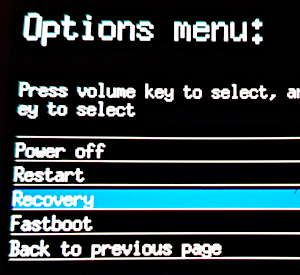
      Hi users, I installed Ubuntu touch on my smartphone one+3T. And at each restart the option menu is displayed before the system boot.
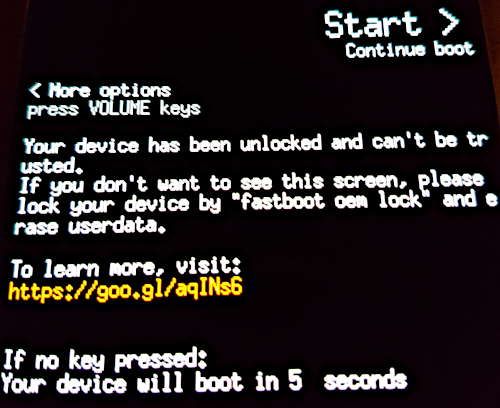
      img1.jpg
      the options are:
      img2.jpg

      Is there a solution to skip this step ?

      The second problem is that when ubuntu touch is started "adb devices" cmd don't find any device. And if I reboot in recovery mode, "adb devices" cmd returns "List of devices attached 3af2ceff recovery". So I can't use adb to test new applications.

      Thanks

      LuksusL 1 Reply Last reply Reply Quote 0
      • LuksusL Offline
        Luksus @qmant
        last edited by

        @qmant The displayed message at startup is a result of unlocking the bootloader and cannot be turned of, as far as I know.

        Did you turn on developer mode in system settings?

        Devices: BQ e4.5, Fairphone 2, Fairphone 3, Lenovo X605F, Pinephone, Moto Z2 Force, OnePlus5T

        Q 1 Reply Last reply Reply Quote 0
        • Q Offline
          qmant @Luksus
          last edited by

          @luksus Yes I turned on the developer mode in system settings. But it is always the same thing.

          LuksusL 1 Reply Last reply Reply Quote 0
          • LuksusL Offline
            Luksus @qmant
            last edited by Luksus

            @qmant hm, I am not sure, if adb is available at all in this port.
            Do you perhaps have an ssh over usb connection?

            Edit: As you can read here: https://forums.ubports.com/post/26030 adb is not available on Halium ports.
            Try: ssh phablet@10.15.19.82 to get commandline access to your phone.

            Do you want to copy unreleased click-packages to your device? Then, assuming ssh over usb works, try copying it with scp command: scp yourfile.click phablet@10.15.19.82:/home/phablet/Downloads for example.

            Devices: BQ e4.5, Fairphone 2, Fairphone 3, Lenovo X605F, Pinephone, Moto Z2 Force, OnePlus5T

            Q 1 Reply Last reply Reply Quote 0
            • Q Offline
              qmant @Luksus
              last edited by

              @luksus Ok effectively I have a ssh connection (provided I start the ssh service on the device). But what about the option menu (when switching on the device) before the boot of ubuntu touch system ?

              LakotaubpL LuksusL 2 Replies Last reply Reply Quote 0
              • LakotaubpL Offline
                Lakotaubp @qmant
                last edited by

                @qmant That cannot be romoved part of halium boot, same on my Bq uPlus.

                Q 1 Reply Last reply Reply Quote 0
                • LuksusL Offline
                  Luksus @qmant
                  last edited by

                  @qmant see my first comment.

                  Devices: BQ e4.5, Fairphone 2, Fairphone 3, Lenovo X605F, Pinephone, Moto Z2 Force, OnePlus5T

                  Q 1 Reply Last reply Reply Quote 0
                  • Q Offline
                    qmant @Luksus
                    last edited by

                    @luksus ok thank you for your help.

                    I tested "clickable install /path/to/the/app.click --ssh 192.168.0.26" and the installation is perfect.

                    1 Reply Last reply Reply Quote 0
                    • Q Offline
                      qmant @Lakotaubp
                      last edited by

                      @lakotaubp ok thank you

                      1 Reply Last reply Reply Quote 0

                      Hello! It looks like you're interested in this conversation, but you don't have an account yet.

                      Getting fed up of having to scroll through the same posts each visit? When you register for an account, you'll always come back to exactly where you were before, and choose to be notified of new replies (either via email, or push notification). You'll also be able to save bookmarks and upvote posts to show your appreciation to other community members.

                      With your input, this post could be even better 💗

                      Register Login
                      • First post
                        Last post