Nextcloud login fails...
-
I found the option in the Account Settings.
Do i have to put off 2FA for it to work? -
@h_b While I can sync successfully with an external CalDAV server, I can't with a self-hosted nextcloud instance that has a self-signed certificate. There are other similar reports ... Is your nextcloud instance, by chance, secured with a self-signed certificate?
CalDAV/CardDAV situation was discussed in Ubuntu Touch Q&A 93 (at 3:00 min). Things will probably not improve before 20.04 transition.
-
@padu hmm no i definetly have a letsencrypt cert which is perfectly fine according to qualys ssl check.
Ok so according to the vid synchronisation might be broken, but the login itself should work right?
Then probably the login doesnt support 2FA yet. -
@h_b
I think that's it.
If you can, you can try and deactivate 2FA, an try on UT before activating it again...
Nextcloud account being a service in UT, how to handle 2FA is not something I'll label as trivial... -
If you are using a Nextcloud account with 2-factor authentication, you can use an app password to allow your Ubuntu Touch device access to your account.
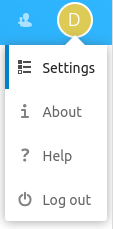
To create an app password, first browse to your account settings:
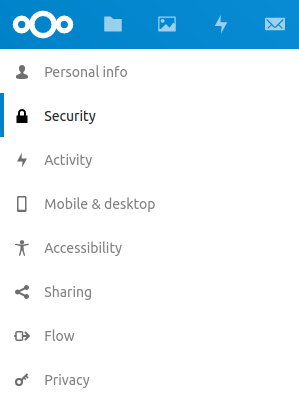
Click Security
And finally scroll down to the bottom of the page where you can enter a name for your app password, then click "Generate password"

You can enter the new app password in the Nextcloud login page on Ubuntu Touch.
-
@h_b said in Nextcloud login fails...:
@padu hmm no i definetly have a letsencrypt cert which is perfectly fine according to qualys ssl check.
OK. No idea then. Did you try adding a generic CalDAV account?
Ok so according to the vid synchronisation might be broken, but the login itself should work right?
I think it's the other way around, syncing should work, but login is only possible in selected environments.
-
@unisuperbox it worked with app pw even with 2fa enabled, thx :3
-
@h_b
Great news (and instructive one).
Can you "ask a question" and then "mark as solved" ?
It's in the cog wheel menu next to the blue reply button at the top...If you have any trouble, ping me and I'll do it for you.

Hello! It looks like you're interested in this conversation, but you don't have an account yet.
Getting fed up of having to scroll through the same posts each visit? When you register for an account, you'll always come back to exactly where you were before, and choose to be notified of new replies (either via email, or push notification). You'll also be able to save bookmarks and upvote posts to show your appreciation to other community members.
With your input, this post could be even better 💗
Register Login