Nexus 5 | Installation error

-
Getting error when trying to use UBports installer for nexus 5.
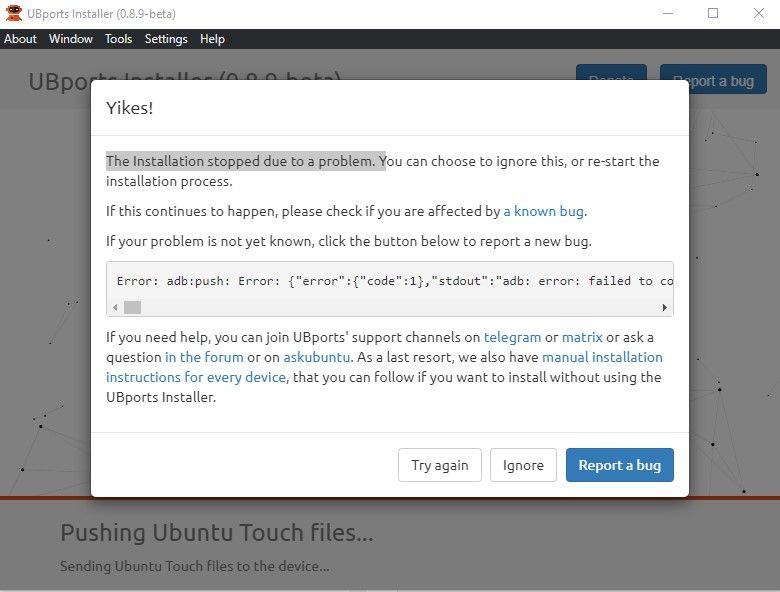
UB ports Recovery is installed properly on the phone. Unfortunately installer is showing following error:
adb:push: Error: {"error":{"code":1},"stdout":"adb: error: failed to copy 'C:\Users\User\AppData\Roaming\ubports\hammerhead\Ubuntu Touch\ubports-6c2795de9002b7b70b9e83e36cb4e56c3fee9b7c35e0a22a2038ee34a7b20be6.tar.xz' to '/cache/recovery/ubports-6c2795de9002b7b70b9e83e36cb4e56c3fee9b7c35e0a22a2038ee34a7b20be6.tar.xz': remote No space left on device\r\nC:\Users\User\AppData\Roaming\ubports\hammerhead\Ubuntu Touch\ubports-6c2795de9002b7b70b9e83e36cb4e56c3fee9b7c35e0a22a2038ee34a7b20be6.tar.xz: 1 file pushed, 0 skipped. 5.9 MB/s (367397528 bytes in 59.686s)\r\nC:\Users\User\AppData\Roaming\ubports\hammerhead\Ubuntu Touch\ubports-6c2795de9002b7b70b9e83e36cb4e56c3fee9b7c35e0a22a2038ee34a7b20be6.tar.xz.asc: 1 file pushed, 0 skipped. 0.8 MB/s (488 bytes in 0.001s)\r\nC:\Users\User\AppData\Roaming\ubports\hammerhead\Ubuntu Touch\device-48f008aae9f1a867b50ee435b8abd982f596098effd459c02d13ff55729b6242.tar.xz: 1 file pushed, 0 skipped. 5.8 MB/s (59674516 bytes in 9.843s)\r\nC:\Users\User\AppData\Roaming\ubports\hammerhead\Ubuntu Touch\device-48f008aae9f1a867b50ee435b8abd982f596098effd459c02d13ff55729b6242.tar.xz.asc: 1 file pushed, 0 skipped. 0.7 MB/s (488 bytes in 0.001s)\r\nC:\Users\User\AppData\Roaming\ubports\hammerhead\Ubuntu Touch\keyring-28992f008be20d562ea06745f563d3abe00b08da1b16e5b92e448e2d4ba21e9f.tar.xz: 1 file pushed, 0 skipped. 2.4 MB/s (1564 bytes in 0.001s)\r\nC:\Users\User\AppData\Roaming\ubports\hammerhead\Ubuntu Touch\keyring-28992f008be20d562ea06745f563d3abe00b08da1b16e5b92e448e2d4ba21e9f.tar.xz.asc: 1 file pushed, 0 skipped. 0.6 MB/s (488 bytes in 0.001s)\r\nC:\Users\User\AppData\Roaming\ubports\hammerhead\Ubuntu Touch\version-18.tar.xz: 1 file pushed, 0 skipped. 0.7 MB/s (472 bytes in 0.001s)\r\nC:\Users\User\AppData\Roaming\ubports\hammerhead\Ubuntu Touch\version-18.tar.xz.asc: 1 file pushed, 0 skipped. 0.7 MB/s (488 bytes in 0.001s)\r\nC:\Users\User\AppData\Roaming\ubports\hammerhead\Ubuntu Touch\image-signing.tar.xz: 1 file pushed, 0 skipped. 1.6 MB/s (940 bytes in 0.001s)\r\nC:\Users\User\AppData\Roaming\ubports\hammerhead\Ubuntu Touch\image-signing.tar.xz.asc: 1 file pushed, 0 skipped. 0.9 MB/s (488 bytes in 0.001s)\r\nC:\Users\User\AppData\Roaming\ubports\hammerhead\Ubuntu Touch\image-master.tar.xz: 1 file pushed, 0 skipped. 1.5 MB/s (900 bytes in 0.001s)\r\nC:\Users\User\AppData\Roaming\ubports\hammerhead\Ubuntu Touch\image-master.tar.xz.asc: 1 file pushed, 0 skipped. 0.9 MB/s (488 bytes in 0.001s)\r\nC:\Users\User\AppData\Roaming\ubports\hammerhead\Ubuntu Touch\ubuntu_command: 1 file pushed, 0 skipped. 1.2 MB/s (727 bytes in 0.001s)\r\n13 files pushed, 0 skipped. 5.8 MB/s (427079575 bytes in 70.824s)"}
-
I have seen some messages about the latest version beeing bugged/buggy so please try the previous version of the installer or the version before that one!

And one other thing :
When working with phones in general please try to use VERY SHORT and SIMPLE paths for everything :
- C:\LG\my_rom.img = GOOD!
- C:\Users\user\AppData\Some DIR with a SPACE in it\my_rom.img = BAD!
It solves a lot of issues when you are flashing various phones

-
@sabzwari said in Nexus 5 | Installation error:
adb:push: Error: {"error":{"code":1},"stdout":"adb: error: failed to copy 'C:\Users\User....tar.xz': remote No space left on
It seems a device memory amount issue.
But like nero355 told there is a possible link to installer so try another. -
-
If the older installer doesn't resolve, has this phone had a custom ROM on it?
-
Thank you for the reply. Did not work.
-
Yes its flashed with custom rom. Ubports was unsuccessful during flashing I have switched to another Android 11 based custom rom.
Is there any way to fix the phone with custom roms prior to retry ubports process ?
-
@sabzwari You need the android version last designed for the nexus 5 and the partitions put back to their original sizes before you can install UT.
-
There is a repartition tool that you can use in TWRP to restore the partitions to their stock size. I have used it many of times to restore a Nexus 5.
Download hh_clamour_repartition zip from here.
Flash TWRP for the Nexus 5 and copy the zip file to the root of the phone storage, usually called SDcard. Follow the instructions on the XDA-developers link and set the partitions back to stock.
Flash a stock ROM to the Nexus 5.
Then install Ubuntu Touch to the phone.
I use WugFresh Development tool for nexus to flash the stock ROM as it id easy to use and generally works.
-
 M MrT10001 referenced this topic on


Hello! It looks like you're interested in this conversation, but you don't have an account yet.
Getting fed up of having to scroll through the same posts each visit? When you register for an account, you'll always come back to exactly where you were before, and choose to be notified of new replies (either via email, or push notification). You'll also be able to save bookmarks and upvote posts to show your appreciation to other community members.
With your input, this post could be even better 💗
Register Login