UBports Robot Logo UBports Forum
    • Categories
    • Recent
    • Tags
    • Popular
    • Users
    • Groups
    • Search
    • Register
    • Login

    How to replace the service-provider.xml file

    Scheduled Pinned Locked Moved Solved Support
    9 Posts 2 Posters 635 Views 1 Watching
    Loading More Posts
    • Oldest to Newest
    • Newest to Oldest
    • Most Votes
      Reply
      • Reply as topic
      Log in to reply
      This topic has been deleted. Only users with topic management privileges can see it.
      • D Offline
        domubpkm
        last edited by

        @arubislander It is suggested for testing (MMS issue to solve for me) that I replace the service-provider.xml file with the same file I modified.

        The path of the original file (original file I saved in case so as to reverse the operation...) is usr/share/mobile-broadband-provider-info/service-provider.xml.

        The modified file (same name) is in Documents.

        What is the simplest complete procedure to do this. Thanks in advance.

        arubislanderA 1 Reply Last reply Reply Quote 0
        • arubislanderA Offline
          arubislander @domubpkm
          last edited by

          @domubpkm mount the root filesystem read/write and copy the file from Documents to the location where it is needed.
          You can choose to use the File Manager to do this. Just remember to unlock it / entering your passcode to be able to browse to where you need to be.

          πŸ‡¦πŸ‡Ό πŸ‡³πŸ‡± πŸ‡ΊπŸ‡Έ πŸ‡ͺπŸ‡Έ
          Happily running Ubuntu Touch
          JingPad (24.04-1.x daily)
          OnePlus Nord N10 5G (24.04-2.x daily)
          PinePhone OG (20.04)
          Meizu Pro 5 (16.04 DEV)

          D 1 Reply Last reply Reply Quote 0
          • D Offline
            domubpkm @arubislander
            last edited by domubpkm

            @arubislander @Flohack Yes, i tried before i asked, with UTTT for read/write and i used file manager and it didn't work, i got :
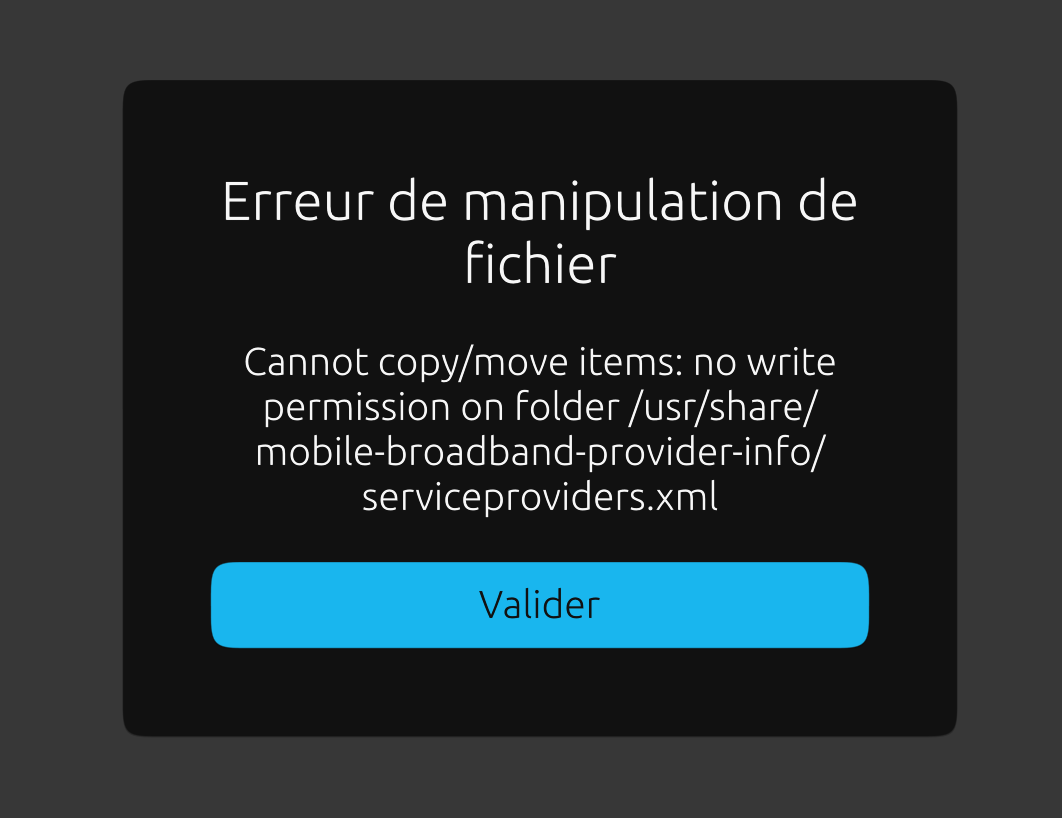
            screenshot20211222_235723889.png

            arubislanderA 1 Reply Last reply Reply Quote 0
            • arubislanderA Offline
              arubislander @domubpkm
              last edited by

              @domubpkm Ah, of course. User phablet is not allowed to write in that location. You would need to copy the file using the terminal app and sudo.
              I keep making the same mistake...

              πŸ‡¦πŸ‡Ό πŸ‡³πŸ‡± πŸ‡ΊπŸ‡Έ πŸ‡ͺπŸ‡Έ
              Happily running Ubuntu Touch
              JingPad (24.04-1.x daily)
              OnePlus Nord N10 5G (24.04-2.x daily)
              PinePhone OG (20.04)
              Meizu Pro 5 (16.04 DEV)

              D 1 Reply Last reply Reply Quote 0
              • D Offline
                domubpkm @arubislander
                last edited by

                @arubislander said in How to replace the service-provider.xml file:

                You would need to copy the file using the terminal app and sudo.

                Can you clarify/detail the appropriate command lines? Thanks in advance.

                arubislanderA 1 Reply Last reply Reply Quote 0
                • arubislanderA Offline
                  arubislander @domubpkm
                  last edited by

                  @domubpkm After making the root filesystem read/write:

                  $ sudo cp $HOME/Documents/service-provider.xml /usr/share/mobile-broadband-provider-info/service-provider.xml
                  

                  πŸ‡¦πŸ‡Ό πŸ‡³πŸ‡± πŸ‡ΊπŸ‡Έ πŸ‡ͺπŸ‡Έ
                  Happily running Ubuntu Touch
                  JingPad (24.04-1.x daily)
                  OnePlus Nord N10 5G (24.04-2.x daily)
                  PinePhone OG (20.04)
                  Meizu Pro 5 (16.04 DEV)

                  D 1 Reply Last reply Reply Quote 1
                  • D Offline
                    domubpkm @arubislander
                    last edited by domubpkm

                    @arubislander said in How to replace the service-provider.xml file:

                    sudo cp $HOME/Documents/service-provider.xml /usr/share/mobile-broadband-provider-info/service-provider.xml

                    ok. Thank you. I will test i don't know when...
                    I had wrotten a 'similar' command line that didn't work :

                    sudo cp ~/Documents/service-provider.xml /usr/share/mobile-broadband-provider-info

                    arubislanderA 1 Reply Last reply Reply Quote 0
                    • arubislanderA Offline
                      arubislander @domubpkm
                      last edited by

                      @domubpkm Had you made the root filesystem read/write beforehand?

                      πŸ‡¦πŸ‡Ό πŸ‡³πŸ‡± πŸ‡ΊπŸ‡Έ πŸ‡ͺπŸ‡Έ
                      Happily running Ubuntu Touch
                      JingPad (24.04-1.x daily)
                      OnePlus Nord N10 5G (24.04-2.x daily)
                      PinePhone OG (20.04)
                      Meizu Pro 5 (16.04 DEV)

                      D 1 Reply Last reply Reply Quote 0
                      • D domubpkm has marked this topic as solved on
                      • D Offline
                        domubpkm @arubislander
                        last edited by

                        @arubislander Yes. I don't know why. Maybe the ~ symbol is not allowed with sudo and one has to use $HOME, or I made some other mistake. Anyway your command line works, I learned something useful, even if my basic problem is not solved: I restored the original file.

                        1 Reply Last reply Reply Quote 0

                        Hello! It looks like you're interested in this conversation, but you don't have an account yet.

                        Getting fed up of having to scroll through the same posts each visit? When you register for an account, you'll always come back to exactly where you were before, and choose to be notified of new replies (either via email, or push notification). You'll also be able to save bookmarks and upvote posts to show your appreciation to other community members.

                        With your input, this post could be even better πŸ’—

                        Register Login
                        • First post
                          Last post