[HowTo] Block unwanted calls - create blacklist
-
@emphrath yes I am sure
-
 B Br1 referenced this topic on
-
--------- UPDATE ---------
New version to install/uninstall with single command, see here for further information.The old version has to be manually uninstalled before.
There are no new features but should be running much faster and draw less battery power (*)
three steps :
1 - download (just click) blacklist.1.01.tar.gz from here
2 - open file manager, go to Downloads click blacklist.1.01.tar.gz and extract archive
3 - open terminal and type :
sudo /home/phablet/Downloads/blacklist.1.01/blist-installtype 1 to install
type 2 to uninstall
type 3 to exitThat's all.
Preview of install/uninstall script (blist-install) :
#!/bin/bash BLSERV=/etc/init.d/blacklist ; # Make sure only root can run this script if [ "$(id -u)" != "0" ]; then echo " Must be run as root, you must prepend sudo !" 1>&2 ; exit 1 fi echo -e '\n - Install/uninstall BlackList :\n' ; PS3='Please enter your choice : ' options=("Install" "Uninstall" "Quit") select opt in "${options[@]}" do case $opt in "Install") echo -e '\n Installation in progress ...\n' ; # change the working directory cd /home/phablet/Downloads/blacklist.1.01/ ; # create directory mkdir -p /home/phablet/.blacklist ; # copy scripts to directory just created cp *.sh /home/phablet/.blacklist/ ; # mount root in read/write mode mount -o remount,rw / ; # copy blacklist service cp blacklist /etc/init.d/ ; # enable autostart update-rc.d blacklist defaults ; # start service service blacklist start # roll back root in read only mode mount -o remount,ro / ; echo -e '\n Done, Blacklist installed !\n' exit 0 ;; "Uninstall") # check status if [ ! -f "$BLSERV" ]; then echo -e '\n Blacklist is not installed !\n' ; else # mount root in read/write mode mount -o remount,rw / ; # stop blacklist service, disable autostart and remove file service blacklist stop ; update-rc.d -f blacklist remove ; rm /etc/init.d/blacklist ; # roll back root in read only mode mount -o remount,ro / ; # delete scripts and remove directory rm -rf /home/phablet/.blacklist/* ; rmdir /home/phablet/.blacklist ; echo -e '\n Blacklist uninstalled !\n' exit 0 fi ;; "Quit") exit 0 ;; *) echo "invalid option $REPLY" ;; esac done- small changes to make more efficient the script (now named sr-kill.sh) useful to stop blacklist service from command line :
#!/bin/sh

# stop blacklist service

# get pid of the script
scPID=$(pidof -x calls_blocker.sh)

# kill script and child processes
pkill -P $scPID

exit
(*) Now the always running script (calls_blocker.sh) is executed by dash shell which is much faster and requires fewer resources than bash shell, see benchmark , here is the preview :
#!/bin/sh # Intercepts every incoming call addressed to SPAM contact and terminates it interface=org.freedesktop.DBus.Properties member=Set sudo dbus-monitor --system interface=$interface member=$member | awk '/SPAM/ { system("dbus-send --system --print-reply --dest=org.ofono /ril_0/voicecall01 org.ofono.VoiceCall.Hangup") }' >/dev/null 2>&1 -
This post is deleted! -
This post is deleted! -
Hello the program works perfectly. The autonomy is frankly superior to the old version, the application consumes 9% per hour on my nexus 5 with a new battery. Without the appication my nexus 5 consumes 3% per hour. It's a bit fair but as you say the nexus has a limited basic autonomy.
Thanks, great job. -
OTA-25 --- You can reinstall, no changes are necessary.
-
---- UPDATE OTA-2 Focal ----
---- Stable Channel ----Usual three steps :
1 - download (just tap) blacklist-ota.2 from here
2 - open file manager, go to Downloads tap blacklist-ota.2.tar.gz and tap extract archive
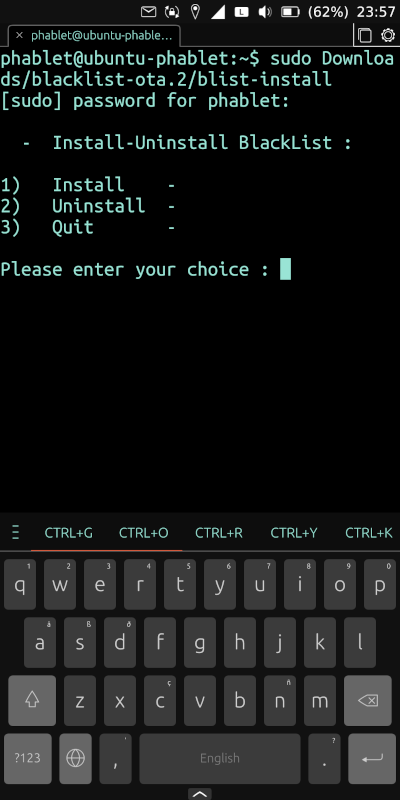
3 - open terminal, type :
sudo Downloads/blacklist-ota.2/blist-installand hit enter,
type 1 + enter to install
type 2 + enter to uninstall
reboot not required.
Blacklist only consist of three files :
preview of blist-install :
#!/bin/bash

BLSERV=/usr/lib/systemd/system/blacklist.service ;

# Make sure only root can run this script
if [ "$(id -u)" != "0" ]; then
   echo "    Must be run as root, you must prepend sudo !" 1>&2 ; exit 1
fi

echo -e '\n  -  Install-Uninstall BlackList :\n' ;

PS3=$'
Please enter your choice : '
options=("  Install    -       " "  Uninstall  -       " "  Quit       -       ")

select opt in "${options[@]}"
do
	case $opt in
	"  Install    -       ")

 			echo -e '\n Installation in progress ...\n' ;

			# change the working directory
			cd /home/phablet/Downloads/blacklist-ota.2/ ;

			# create directory
			mkdir -p /home/phablet/.blacklist ;

			# copy scripts to directory just created
			cp calls_blocker.sh /home/phablet/.blacklist/ ;

			# mount root in read/write mode
			mount -o remount,rw / ;

			# copy blacklist service
			cp blacklist.service /usr/lib/systemd/system/ ;

			# enable and start service
			systemctl enable --now blacklist > /dev/null 2>&1 ;

			# roll back root in read only mode
			mount -o remount,ro / ;

			echo -e '\n Done, Blacklist installed !\n'

			exit 0

		;;

	"  Uninstall  -       ")

			# check status
			if [ ! -f "$BLSERV" ]; then

			echo -e '\n Blacklist is not installed !\n' ;

			else

			# mount root in read/write mode
			mount -o remount,rw / ;

			# stop and disable blacklist service
			systemctl disable --now blacklist > /dev/null 2>&1 ;

			# remove file
			rm /usr/lib/systemd/system/blacklist.service ;

			# roll back root in read only mode
			mount -o remount,ro / ;

			# delete scripts and remove directory
			rm -rf /home/phablet/.blacklist/* ; rmdir /home/phablet/.blacklist ;

			echo -e '\n Blacklist uninstalled !\n'

			exit 0

			fi

		;;

        "  Quit       -       ")
			echo -e '\n - OS unchanged !\n'

			exit 0
		;;
			*) echo "invalid option $REPLY"
		;;
    esac
done
preview of blacklist.service :
[Unit]
Description=Calls Blacklist

[Service]
Type=simple
ExecStart=/home/phablet/.blacklist/calls_blocker.sh
RemainAfterExit=yes

[Install]
WantedBy=multi-user.target
calls_blocker.sh script has not changed.
The script to stop service is no longer necessary, blacklist now is a systemd service and can be managed with systemctl commands, example :
systemctl stop blacklistimproved legibility :
-
I can’t test ota 3 update, install at your own risk. -
OTA 3 Stable channel --- You can reinstall, no changes are necessary.
-
Blacklist also work fine with OTA 4.
-
B Br1 referenced this topic on
-
F Futura referenced this topic on
Hello! It looks like you're interested in this conversation, but you don't have an account yet.
Getting fed up of having to scroll through the same posts each visit? When you register for an account, you'll always come back to exactly where you were before, and choose to be notified of new replies (either via email, or push notification). You'll also be able to save bookmarks and upvote posts to show your appreciation to other community members.
With your input, this post could be even better 💗
Register Login