UBports Robot Logo UBports Forum
    • Categories
    • Recent
    • Tags
    • Popular
    • Users
    • Groups
    • Search
    • Register
    • Login

    Change DNS servers, wifi and mobile data

    Scheduled Pinned Locked Moved Support
    22 Posts 4 Posters 6.5k Views 3 Watching
    Loading More Posts
    • Oldest to Newest
    • Newest to Oldest
    • Most Votes
      Reply
      • Reply as topic
      Log in to reply
      This topic has been deleted. Only users with topic management privileges can see it.
      • KenedaK Offline
        Keneda @Br1
        last edited by

        @Br1
        Did you consider building an app for your 3 scripts to be nooby friendly ?

        2015-2023 : Meizu MX4 ☠️⚰️✝️
        2023-2024 : Nexus 5 ☠️⚰️✝️
        2024-***** : FPOS Fairphone 5
        🇲🇫🇬🇧

        Br1B 1 Reply Last reply Reply Quote 0
        • K Offline
          kimo @Br1
          last edited by kimo

          @Br1 As he said, Keneda if you can building an app, this would be great. I tried it on focal. It worked with me in the first time, and when I tried to return to restore default settings, I lost my connection to the Internet without finding a solution, despite my attempts to fix it, which forced me to re-install UT 😅

          1 Reply Last reply Reply Quote 0
          • Br1B Offline
            Br1 @Keneda
            last edited by

            @Keneda I can't promise anything but I will try.

            ^

            • Google Pixel 3a XL
            • Xiaomi MI A2
            KenedaK 1 Reply Last reply Reply Quote 1
            • KenedaK Offline
              Keneda @Br1
              last edited by

              @Br1
              I don't know if you saw my post responding to you on another of your thread so i put link here, it may be helpfull : https://forums.ubports.com/topic/8144/how-to-record-calls/4?_=1680905394718

              2015-2023 : Meizu MX4 ☠️⚰️✝️
              2023-2024 : Nexus 5 ☠️⚰️✝️
              2024-***** : FPOS Fairphone 5
              🇲🇫🇬🇧

              Br1B 1 Reply Last reply Reply Quote 0
              • Br1B Offline
                Br1 @Keneda
                last edited by

                @Keneda to build apps it is necessary to know qml and python and I don't know them 😞 "Touch IDE" is an interesting app, but I would like to do something with shell scripting

                ^

                • Google Pixel 3a XL
                • Xiaomi MI A2
                1 Reply Last reply Reply Quote 1
                • D Offline
                  domubpkm @Br1
                  last edited by

                  This post is deleted!
                  Br1B 1 Reply Last reply Reply Quote 0
                  • Br1B Offline
                    Br1 @domubpkm
                    last edited by

                    @domubpkm said in Change DNS servers, wifi and mobile data:

                    @Br1 typo error

                    fixed, thank you.

                    ^

                    • Google Pixel 3a XL
                    • Xiaomi MI A2
                    D 1 Reply Last reply Reply Quote 0
                    • D Offline
                      domubpkm @Br1
                      last edited by domubpkm

                      This post is deleted!
                      1 Reply Last reply Reply Quote 0
                      • Br1B Offline
                        Br1
                        last edited by

                        ---- UPDATE OTA-2 Focal ----
                        ---- Stable Channel ----

                        Usual three steps :

                        1 - download (just tap) setdns-ota.2 from here

                        2 - open file manager, go to Downloads, tap setdns-ota.2.tar.gz and tap extract archive

                        3 - open terminal, type :

                        sudo Downloads/setdns-ota.2/setdns-ota.2.sh
                        

                        and hit enter,

                        type 1 + enter to set Cloudflare servers
                        type 2 + enter to set OpenDNS servers
                        type 3 + enter to set custom servers (*)
                        type 4 + enter to restore default settings (Restore OS)
                        type 5 + enter to exit (OS unchanged)

                        Remember to "Restore OS" before the next OTA update !

                        set-dns is one single script, preview :

                        #!/bin/bash
                        
                        # Make sure only root can run this script
                        if [ "$(id -u)" != "0" ]; then
                           echo " - You must prepend 'sudo' !" 1>&2
                           exit 1
                        fi
                        
                        echo -e '\n- Set DNS servers / Restore default -\n' ;
                        
                        rsv_cnf=/etc/resolv.conf ;
                        
                        # these are Cloudflare's DNS servers
                        CLF_one=1.1.1.1
                        CLF_two=1.0.0.1
                        
                        # these are OpenDNS servers
                        OPE_one=208.67.222.222
                        OPE_two=208.67.220.220
                        
                        PS3='
                        Please enter your choice : '
                        options=("  Cloudflare  -      " "  OpenDNS     -      " "  Custom DNS  -      " "  Restore OS  -      " "  Quit        -      ")
                        select opt in "${options[@]}"
                        do
                        	case $opt in
                        	"  Cloudflare  -      ")
                        		# check resolv.conf
                        		if [ ! -L $rsv_cnf ] ;
                        
                        		then
                        
                        			# -------------------- runs if resolv.conf is a file --------------------
                        
                        			# mount root in read/write mode
                        			mount -o remount,rw / ;
                        
                        			# add it Cloudflare servers
                        			echo -e "# Cloudflare servers" > $rsv_cnf ; echo -e "nameserver $CLF_one" >> $rsv_cnf ; echo -e "nameserver $CLF_two" >> $rsv_cnf ;
                        
                        			# remount root in read only mode
                        			mount -o remount,ro / ;
                        
                        			echo -e '\n Cloudflare DNS are set up !\n'
                        
                        			exit 0
                        
                        		else
                        
                        			# -------------------- runs if resolv.conf is a symbolic link --------------------
                        
                        			# mount root in read/write mode
                        			mount -o remount,rw / ;
                        
                        			# delete symbolic link
                        			rm /etc/resolv.conf ;
                        
                        			# create file
                        			touch /etc/resolv.conf ;
                        
                        			# add it Cloudflare servers
                        			echo -e "# Cloudflare servers" > $rsv_cnf ; echo -e "nameserver $CLF_one" >> $rsv_cnf ; echo -e "nameserver $CLF_two" >> $rsv_cnf ;
                        
                                               # remount root in read only mode
                                                mount -o remount,ro / ;
                        
                        			echo -e '\n Cloudflare DNS are set up !\n'
                        
                        			exit 0
                        
                        		fi
                        
                        		;;
                        
                        	"  OpenDNS     -      ")
                        		# check resolv.conf
                        		if [ ! -L $rsv_cnf ] ;
                        
                        		then
                        
                        			# -------------------- runs if resolv.conf is a file --------------------
                        
                        			# mount root in read/write mode
                        			mount -o remount,rw / ;
                        
                        			# add it Cloudflare servers
                        			echo -e "# OpenDNS servers" > $rsv_cnf ; echo -e "nameserver $OPE_one" >> $rsv_cnf ; echo -e "nameserver $OPE_two" >> $rsv_cnf ;
                        
                        			# remount root in read only mode
                        			mount -o remount,ro / ;
                        
                        			echo -e '\n OpenDNS servers are set up !\n'
                        
                        			exit 0
                        
                        		else
                        
                        			# -------------------- runs if resolv.conf is a symbolic link --------------------
                        
                        			# mount root in read/write mode
                        			mount -o remount,rw / ;
                        
                        			# delete symbolic link
                        			rm /etc/resolv.conf ;
                        
                        			# create file
                        			touch /etc/resolv.conf ;
                        
                        			# add it Cloudflare servers
                        			echo -e "# OpenDNS servers" > $rsv_cnf ; echo -e "nameserver $OPE_one" >> $rsv_cnf ; echo -e "nameserver $OPE_two" >> $rsv_cnf ;
                        
                                               # remount root in read only mode
                                                mount -o remount,ro / ;
                        
                        			echo -e '\n OpenDNS servers are set up !\n'
                        
                        			exit 0
                        
                        		fi
                        
                        		;;
                        
                        	"  Custom DNS  -      ")
                        		# check resolv.conf
                        		if [ ! -L $rsv_cnf ] ;
                        
                        		then
                        
                        			# -------------------- runs if resolv.conf is a file -------------------- 
                        
                        			# mount root in read/write mode
                        			mount -o remount,rw / ;
                        
                        			echo -e "# Custom DNS servers" > $rsv_cnf ; 
                        
                                                                read -p " Type primary server : " priDN
                        
                        					echo -e "nameserver $priDN" >> $rsv_cnf ;
                        
                        					read -p " Type secondary server : " secDN
                        
                        					echo -e "nameserver $secDN" >> $rsv_cnf ;
                        
                        			# remount root in read only mode
                        			mount -o remount,ro / ;
                        
                        			echo -e '\n Custom DNS are set up !\n'
                        
                        			exit 0
                        
                        		else
                        
                        			# -------------------- runs if resolv.conf is a symbolic link --------------------
                        
                        			# mount root in read/write mode
                        			mount -o remount,rw / ;
                        
                        			# delete symbolic link
                        			rm /etc/resolv.conf ;
                        
                        			# create file
                        			touch /etc/resolv.conf ;
                        
                        			echo -e "# Custom DNS servers" > $rsv_cnf ;
                        
                                                                read -p " Type primary server : " priDN
                        
                                                                echo -e "nameserver $priDN" >> $rsv_cnf ;
                        
                                                                read -p " Type secondary server : " secDN
                        
                                                                echo -e "nameserver $secDN" >> $rsv_cnf ;
                        
                                               # remount root in read only mode
                                                mount -o remount,ro / ;
                        
                        			echo -e '\n Custom DNS are set up !\n'
                        
                        			exit 0
                        
                        		fi
                        
                        		;;
                        
                        	"  Restore OS  -      ")
                        			# mount root in read/write mode
                        			mount -o remount,rw / ;
                        
                        			# delete file
                        			rm /etc/resolv.conf ;
                        
                        			# recreate symbolic link
                        			ln -s /run/systemd/resolve/stub-resolv.conf /etc/resolv.conf ;
                        
                                               # remount root in read only mode
                                                mount -o remount,ro / ;
                        
                        			echo -e '\n Default settings have been Restored !\n'
                        
                        			exit 0
                        
                        		;;
                                "  Quit        -      ")
                        			echo -e '\n  - OS unchanged !\n'
                        
                        			break
                        		;;
                        			*) echo "invalid option $REPLY"
                        		;;
                            esac
                        done


                        (*) For example, if you want to set Google DNS servers enter 8.8.8.8 as primary server and 8.8.4.4 as secondary server.

                        ^

                        • Google Pixel 3a XL
                        • Xiaomi MI A2
                        D 1 Reply Last reply Reply Quote 2
                        • D Offline
                          domubpkm @Br1
                          last edited by

                          @Br1 Hello. is your OTA-2 work / procedure the same for OTA-3 ? Thanks again

                          1 Reply Last reply Reply Quote 0
                          • Br1B Offline
                            Br1
                            last edited by Br1

                            I can’t test ota 3 update, install at your own risk (*)

                            ^

                            • Google Pixel 3a XL
                            • Xiaomi MI A2
                            1 Reply Last reply Reply Quote 0
                            • Br1B Offline
                              Br1
                              last edited by

                              OTA 3 Stable channel --- You can reinstall, no changes are necessary.

                              ^

                              • Google Pixel 3a XL
                              • Xiaomi MI A2
                              D 1 Reply Last reply Reply Quote 1
                              • D Offline
                                domubpkm @Br1
                                last edited by

                                @Br1 Done, it works as expected.

                                1 Reply Last reply Reply Quote 0
                                • D Offline
                                  domubpkm
                                  last edited by

                                  @Br1 I am on RC test OTA-4, it seems ok for me.

                                  1 Reply Last reply Reply Quote 0
                                  • D Offline
                                    domubpkm
                                    last edited by domubpkm

                                    @Br1

                                    New tests.

                                    I noted this:
                                    . Sometimes a reboot is necessary to get my carrier's DNS fully restored if I no longer want to use cloudflare dns. Just using the 'restore' option in the script is not enough.

                                    . When using cloudflare, in the list of cloudflare DNS servers, some are in the USA (Missouri). Is this normal ? Shouldn't cloudflare DNS all stay in its country of origin like I see with Firefox (all in France for me) ?

                                    Thank you to enlighten me.

                                    Br1B 1 Reply Last reply Reply Quote 0
                                    • Br1B Offline
                                      Br1 @domubpkm
                                      last edited by

                                      @domubpkm said in Change DNS servers, wifi and mobile data:

                                      Sometimes a reboot is necessary to get my carrier's DNS fully restored

                                      It could be caused by dns cache, after restoring try this :

                                      sudo resolvectl flush-caches
                                      

                                      if it works, I can add it to next version

                                      @domubpkm said in Change DNS servers, wifi and mobile data:

                                      Shouldn't cloudflare DNS all stay in its country of origin

                                      servers in 120+ countries ... I don’t know what criteria they use

                                      ^

                                      • Google Pixel 3a XL
                                      • Xiaomi MI A2
                                      D 1 Reply Last reply Reply Quote 0
                                      • D Offline
                                        domubpkm @Br1
                                        last edited by

                                        @Br1 said in Change DNS servers, wifi and mobile data:

                                        It could be caused by dns cache, after restoring try this :

                                        sudo resolvectl flush-caches

                                        Sorry, i can't confirm it works for me. A reboot is yet necessary.

                                        @Br1 said in Change DNS servers, wifi and mobile data:

                                        Shouldn't cloudflare DNS all stay in its country of origin

                                        servers in 120+ countries ... I don’t know what criteria they use

                                        When i did my precedent feedback, i was in RC TEST OTA-4. Now i am on 'real' OTA-4 and all cloudfare DNS are in my country. So for this, it's solved. 🤔 🙂

                                        1 Reply Last reply Reply Quote 0
                                        • Br1B Offline
                                          Br1
                                          last edited by

                                          --- New version (only an optimization) here, as reported by @domubpkm to restore the original dns servers reboot is required (added message).

                                          ^

                                          • Google Pixel 3a XL
                                          • Xiaomi MI A2
                                          1 Reply Last reply Reply Quote 0
                                          • Br1B Br1 referenced this topic on
                                          • D Offline
                                            domubpkm
                                            last edited by domubpkm

                                            Hi @Br1 . Could you please update your very useful script for Noble ? I'm still using your last focal script which works yet with Noble, but with an error. Thanks in advance.
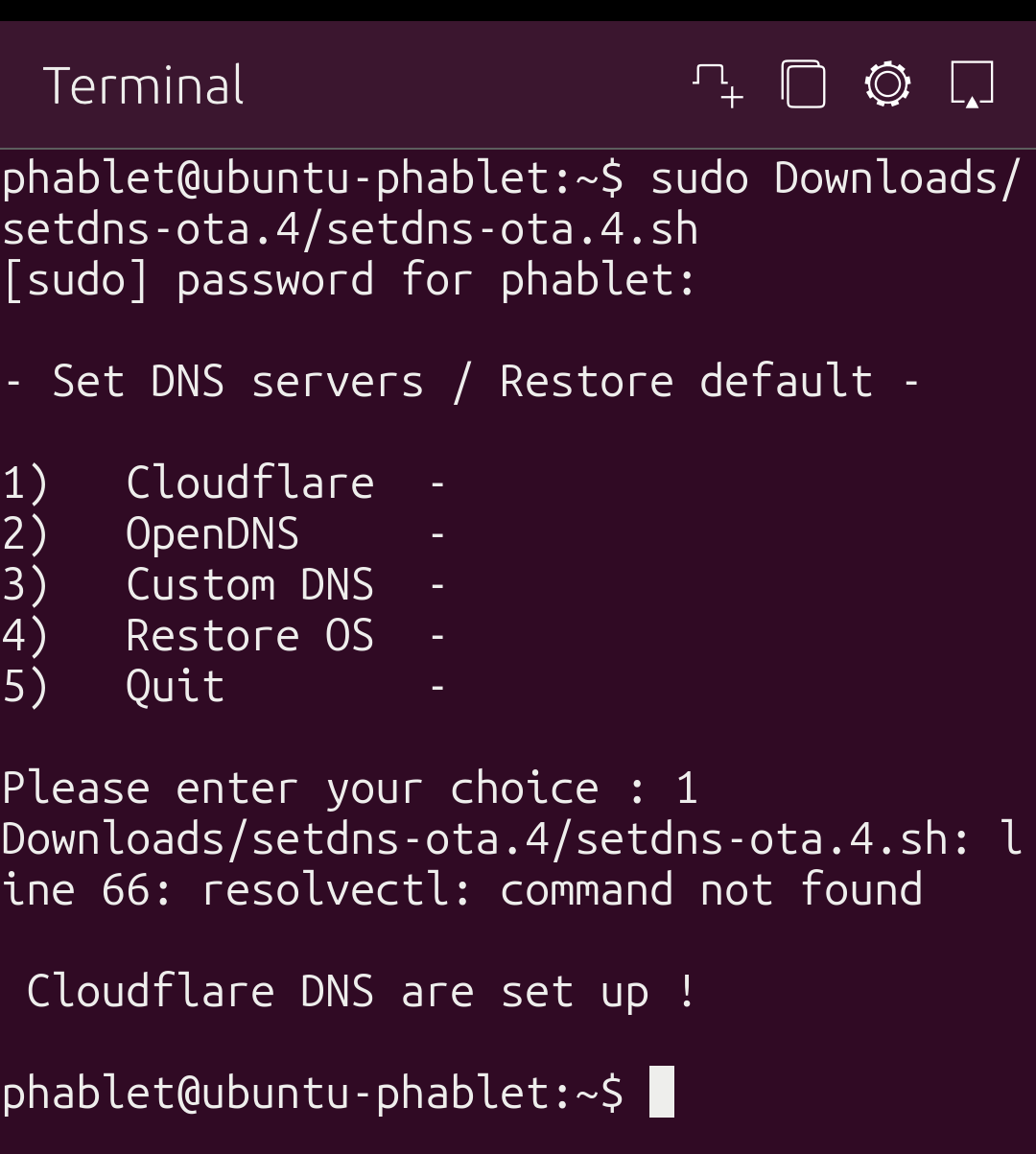
                                            screenshot20251019_195605222.png

                                            1 Reply Last reply Reply Quote 0

                                            Hello! It looks like you're interested in this conversation, but you don't have an account yet.

                                            Getting fed up of having to scroll through the same posts each visit? When you register for an account, you'll always come back to exactly where you were before, and choose to be notified of new replies (either via email, or push notification). You'll also be able to save bookmarks and upvote posts to show your appreciation to other community members.

                                            With your input, this post could be even better 💗

                                            Register Login
                                            • First post
                                              Last post