UBports Robot Logo UBports Forum
    • Categories
    • Recent
    • Tags
    • Popular
    • Users
    • Groups
    • Search
    • Register
    • Login

    tedit development and design discussion

    Scheduled Pinned Locked Moved App Development
    tediteditorappdevelopmentfeatures
    239 Posts 13 Posters 134.2k Views 3 Watching
    Loading More Posts
    • Oldest to Newest
    • Newest to Oldest
    • Most Votes
    Reply
    • Reply as topic
    Log in to reply
    This topic has been deleted. Only users with topic management privileges can see it.
    • D Offline
      domubpkm @danfro
      last edited by domubpkm

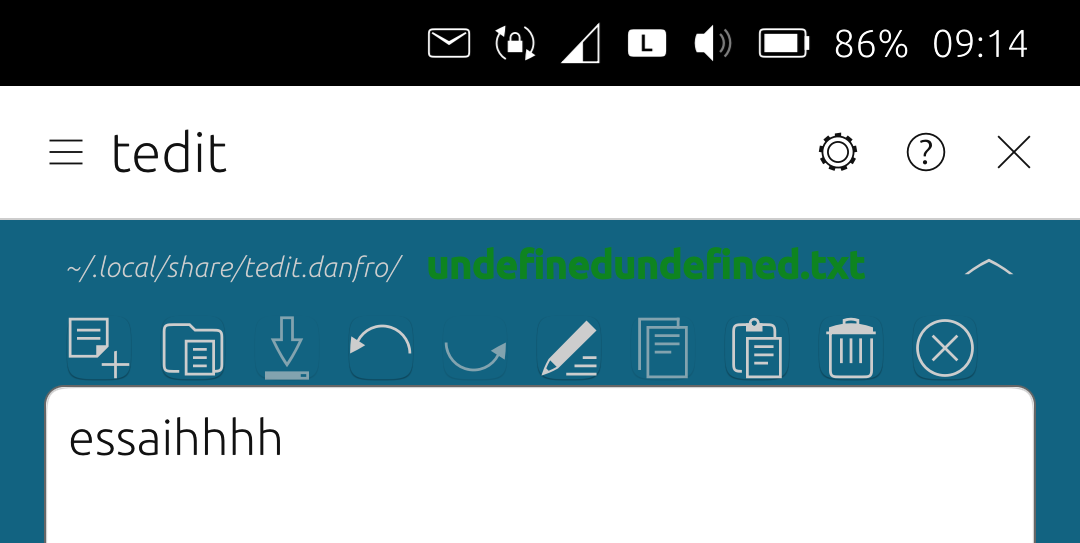
      @danfro Saving a NEW file no longer seems to work!
      screenshot20260506_091405236.png
      But edit a file seems ok.

      danfroD 1 Reply Last reply Reply Quote 0
      • danfroD Offline
        danfro @domubpkm
        last edited by

        @domubpkm that must be the last change I did. It worked with the first change. But I can confirm that, need to look into that. Thanks for reporting.

        D 1 Reply Last reply Reply Quote 0
        • D Offline
          domubpkm @danfro
          last edited by domubpkm

          @danfro In fact, seems works if we want to save a file in tedit.danfro but we must put a slash first in the windows when recording name of the file.

          danfroD 1 Reply Last reply Reply Quote 0
          • danfroD Offline
            danfro @domubpkm
            last edited by

            @domubpkm Yeah, I found the bug, thanks for testing. Forgot an "else" branch when no slash is used. The latest build should fix that: https://gitlab.com/Danfro/tedit/-/jobs/14248945062/artifacts/file/build/aarch64-linux-gnu/app/tedit.danfro_3.6.1_arm64.click.

            D 1 Reply Last reply Reply Quote 0
            • D Offline
              domubpkm @danfro
              last edited by

              @danfro ok, works great. All tested, it creats folders. Great. Passphrase ok too

              danfroD 1 Reply Last reply Reply Quote 0
              • danfroD Offline
                danfro @domubpkm
                last edited by

                @domubpkm And I got something else for testing. I added an option to share notes from tedit to other apps. Can be tested from this pipeline (is including the subfolder additions): https://gitlab.com/Danfro/tedit/-/jobs/14249888806/artifacts/file/build/aarch64-linux-gnu/app/tedit.danfro_3.6.1_arm64.click

                And now when importing a file via content hub into tedit, the file list page is not show (if that setting is enabled to start with that view). That doesn't make sense, when importing we want to see our imported file.

                D 1 Reply Last reply Reply Quote 1
                • D Offline
                  domubpkm @danfro
                  last edited by domubpkm

                  @danfro great . Too bad it can't directly share the content of a file with a contact in the 'messaging app', that would have saved me from having to select - copy - paste sometimes. Could the 'share with' mode also apply when using the 'read only' mode?

                  danfroD 1 Reply Last reply Reply Quote 1
                  • danfroD Offline
                    danfro @domubpkm
                    last edited by

                    @domubpkm to handle imported files differently in messaging app, would be a task to solve there. tedit can only hand over a file to messaging app. What that does with the file is defined there. tedit has no control over that.

                    I added the share option to read only mode page too. I simply didn't think of that yet. 😅
                    (Build here: https://gitlab.com/Danfro/tedit/-/jobs/14268879889/artifacts/file/build/aarch64-linux-gnu/app/tedit.danfro_3.6.1_arm64.click)

                    1 Reply Last reply Reply Quote 1
                    • M Offline
                      ma
                      last edited by

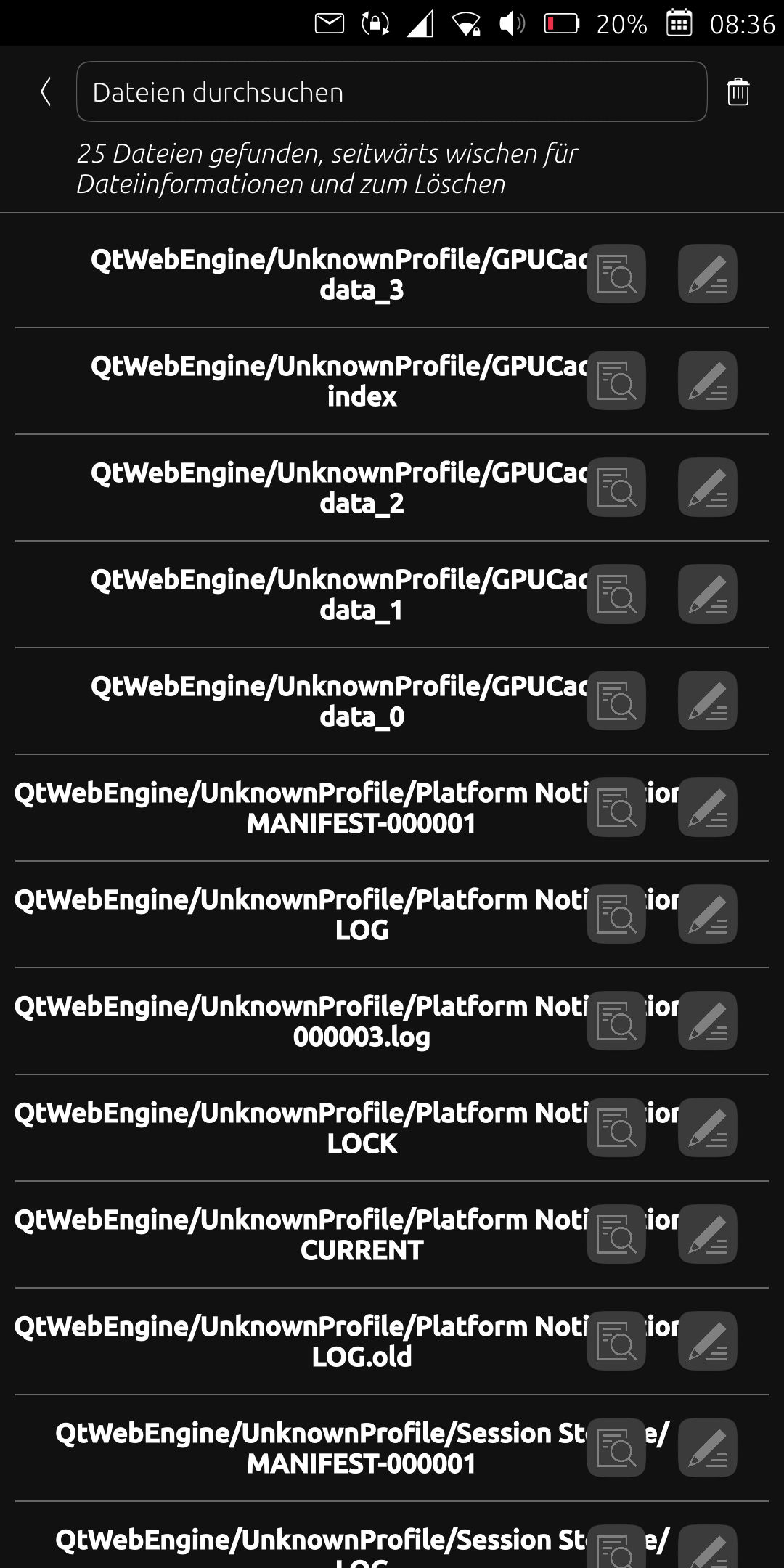
                      After I updated the app today, many files are listed under the "QtWebEngineUnknownProfile/..." path. Unfortunately, this is very confusing and I only want to see the files I created. What can I do about it? Simply delete the relevant files? Thanks

                      danfroD 1 Reply Last reply Reply Quote 0
                      • danfroD Offline
                        danfro @ma
                        last edited by

                        @ma Could you please share a screenshot? I don't have that here. Also some logs might help from logviewer app.

                        M 1 Reply Last reply Reply Quote 0
                        • M Offline
                          ma @danfro
                          last edited by

                          @danfro screenshot20260518_083655335.png

                          danfroD 1 Reply Last reply Reply Quote 0
                          • M Offline
                            ma
                            last edited by

                            Also the files are not sorted by name anymore.

                            danfroD 1 Reply Last reply Reply Quote 0
                            • danfroD Offline
                              danfro @ma
                              last edited by

                              @ma not being sorted alphabetically I can confirm. I overlooked that when testing.

                              M 1 Reply Last reply Reply Quote 0
                              • danfroD Offline
                                danfro @ma
                                last edited by

                                @ma I am not sure how this can happen. Since this is not the default saved folder.
                                That looks like a cache folder. Are the file names duplicates of your actual files? Then maybe clearing the cache could help (available in tedit settings).

                                danfroD 1 Reply Last reply Reply Quote 0
                                • danfroD Offline
                                  danfro @danfro
                                  last edited by

                                  Hmm. I have an idea. The first version of read only mode used a file cache. That might have used the same folder for caching as the notes folder.

                                  Now read only mode uses an in-memory cache and doesn't creaty any files.

                                  If my guess is true, there should be a folder under "/home/phablet/.local/share/tedit.danfro" with qtwebengine in it. After deleting that e.g. in file manager you shoukd be fine. Just be careful not to delete your notes, only that subfolder.

                                  M 1 Reply Last reply Reply Quote 0
                                  • M Offline
                                    ma @danfro
                                    last edited by

                                    @danfro Yes it works. Thanks for the quick response.

                                    1 Reply Last reply Reply Quote 0
                                    • M Offline
                                      ma @danfro
                                      last edited by

                                      @danfro Is there a way to sort the files by name again? And how are the sorted by now?

                                      danfroD 1 Reply Last reply Reply Quote 0
                                      • danfroD Offline
                                        danfro @ma
                                        last edited by

                                        @ma I am afraid, but I can't say right now why sorting is broken. I will investigate and try to fix that. For sure alphabetical order is easier to use.

                                        Using the search is likely the best option to get along for the moment.

                                        M D 2 Replies Last reply Reply Quote 0
                                        • M Offline
                                          ma @danfro
                                          last edited by

                                          @danfro Okay, thanks.

                                          1 Reply Last reply Reply Quote 0
                                          • D Offline
                                            domubpkm @danfro
                                            last edited by

                                            @danfro I hadn't even paid attention to the broken sorting mode ! Perhaps this is an opportunity to implement different sorting modes internal to tedit or for tedit to conform to the sorting mode defined for Files?

                                            1 Reply Last reply Reply Quote 0

                                            Hello! It looks like you're interested in this conversation, but you don't have an account yet.

                                            Getting fed up of having to scroll through the same posts each visit? When you register for an account, you'll always come back to exactly where you were before, and choose to be notified of new replies (either via email, or push notification). You'll also be able to save bookmarks and upvote posts to show your appreciation to other community members.

                                            With your input, this post could be even better 💗

                                            Register Login
                                            • First post
                                              Last post